I have two loans (a first trust + a home equity loan) but I can't make entries in a register like

How do I enter transactions in a register for my two loan accounts, similar to what I'm able to do with regular checking and savings accounts?
Answers
-
I've asked the Mods to split this into 2 threads. Your issues appear to be unrelated, and having unrelated discussions in a single thread almost always leads to confusion.
re: your loan question. Normally, loan payments, including Principal/Interest/Escrow amounts, are made from your checking account NOT directly into the loan account. In the checking account you'd show the total amount of the payment and then split the transaction to show the components. I've show an example from my mortgage:
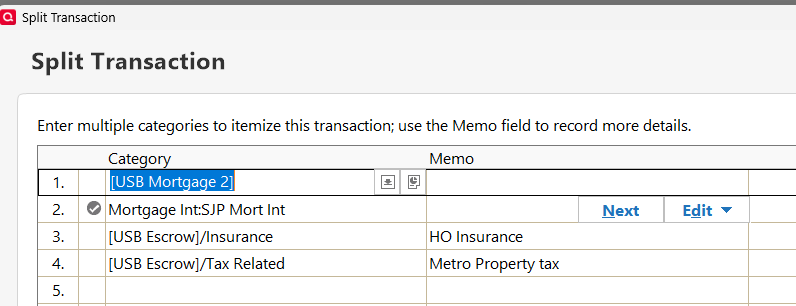
Note that line 1 has square brackets around the name of the mortgage account. That means that the amount is a transfer to that account which reduces the loan balance.
Line 2 is the interest expense, which is a category, not an acccount.
Lines 3 & 4 are likewise transfers. By use of the slash after the account name, I'm able to record 2 separate transactions in the Escrow account so that I can track those 2 needs separately.
My HELOC payment only has the first 2 lines, adjusted to point to that account and that expense category.
Q user since February, 1990. DOS Version 4
Now running Quicken Windows Subscription, Business & Personal
Retired "Certified Information Systems Auditor" & Bank Audit VP0 -
So why does Quicken show my main checkinhg account as overdrawn when PNC shows a positive balance of $8,400?
0 -
I keep having to do a manual balance adjustment which is incredibly frustrating
0 -
When was the last time that you reconciled the account?
Since creating the account, have you Deactivated and Re-activated it? Due to a longstanding bug, the cause of which hasn't yet been determined, doing so can cause the Opening Balance in the account to be changed which can easily explain your situation.
SO, you might need to restore (to a different name, so as to not over-write your current file) from a backup taken before such actions and determine what the correct Opening Balance should be. OR, if you've got statements that are old enough you might determine the amount from them.
When you get the OB figured out, it's suggested that in every account you download into, you store the correct OB in the memo field of that "Opening Balance" transaction. So that if this happens again you can easily spot the difference and know what it should be.
Q user since February, 1990. DOS Version 4
Now running Quicken Windows Subscription, Business & Personal
Retired "Certified Information Systems Auditor" & Bank Audit VP0
