Red notice flags don't disappear for the investment side of linked cash account

The red flags that display on the linked cash account and the partner investments account when a transaction is downloaded do not disappear from the investment account when the transaction is posted in the linked cash account like it used to do. Even though there is no other downloaded transaction for the account. In order to clear, I have to right click in the Account vertical bar section and toggle between Current and Ending balance, or restart Quicken. Then the flag disappears.
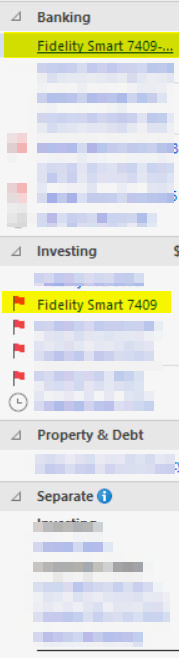
I have reported the problem.
Deluxe R66.23, Windows 11 Pro
Comments
-
Hello @leishirsute,
Thank you for reporting this issue.
I have some follow-up questions for you:
- How long has this issue been happening?
- Did anything significant happen around the same time that this issue started?
- Quicken updates, computer updates, etc.
- Where is your data file located?
- Is your file being backed up/synced by any third-party services like Dropbox, OneDrive, or Carbonite?
Looking forward to your response!
Quicken Alyssa
Make sure to sign up for the email digest to see a round up of your top posts.
0 -
- How long has this issue been happening?
I don't exactly know which version of Quicken this started but I know I definitely noticed it once I upgraded to version R66.23.
- Did anything significant happen around the same time that this issue started?
- Quicken updates, computer updates, etc.
Yes. Update to Quicken R66.23. Also, it is during all the issues with Fidelity. Note that the problem account is a Fidelity account.
- Where is your data file located?
It is located on my internal desktop drive.
- Is your file being backed up/synced by any third-party services like Dropbox, OneDrive, or Carbonite?
I have been using SyncBackFree to backup my files for at least 5 years now without problems. It is a disk to disk backup copy program. It does not do a cloud backup.
I know this is basically a cosmetic issue. But it is an aggravation that did not previously occur.
Hope this helps
Deluxe R66.23, Windows 11 Pro
0 -
Thank you for following up.
First, I would suggest excluding your main data file from the SyncBackFree service, just to be on the safe side. It would be ok for it to be backing up your Quicken backup files, but it probably isn't worth risking damage to the file you are actively using.
After you have excluded it, I would then suggest validating your data file to help clear up any potential issues. To do this:
- Save a backup.
- Go to File.
- Select Validate and Repair file…

- Check the first box for Validate file.
- Click Ok.
Once the validation has completed, it will produce a report of anything it has found/corrected. After this, use Quicken as you normally do and let us know if the issue with flags continues.
Thanks again!
Quicken Alyssa
Make sure to sign up for the email digest to see a round up of your top posts.
0 -
@Quicken Alyssa SyncBackFree is not a continuously running service. It is a copy program I start when Quicken is not running. After it completes, the program no longer runs. Sorry if I wasn't clear about that. I suspect this issue is one of several reported that are related to linked cash accounts.
I do a Validate once a month and they have been without errors. Here's the one I did per your request:
[Tue May 05 11:18:12 2026]File: "C:\Users\mdp\Documents\Quicken\mdp"
QDF:
Validating your data.
No errors.QEL:
No read errors.QEL:
All internal consistency checks passed.[Tue May 05 11:18:39 2026]
Maximum security reference: 395, number of securities: 395.
Analyzing securities.
All security references are within the normal range.Validation has completed.
Deluxe R66.23, Windows 11 Pro
0
