Auto-categorizing Downloaded Transactions

I manually accept downloaded transactions into the account register. However, even doing do, Quicken often auto-categorizes transactions. At times, this functionality works great. At times, it's ridiculous and incorrect.
I personally would like the ability to pick-and-choose "which" transactions are automatically categorized and which are not.
For me, this would be done by payee:
- Kroger > Groceries
- Publix > Groceries
- Kroger Fuel > Auto Fuel
- Amazon > Ask me
The default should be "do not categorize."
If I want to create a categorization rule, then let me, just like is done with Payee names.
Comments
-
You can do what you want if you setup your preferences and memorized payee names correctly.
I prefer to turn off: Edit → Preferences → Downloaded transactions → Automatically categorize transactions. This preference is good at the start when you have a lot of unknown payees, but not once you have most of your payees already memorized. With this option off new transactions won't get a category, and so they are easy to spot. Then you can fill in the category and use Ctrl+M to memorize the payee if you like.
The next thing to understand is that your memorized payees are matched first. So, with the first three in your list just having them memorized will get Quicken to select the correct category.
For Amazon, there isn't a "Ask me", but there is a "do nothing".
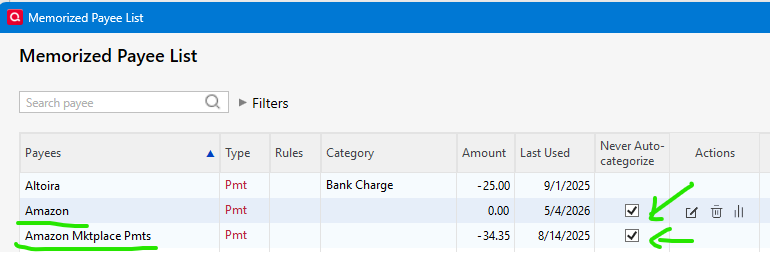
What will happen is that the category will be left blank and then you can fill it in.
0 -
I'll try this and see if it achieves what I need it to.
0
