Show Memo Field in Search Results

Quicken Classic Premier - R67.7 Build 27.1.67.7
Show the Memo field in Search Results from a global search. By global search I mean the search box in the upper right corner of Quicken Classic Premier.
----Quicken User since 1998 ----
Comments
-
Quicken has several flavors of Find/Replace.
If you don't like the one at the top right, try Edit > Find/Replace or click on All Transactions at the top of the Accounts bar on the left side of the screen.
QWin Premier subscription0 -
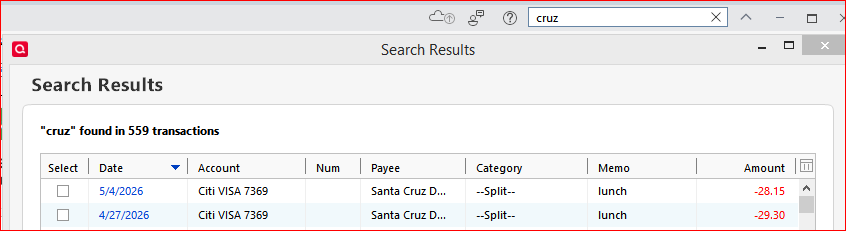
The Memo field does show in Global Search results:
Is your Search Results window too small? Are you using Large Fonts or any other Windows screen resolution setting to make text larger than the default?
Try making the Search Results window larger by grabbing the edges and dragging. Or click the Maximize icon.To help us determine what's going on, capture an image snapshot of your Quicken Search Results window and attach it to your next comment.
0 -
The issue is with Edit > Find or as the OP states, the Search transactions box in the Quicken title bar.
The screenshot you posted is from Edit > Find/Replace.
QWin Premier subscription0 -
No, it's not … I ran a Global Search (see at the top of my image). And the search results are, as you can see in the image.
I'm running R67.7, same as indicated by the OP, @Philip107
Even running a Ctrl-F (Find) returns the same Search Results.Are you on R67.7?
0 -
OK, I stand somewhat corrected.
What I see is that if you have an account selected, there is an option Edit > Find or Ctrl-F. That opens the Quicken Find window, with a Find button that only searches the current account.
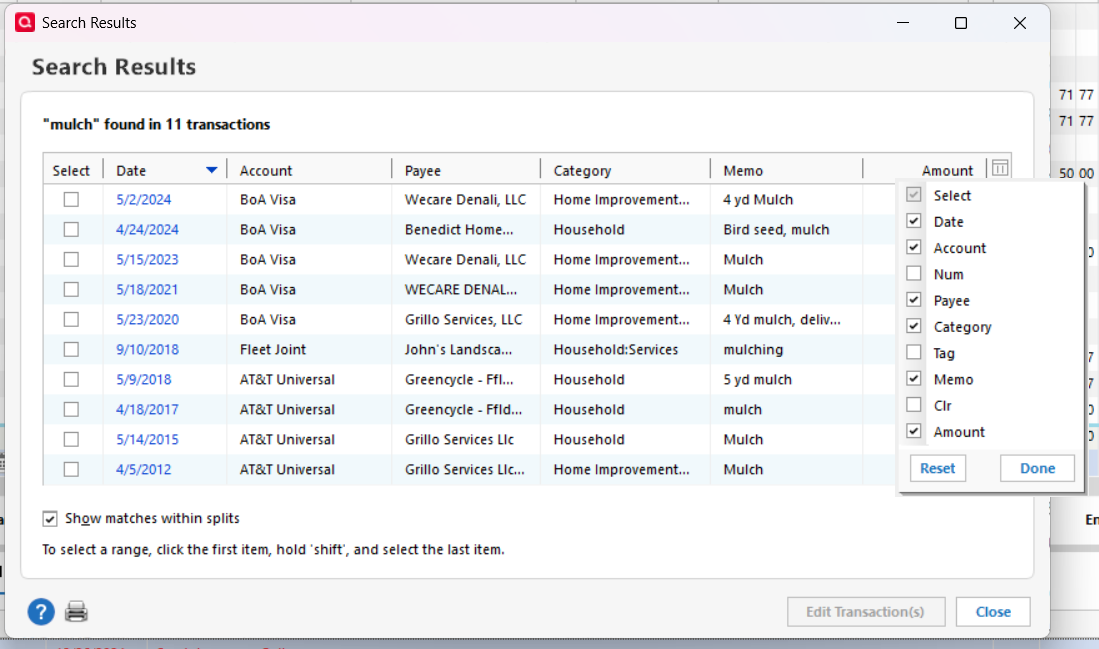
Find All opens the Search Results window. For me that was defaulting to not show the Memo field, but if you click on the icon above the scroll bar, you can control which fields are displayed, including the Memo field.
The Search transactions box at the top right displays the same Search Results window, with the option to include the Memo field.
 QWin Premier subscription0
 -
I'm so sorry. I never noticed that little icon to click on, but there it is. I did right and left mouse click everywhere else though.
So, the Memo field is available you just have to know where to look.
----Quicken User since 1998 ----
0 -
I never noticed that little icon to click on, but there it is.
Neither did I. Now maybe they should add that same capability to the Find and Replace window, which is cluttered with columns you may not want.
QWin Premier subscription0

