Syncing From iPad to Desktop

Hello. I have Quicken Deluxe for Windows on my desktop and also just installed the Quicken Classic iPad app. I will be going on vacation and would like to keep my bank accounts updated while I'm gone. I'm able to sync from the desktop to the iPad but is there a way to sync from the iPad to the desktop? Otherwise, it's obviously not worth the trouble. Thank you.
Answers
-
Hello @RandyLH,
Thank you for posing this question.
Yes, you can sync from the iPad back to the desktop. Just make sure to sync back to the desktop when you are back from your travels. Using only the mobile/web versions for extended periods is not recommended and could result in data loss. Quicken is primarily computer-based, and the mobile and web are meant to act as extensions of that.
Here is a Support Article that addresses some Frequently Asked Questions when using Quicken on the Web.
Quicken on the Web will automatically sync your transactions; you can see the spinning arrow in the upper right when Quicken on the Web is performing a sync, or you can initiate a sync at any time by clicking the arrow.

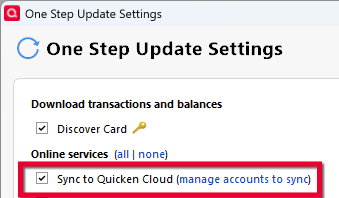
Note: To sync to Quicken on the Web whenever you perform a One Step Update, just select Sync to Quicken Cloud under your One Step Update settings (Tools > One Step Update...):
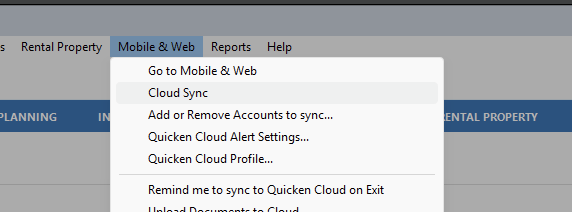
If you update the desktop with information from the mobile/web, go to Mobile & Web > Cloud Sync.
Test out the process before you leave for vacation, and let us know how it goes. If you run into any bumps along the way, come back, and we can help you work them out!
Looking forward to your response!
Quicken Alyssa
Make sure to sign up for the email digest to see a round up of your top posts.
0
