Edit on register rows opens Find and Replace

Has anyone noticed that since R67.7, the register rows on anything other than an investment transaction no longer shows any action buttons when the row is selected. It used to show the same as investment rows "Enter", "Edit", "Delete" and "Attach". Now it shows nothing and the only way to edit is to right click and select "Edit", however when doing that it opens "Finda and Replace" instead of the transaction entry popup.
Is this now how it is supposed to work by editing on the line itself or using "Find and Replace" and not using a transaction entry popup screen similar to the Scheduled Transaction window?
I could swear there was an edit ability on Banking and CC register entries before.
Comments
-
Is it possible that your investment register window isn't wide enough to show the Edit, Enter, Delete buttons without scrolling to the right or widening the window (try using the F11 key as a toggle)?
0 -
This issue concerns Banking registers. I see the same thing as the OP. But can't remember whether I saw action buttons there before.
Quicken user since version 2 for DOS, as of 2025 using QWin Premier (US) on Win10 Pro & Win11 Pro on 2 PCs.
0 -
The banking registers contain three icons: Save, more actions, split. Which are different from the buttons in the investing registers. I have no recollection of ever seeing those buttons in the banking registers. I just looked at R67.7, R66.28, and R62.16 and all behave the same way.
- Q Win Deluxe user since 2010, US Subscription
- I don't use Cloud Sync, Mobile & Web, Bill Pay0 -
First check if the action button column is even on:
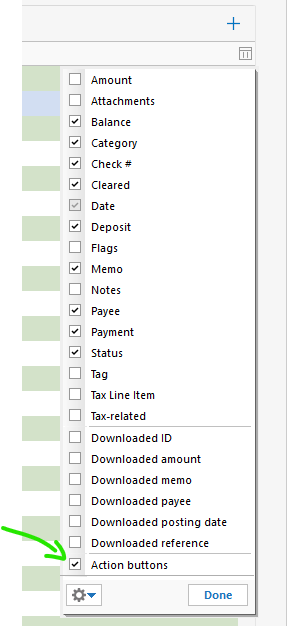
For me it was off.
And when I turned it on, I couldn't resize it, and it was tiny.
I had to restart Quicken before I could resize the column. It is the last one:
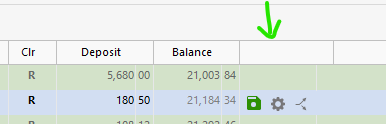
EDIT: It isn't possible to resize this column. It sizes itself, but it seems like it will only do that if you have turned on the column and restarted Quicken.
0 -
It isn't the action buttons that I'm referring to. It is buttons that show below the register line when the line is selected. I can see them on the investment registers, and I thought they were on banking registers also but I may have been mistaken. I thought I used to use edit or right click and select edit and it would open a popup much like scheduled transactions but again I may be crazy that it ever worked like that. I don't ever remember selecting edit and it opens "Find and Replace" like it is doing now. The picture is from an investment register.
 1
1 -
Oh, well in that case, I haven't seen those buttons in quite a while.
0 -
Thanks, I wasn't sure the last time I saw it but I was pretty sure it was there at some point and I didn't remember editing a row opened Find and Replace at all until now but I probably hadn't edited a row in a while.
0



