Making a transfer from savings to checking

Rvee
Quicken Windows Subscription Member
Comments
-
None of my transfers are showing up in the reconciliation window.
0 -
Hi @Rvee,
Thanks for reaching out to Quicken Support!
To transfer money between accounts:- Open the account you want to transfer money from.
- Click on the gear icon, and then choose Transfer Money.
- Enter the date and the amount of the transaction.
- Verify the account you're transferring money from, the source account.
- Select the account you're transferring money to, the destination account.
- If you want to transfer money to an account that you haven't previously set up in Quicken, click Add New Account in the To Account list.
- Enter a memo for the transfer. (Optional)
- Click OK.
- You cannot enter both a category and a transfer in the same Category field. However, you can use tags if you need additional tracking.
If the issue persists, I recommend checking the following questions and providing your answers:
- When was the last time you reconciled the account?
- Did the transfer transactions appear in the last reconciliation screen?
- Are the transactions sorted by date in the reconcile screen?

- Are you reconciling using a paper statement or the online balance?
- Do the missing transactions show a reconciled status?
If you don’t see the Cleared/Reconciled column, please try the following:
- Select the Gear icon
- Click Register Columns
- Enable Cleared
- In the register, check whether the transactions show (C) for Cleared or (R) for Reconciled
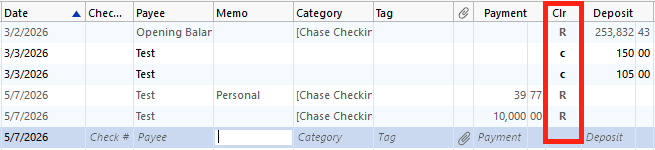
I look forward to your reply.
Quicken Carlos
Make sure to sign up for the email digest to see a round up of your top posts.
0
