Portfolio X-Ray never finishes a update

For quite awhile now Portfolio X-Ray hasn't worked for me. It happened after one of the last updates to the feature. When I click on Portfolio X-Ray I get a screen which has the title line with accounts, date of last update and the Generate AI selection. But the rest if the window is blank. My mouse cursor start blinking showing activity but never stops. From then on even when I am in other browser tabs the cursor keeps blinking. I close every other program down except Quicken the the blinking continues.
I have just been ignoring this bug but would like to use the feature for some rebalancing.
Any way to reset the feature?
Comments
-
I just now checked, and I'm not seeing the same.
SO, a bit more info needed to help you.
What Q product are you running, what RELEASE of that product and what's your "Subscription Valid Until" date?That info is available at HELP, About Quicken.
Are you having any problems with downloads from your banks/cards/brokerages?
Other than described in your original post, have you taken any other action re: this issue?
Q user since February, 1990. DOS Version 4
Now running Quicken Windows Subscription, Business & Personal
Retired "Certified Information Systems Auditor" & Bank Audit VP0 -
I thought that info automatically was included in my post.
I also have been using since the DOS days
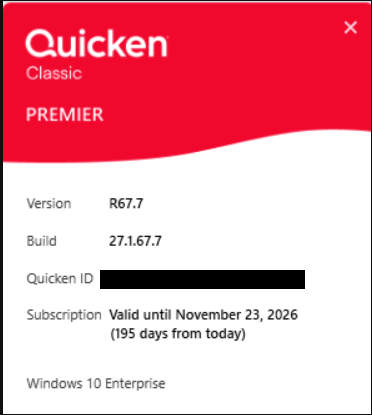
[Edited-Personal Information Removed]
0 -
No problems anywhere else. I haven't done anything else on this issue because I am conditioned to wait for Quicken to fix features. The SQA has gotten much better over the last few years.
0 -
@Greg Lampe have you tried taking a backup and then Validating your file? And, if that doesn't help, SuperValidating?
Q user since February, 1990. DOS Version 4
Now running Quicken Windows Subscription, Business & Personal
Retired "Certified Information Systems Auditor" & Bank Audit VP0
