Community Homepage
Discussions
Categories
Quicken for Mac
Quicken Lifehub
Quicken Mobile
Quicken on the Web
Quicken for Windows
Support
Quicken Classic
Quicken Simplifi
Getting Started
Community Training FAQs
Using and Improving the Community
Connect and Engage
Announcements & Alerts
Announcements
Alerts, Online Banking & Known Product Issues
Product Ideas
Beta
Home
Quicken Classic for Windows
Errors and Troubleshooting (Windows)
I am getting an error that says,"The account "Checking XXXX" was not synced. Why?
robertaorr
The full message includes, "Parameter InstitutionIoginId must be specified for this request."
Where do I specify that parameter?
Find more posts tagged with
QWIN - Mobile/Web Sync
Accepted answers
Quicken Anja
Hello
@robertaorr
,
Thank you for reaching out to the Community regarding your issue, though I am sorry to hear that you are experiencing this.
Since your issue is related to syncing with the Quicken Cloud, do you happen to use the Mobile and/or Web apps at all?
If you do, then I suggest you try is to
reset your cloud data
by following the steps below.
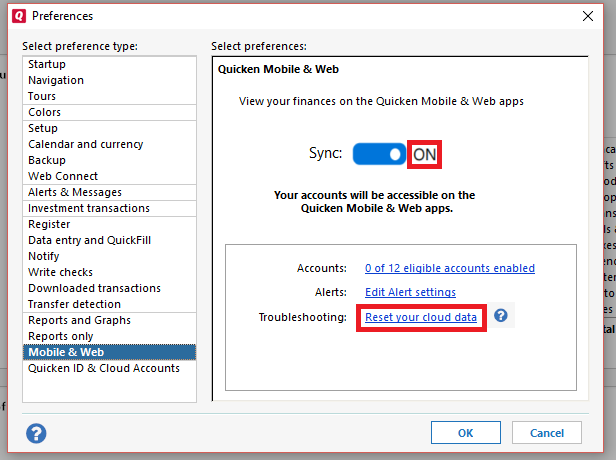
Go to
Edit
Preferences
Mobile & Web
Make sure sync shows is
ON
and click on
Reset your cloud data
(
see below
)
Once that is done, see if the issue still persists.
If you don't use the Mobile and Web apps, then you can simply follow the same steps from above except you would just switch the sync button to
OFF
instead of resetting. The reason being is that the only purpose syncing to the cloud serves is to be able to access your data from the two companion apps.
Let us know how it goes and/or if you have any additional questions!
All comments
Quicken Anja
Hello
@robertaorr
,
Thank you for reaching out to the Community regarding your issue, though I am sorry to hear that you are experiencing this.
Since your issue is related to syncing with the Quicken Cloud, do you happen to use the Mobile and/or Web apps at all?
If you do, then I suggest you try is to
reset your cloud data
by following the steps below.
Go to
Edit
Preferences
Mobile & Web
Make sure sync shows is
ON
and click on
Reset your cloud data
(
see below
)
Once that is done, see if the issue still persists.
If you don't use the Mobile and Web apps, then you can simply follow the same steps from above except you would just switch the sync button to
OFF
instead of resetting. The reason being is that the only purpose syncing to the cloud serves is to be able to access your data from the two companion apps.
Let us know how it goes and/or if you have any additional questions!
Quick Links
All Categories
Recent Discussions
Activity
My Bookmarks
My Discussions
My Drafts
Unanswered
Best Of