Community Homepage
Discussions
Categories
Quicken for Mac
Quicken Lifehub
Quicken Mobile
Quicken on the Web
Quicken for Windows
Support
Quicken Classic
Quicken Simplifi
Getting Started
Community Training FAQs
Using and Improving the Community
Connect and Engage
Announcements & Alerts
Announcements
Alerts, Online Banking & Known Product Issues
Product Ideas
Beta
Home
Quicken Classic for Windows
File Conversion and Backup (Windows)
Missing Transactions
System
This discussion was created from comments split from:
What file size is too large for quicken?
.
Find more posts tagged with
Comments
chellmason1
> @LoriW66 said:
> Hi Mark! Thanks for the quick post. Glad to hear the file size isn't too large. My data base was up to date. I downloaded & processed transactions last weekend. But now those have disappeared after the update that processed a few hours ago now. The latest transactions I have now are from July months old. I also added new accounts last weekend and those are still there but now with no transactions. But I did transactions last weekend in those accounts ugh. When I googled the issue I was seeing I should try to run a file operation to validate and repair but was just nervous about trying it. I don't want to make it worse. And some of the posts made it sound like it was an issue years ago that quicken fixed.
I have this same issue, after any quicken updates my file reverts back to a few weeks previous. I have been doing backups on an external hard drive and then reinstating when my balances don't match. It is more manual. I also have 20 years of history in my data. I don't save any attachments. Has anyone found a fix for this?
Quicken_Tyka
Hello
@chellmason1
Thank you for taking the time to visit the Community to report this issue, although I apologize that you have not received a response. I would first check if the register is being filtered>
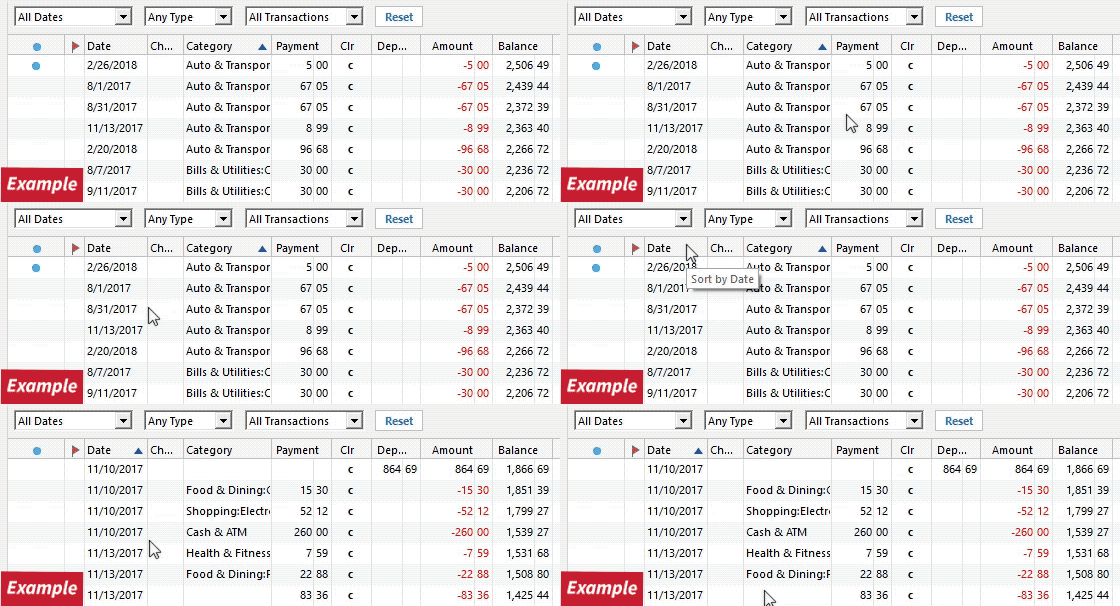
Has the sort order been changed in the register?
Confirm that the
Sort Order
in your account is by
Date;
just
click
the top of the
Date
column in your account register. It's possible the transactions are in your register, but not where you thought they should be.
Click the
Reset
button at the top of the register, to confirm that there's no filtering in your account register.
This can give the appearance the information is missing. Please let me know what you find!
-Quicken Tyka
Quick Links
All Categories
Recent Discussions
Activity
My Bookmarks
My Discussions
My Drafts
Unanswered
Best Of