Pull in Amazon purchases
I, like many people, order many things from Amazon. These things belong in many different categories in Quicken. I would like the ability to sync Quicken with one or more Amazon accounts and match those purchases up with the charges to my credit card(s). Quicken should pull each item in as a split line for each transaction, so each item can be categorized.
Once this system is built, other online retailers could be added.
Comments
-
None of the download protocols support split transactions. So, to changing this isn't up to Quicken Inc, all the financial institutions other parts of the financial system like the aggregators would have to change.
Signature:
This is my website (ImportQIF is free to use):-2 -
OK, if a split can't be done on multi-item orders, maybe there could be an option for the Amazon download to generate a separate transaction for each item in the order, giving users an option to assign a different Category to each item.
At a minimum, it would be very useful if Amazon's credit card transactions included a brief description of the item(s) ordered in the Description field, the way Alexa does when an order arrives - "Shirt and 3 other items" or whatever. That would make it much easier to decide what Category(s) to assign to the transaction.
It is particularly confusing when you have returned an item and the credit is applied to your Amazon account. Then later purchases are "free" until the credit is used up and it is very difficult to properly track and categorize them.
Apparently until recently the downloads for Amazon's store card included a description of the purchases, but that stopped working around May of this year. See this discussion
https://community.quicken.com/discussion/7913995/amazon-synchrony-store-card-download-with-descriptions
QWin Premier subscription2 -
The ability to sync Amazon Prime purchases would be very helpful and a time saver. Quicken, please partner with Amazon so to have the abillity for us users to import Amazon transactions.
4 -
Tracking Amazon purchases would be perfect. I now use Chase credit card and I don't know which purchases are which It's very complicated
-1 -
SO, simply input the transactions manually when you make them.
As previously explained, the request simply won't/can't happen.
Q user since February, 1990. DOS Version 4
Now running Quicken Windows Subscription, Business & Personal
Retired "Certified Information Systems Auditor" & Bank Audit VP0 -
simply input the transactions manually when you make them.
If only that worked. I do input my transactions manually when I make them. But sometimes Amazon splits one order into two or combines two orders into one.
Quicken user since version 2 for DOS, as of 2025 using QWin Premier (US) on Win10 Pro & Win11 Pro on 2 PCs.
0 -
I don't know which purchases are which It's very complicated
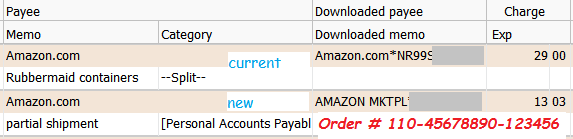
In that case, Amazon would have to be talked into downloading the real, clear text order number in the Downloaded Memo field instead of appending an encrypted order number to the Downloaded Payee Name field.
None of us have the code to decipher this order number, so it's useless to us.For example:
0 -
One of the multiple reasons why I hate Amazon … and why the suggestion can never work because in my experience Amazon charged by the Order, not by the shipment.
Q user since February, 1990. DOS Version 4
Now running Quicken Windows Subscription, Business & Personal
Retired "Certified Information Systems Auditor" & Bank Audit VP0 -
I generally see Amazon charges when items are shipped, even if it is a partial order.
Alexa knows what is coming and when, it would be nice if Amazon included that information in the Memo of the credit card charge.
For me however it is not difficult to go to the Amazon Orders page when I see a charge and set the Category accordingly. I keep a browser tab open on that page for easy reference.
QWin Premier subscription0 -
Not only does Amazon not provide this information (a web page with the invoice isn't a viable way to provide the information for a computer, but it would also be error prone and subject to any changes made by Amazon, not to mention the really big problem of logging in as the user), but there is also a fundamental problem with categorization.
This is no different than if you go to Safeway and by food and household items and you want them separated. Unless someone is going to only buy one category type from Amazon (and if that is the case like what I do with Safeway and just make it Grocers ignoring the minor amount of Household, then you could just map Amazon to that category) then to do this properly it would have to be a split and then you get into how do you categorize the individual split lines???
For reference what I generally do is only have three categories I use for these and generally don't order different types at the same time, and I don't overlap orders for the most part. That means that even if they split the order I end up with just understanding which order was split and categorize them both the same. And yes, this is totally a manual categorization. The only such that I really do on a ongoing basis.
Signature:
This is my website (ImportQIF is free to use):0
Categories
- All Categories
- 56 Product Ideas
- 36 Announcements
- 223 Alerts, Online Banking & Known Product Issues
- 22 Product Alerts
- 701 Welcome to the Community!
- 671 Before you Buy
- 1.2K Product Ideas
- 53.7K Quicken Classic for Windows
- 16.3K Quicken Classic for Mac
- 1K Quicken Mobile
- 813 Quicken on the Web
- 111 Quicken LifeHub