Hello @JamesBorders,
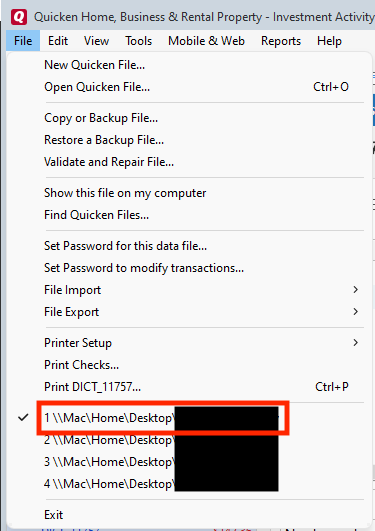
Thank you for reaching out to the Community and telling us about this issue. I'm sorry to hear you're running into this problem. Do you keep your Quicken file on your C drive or is it on a shared network drive? Is your Quicken file synced with any cloud service, such as One Drive or Dropbox (if it is, you will usually see the service name listed in the file location)? The simplest way to check your file location, if you have Quicken up and the file open, is to click on File, then look near the bottom of the list, just above where it says Exit. It will list the file locations for the 4 Quicken files you have most recently accessed, with the one you are currently in at the #1 spot.
Also, since you mentioned this just started with the latest patch, have you tried reinstalling that update patch? If you have not done that yet, this article gives directions on downloading and reinstalling that patch.
Thank you.
Thank you for providing more information.
If you don’t mind, could you please provide a screenshot of the error message you described receiving? If needed, please refer to this Community FAQ for instructions on how to attach a screenshot. Alternatively, you can also drag and drop screenshots to your response if you are not given the option to add attachments. Please remember to redact any personal information as needed.
I look forward to your response.
Thanks for coming back to update us.
We are happy to hear that the issue has been resolved!
Please don't hesitate to reach out with any further questions or concerns.