OL-220-A error Regions Bank
Comments
-
Regions' OL-220-A error is back today for me.
After getting the error, I attempted to re-setup my Regions's connection, and continued to get the error. As an experiment, I created a new Quicken file, and attempted to activate my Regions accounts - no error. I then updated these accounts numerous times without error.
I then went back to my real Quicken file, and attempted to re-setup my Regions connection - ERROR.
With the above experiment, the pointing contest between Regions and Quicken makes me think the problem is indeed Quicken. Very frustrating.
1 -
Same here. This is getting old! Tired of paying money for faulty software.
1 -
This content has been removed.
-
This problem returned yesterday and hasn't cleared. Infrequent glitches are understandable, but when it becomes a regular problem, it may be time to look for alternatives.
0 -
I have the same problem
0 -
Same here as of 5/24/25 with Regions.
quicken ol-220-aWhat is the fix?
0 -
Same problem here. (This happened a few weeks ago also) 5/24 & today 5/25 - OL-220A errors for all Regions accounts. Error says there are no transactions to download
0 -
I ended up deactivating all Region a counts. Removing the bank in the general section then go back and add them all. Worked last night.
0 -
This content has been removed.
-
I hope it doesn't come to that. We all pay way too much for this software to jump through hoops to make it work as it should.
1 -
Same issues with Regions.
- I can use WEB connect on my original account fine.
- I can ignore my current account and start a direct connect from scratch. It works, however is not an option because I will lose, or need to redo all of my history. I actually did this months ago…burned my old Regions accounts and started over, and I do not have time to do it again….nor should I need to.
- I CAN NOT direct connect to my current Regions Quicken account.
This clearly shows to be a Quicken issue since all other options work. What is your fix Quicken???
1 -
I had already deactivate my Regions accounts, but the OL-220-A error continued. I tried Davidjcurl's suggestion of removing the banking info on the General tab, and it worked. Oddly, though, my Regions check account opening balance was updated with a recent transaction amount, so my ending balance would not reconcile. I have since corrected the opening balance and all is good (for now).
Pro Tip: Copy your opening balance into your memo field so if Quicken incorrectly updates it you will see and correct it pronto.
1 -
@jbold before you reactivate your accounts are you also clearing the FI Name and Account Number on the General tab? That seems to be a key step in getting a successful connection.
1 -
Suggestion to deactivate, clear name and account, then setup do not work for me.
😒
0 -
Quicken - the main reason I continue to subscribe is the value provided by downloading my banking/financial transactions. Since we have problems with multiple institutions that take weeks if not longer to resolve, where is the value to us? We understand an institution changing their connection creates a problem for you but since Regions provides a direct connect path you should have a contact there that can help your resolve promptly. Tell us why if that isn't the case.
0 -
Same error for last few days. Please tell me someone is working on fixing this.
0 -
Thank you for the suggestion. I forgot to mention, that I am also clearing the "Financial Institution" and "Account Number" fields. I am not touching "Account Name" filed. Should I try changing that as well?
0 -
@jbold No don't touch "Account Name". It won't make a difference in the reactivation process.
0 -
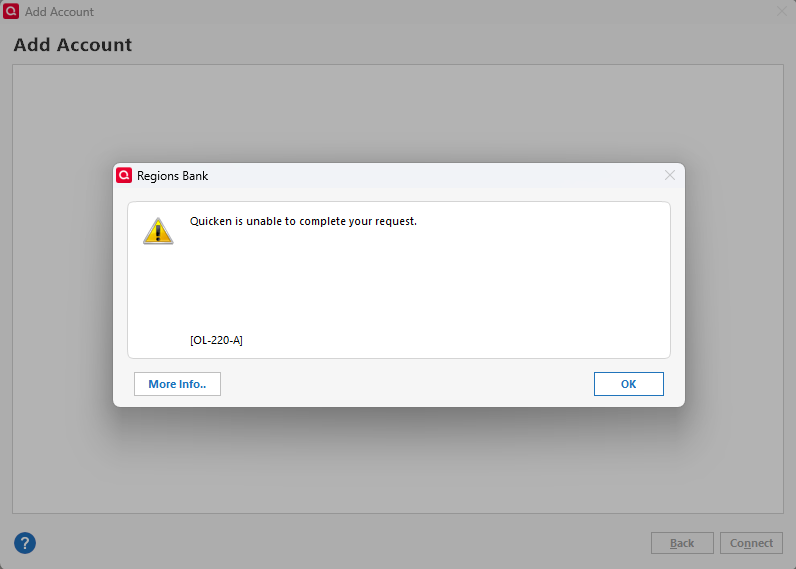
I can make it past the login screen then I get the error below.
 0
0 -
@jbold honestly, if I were you, I would just stick with Web Connect, until the dust settles. Sometimes, when let things sit awhile they have time to reset, especially if you've been locked out. Retrying continually will just make things worse sometimes.
-1 -
I’m getting the same thing. This nonsense is happening every month
0 -
Same as back in December. It took a month to fix then; I hope quicken does better this time.
0 -
I am having the same problem with the Region downloads. I have multiple Direct Connect accounts with Regions and all I get when I try to update is "an error has occurred" ! It has been going on for about 4 or 5 days this time and its also the same exact problem I was having a few weeks back. When I try resetting one of the accounts, my Quicken screen freezes and I have to use task manager to end the session. This is frustrating and needs to be addressed immediately. I have reported it to Quicken and to Regions.
As a suggestion: Go to Regions Bank Facebook and send them a private message:
0 -
Looks like the OL-220-A pandemic at Regions is back. This time I cannot reactivate the account and a 2nd account that is still activated produces the error upon attempt to connect, as well. Is everyone sending reports to Quicken?
0 -
I sent a error report to Quicken.
0 -
I am unable to reactivate my Regions account once I have deactivated it. I only tried to do this with one account in case it did not work. I have submitted an error report with Quicken as well as contacting Regions. Regions has submitted a ticket to check their side. Hopefully, this gets resolved quickly.
1 -
I was just able to update after having this same problem for days. I have done nothing to try to correct it. Hopefully it will keep working and we will be told what the fix was.
1 -
Hello All,
While our teams are still investigating this issue, we ask that you please navigate to Help > Report a Problem to submit a fresh set of logs, screenshots, and any other information that you can provide to contribute to the investigation.
Please let me know once you have done so!
-Quicken Jasmine
Make sure to sign up for the email digest to see a round-up of your top posts.
0 -
it appears to be fixed, for the moment. I was just able to set my Regions account back up and sync it correctly.
Please investigate why this keeps happening. You need to get ahead of whatever is causing it so you can develop a permanent fix.
0 -
Working now for me also. The fix appears to be something simple but the problem keeps recurring every few weeks. Hopefully it will be identified and corrected.
0

