Vanguard Accounts Still Not Showing Registers
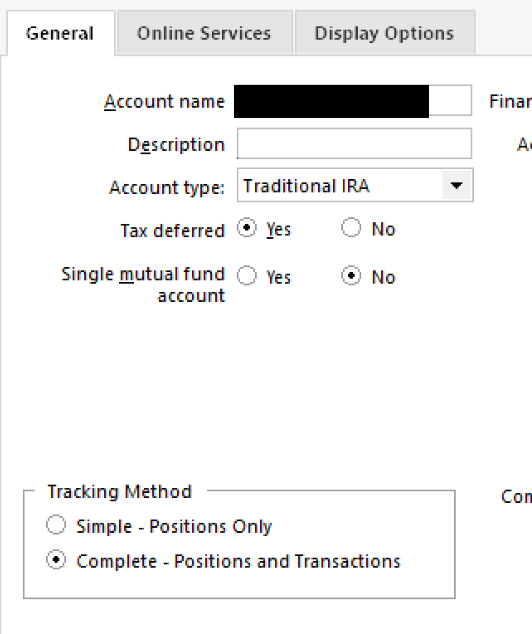
I've researched this issue herein, and have found possible solutions, but every time I attempt to correct this problem, following the step-by-step instructions, I am unable to show two of my Vanguard accounts as Complex vs Simple. It's infuriating and I need to see my registers. Please help!
Comments
-
Hello @DebMj1,
Thanks for reaching out, and I’m sorry to hear you’re having trouble with your Vanguard accounts — I know how important it is to access your full register data.
To help us get a better understanding and figure out the best next steps, could you please let us know:
- Were these accounts previously set to Complete tracking and recently changed to Simple, or have they always shown as Simple since adding them?
- When you go to Tools > Account List, click Edit next to the affected Vanguard account(s), then in the General tab — do you see an option to switch from Simple to Complete?
- If that option is there, what happens when you try to change it — does it revert back to Simple after syncing?
- Are you able to see the account balance but not the transactions, or is nothing showing at all?
Let us know what you're seeing!
-Quicken Anja
Make sure to sign up for the email digest to see a round up of your top posts.0 -
They've always been set to Complex, as are all my accounts. I've set them back to Complex, and then gone in to "Add Account" for Vanguard. I choose Advanced Options, and then choose Direct Connect. When prompted, I link them to my existing accounts and they revert back to Simple. I really, really need to see my register. I do see the four pane Simple screen, but cannot figure out how to even get past that screen to see the register. Thank you.
0 -
@DebMj1 Thanks for the detailed follow-up.
Just to confirm one step, when you go to Tools > Account List, then click Edit next to one of the affected Vanguard accounts, and in the General tab — do you see an option there to switch from Simple to Complete tracking?
If so, what happens when you select it from that screen? Does it revert after the next sync? Or is the option greyed out?
I know you mentioned using Direct Connect and selecting Complete tracking during setup, but confirming this toggle in the Account List will help us narrow down whether the issue is sync-related or something else.
Looking forward to your reply!
-Quicken Anja
Make sure to sign up for the email digest to see a round up of your top posts.0 -
I can toggle to Complex (it is not greyed out), and then it reverts back to Simple whether I try downloading directly, OR going the "Add New Account" route and linking to the existing account.
0 -
And while I'm waiting to try to figure this out, is there any way that I can access my transactions in that account? Is there a way to get past the four-pane screen to see the register? These are critical accounts that I need to track daily. Thank you.
0 -
I just figured it out. Thank you anyway.
0 -
@DebMj1 Thanks for the update — I’m so glad to hear you figured it out!
If you don’t mind sharing what worked for you, it could be really helpful for others experiencing the same issue. Feel free to post the steps you took or any insights you discovered along the way.
Thank you!
-Quicken Anja
Make sure to sign up for the email digest to see a round up of your top posts.0
Categories
- All Categories
- 61 Product Ideas
- 35 Announcements
- 223 Alerts, Online Banking & Known Product Issues
- 21 Product Alerts
- 704 Welcome to the Community!
- 672 Before you Buy
- 1.2K Product Ideas
- 53.9K Quicken Classic for Windows
- 16.4K Quicken Classic for Mac
- 1K Quicken Mobile
- 812 Quicken on the Web
- 115 Quicken LifeHub