What’s Going On Between Fidelity and Quicken?
Comments
-
Unfortunately, I went through the migration to EWC+ on 7/29. Initially, the pain was relinking the accounts in Quicken. Then yesterday, the NAV's for my 401k did not update. I kept checking until almost 10pm Pacific time. The NAV's for my investment and retirement accounts did update. Then this morning I get a strange CC-506 error and this displayed:
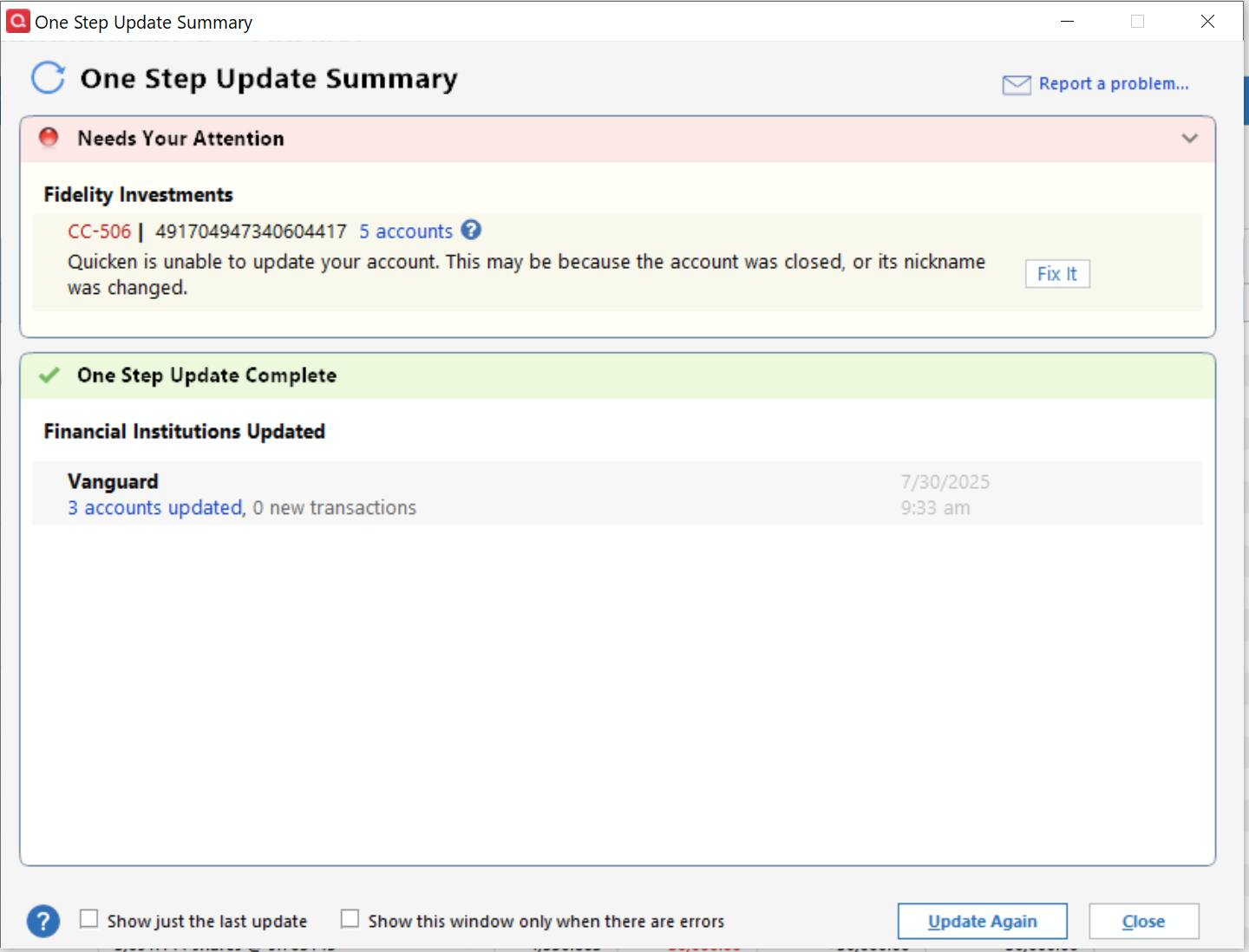
Notice the strange huge number after the error number. This is unacceptable and needs to be fixed ASAP!
Update: I just checked and the NAV's for the 401k did update sometime this morning during my multiple attempts to resolve this error.
Update: I'm seeing this error in the CONNLOG.TXT file now also:
==== Mini-OSU Start (20250731/08:51:44) ====
20250731 08:52:08: Parse error. Current object: SECINFO Missing Tag: TAG UNKNOWN==== Mini-OSU End (20250731/08:52:12) ====
Frustrating that Quicken does not provide enough information to determine which account/fund has the problem, such as the object referenced in the error message!
Update: I was just on the phone with Fidelity's Quicken support team. He suggested adding this 401k account to a new test Quicken data file to see if this error occurs there. It did not. He suggested going back to my production data file and "resetting" the connection. I had done this yesterday multiple times to try to fix the NAV downloading issue. This time I reset my investment account and my 401k account and re-authorized Quicken access. There is no longer that error when I run the update transaction step! One thing to note though. Quicken no longer gets the NAV's with 6 decimal places, only 4 now. The Fidelity support rep will pass this on to the developers.
0 -
I just talked to Quicken and they need more people to contact them and submit logs and screen shots of the issues. Please do this so we get this resolved ASAP and well before the 08/20 forced conversion date.
0 -
I did the reauthorization and now my options are not updating on both my fidelity IRA account and my regular account. This is crazy. I have more than 40 different options and I cant manually update them every day. Everything was working before the reauthorization. I am not a Teck guru and should not have to be.
0 -
You might want to do what many others are doing. Restore a recent backup file (dated before when you did the reauthorization). Your Fidelity DC connection should still be set up in there. When you run OSU and if you get prompted, again, to reauthorize click on the link to "Remind me later". That reauthorization prompt popup will go away and your DC connection should still be intact and functional.
Each time that you get prompted to reauthorize after this be sure to click on that "Remind me later" link. The hard cut in date for EWC+ is Aug 20 so doing this should give you about 3 wks before you will have no choice and will have to reauthorize at that time. Hopefully, during the next 3 wks Fidelity/Intuit/Quicken will have resolved most if not all of the issues being identified.
BTW, when you restore that backup file, while your DC connection(s) should still be intact, all of your EWC and EWC+ connections for other financial institutions will be broken so you will need to set those up, again. But this should be just a 1X occurrance.
Quicken Classic Premier (US) Subscription: R67.7 on Windows 11 Home
2 -
"I was forced"? I was given the option to defer to a later date…which I did. And reading all these posts I'm REALLY glad I did. I was offered a second time to update, but deferred again. Hope there isn't a limit!
0 -
I was forced to change to this new connection today. The change over was relatively simple. I did not realize I had an option to stay with the old one for some more time. The following are the issues I faced-
- I have over 15 accounts and in each of them there were duplicate transactions downloaded, on an average about 5 each account, so a total of about 75 transactions. They had to be manually deleted one at a time (no multiple select and delete option).
- The new connection does not recognize the Money market fund as the core cash account as cash and alerts of a mismatch - Fidelity MM fund is being treated as a security rather than cash.
- Two of my accounts have a ladder of treasury bonds. The prices of these securities used to be updated on my daily morning downloads (The price of prior day would download as the current day prices which is another problem). Today after the transition the fixed income security prices are not updating at all and that is the biggest problem I am facing right now. Hopefully this will be picked up and fixed by Quicken/Fidelity soon.
0 -
Did OSU for Fidelity accounts for the first time in a week this evening and was not prompted to upgrade/reauthorize the connection. Assuming this upgrade was turned off until the issues can be worked out?
0 -
I updated my Quicken Classic Business & Personal vR63.21 for Fidelity accounts to the new "Express Web Connect+" on 7/30/2025 and have confirmed the linking of all my Fidelity accounts. When I run One Step Update I receive confirmation the connections to all accounts have completed and and indicates that 8 new transactions have downloaed, yet the transactions do not appear i my downloaded transaction list or have been added to the accounts.
After reading seveal posts on this topic, it seems there are several similar, but different experiences occurring with the new Express Web Connect+ connection.
Are all of these being looked at by Quicken Support? Is there and ETA on when a fix may be availbale as I haven't been able to download any transactions since the update completed, although my Quicken vesion says it has.
0 -
Whatever Quicken did with Fidelity messed up all my Fidelity accounts and now I will have to take hours to correct all the mistakes lack of testing of changes caused. Why did it purge all my transactions and then enter in transactions where the tags are wrong, the payee is wrong, and the result doesn't match? Even a linked account balance is different from the account it is linked to.
Can't Quicken programmers get enough test data to verify their changes are correct?
Way to go Quicken!
0 -
I noticed a new problem today. Fidelity is now rounding up to 2 decimal digits on share amounts in reinvestment transactions so all of my many mutual funds are out of balance. I knew i should not have done this change before month end but i did it anyway. If you have not transitioned to the new Fidelity connection method, DONT DO IT. It's a disaster that keeps getting worse.
Oh and needless to say, back up everything before you try this.
1 -
I updated my Fidelity accounts to Express Web Connect+ on 7/29. No transactions have downloaded since then even though the accounts in Quicken say "last download August 1, 2025 - 8:15am (Express Web Connect+)" When is this going to be fixed?
0 -
This morning I did my daily morning OSU and Quicken did not pop-up the Fidelity reauthorize window like it did yesterday morning when I selected "Remind Me Next Time" to ignore the reauthorize request.
Instead it used the Fidelity DC connection.
I had expected to show the reauthorize pop-up for every OSU, but it didn't.
Deluxe R66.23, Windows 11 Pro
0 -
I reverted to a backup file today and was NOT presented with the Fidelity Authorization dialog. Downloads processed as usual. Cash balance in investment accounts remains intact.
0 -
I have been electing to postpone the Fidelity upgrade . Today when I did my OSU I also was not presented with the authorization. Hopefully they are deferring this until it is resolved.
0 -
I restored a backup and started using the file with "zzz-Fidelity Investments - DC" three days ago and have not been presented with a reauthorization prompt since then. Let's see how long this lasts!
Downloads processed as usual. Balances in investment accounts remain intact.
0 -
Big thanks to Boatnmaniac for several posts here of concise insight and advice.
Yesterday I followed the prompts to set up the new Fidelity protocol, and like most everyone else was plagued with issues. So I restored to a backup, hoping this would eventually be worked out.
For today's OSU to the restored backup Quicken did not prompt to change the protocol and everything worked as before. Only difference is that my primary account financial institution is now zzz-Fidelity Investments-DC, which Boatnmaniac explains earlier here.
One can hope and expect that this will all be worked out soon, as obviously the utility of Quicken for Fidelity clients will be drastically reduced otherwise, and this multi-decade Quicken customer will have little incentive to continue to pay for a subscription.
1 -
No one here can answer that question. And I seriously doubt that the Moderators can answer that question. I do know that the issues with Fidelity's EWC+ transition are getting high level attention and focus at Quicken so that is a good sign.
You should stop using that EWC+ data file. Instead, do what others are doing as I posted above on 7/31. Doing this will buy you about 3 wks of continued DC downloads before Fidelity forces us to reauthorize to EWC+. Hopefull, Fidelity/Intuit/Quicken will be able to resolve the EWC+ issues before then.
Quicken Classic Premier (US) Subscription: R67.7 on Windows 11 Home
0 -
OK, after talking with Fidelity (they assured me their data feed has not changed) and then Quicken support for about 2 hours on a couple specific issues my suggestion is to restore your 7/29 backup. Then validate/repair that file and run your One Step update. Hopefully it will behave as expected. You may notice the connection method remains the old Direct Connect. Seems like things have been rolled back.
0 -
I had problems too, and they are not all resolved. My experience:
Conversion to EWC+ did not appear to be optional to me. I started One Step Update expecting nothing different from the day before. A window appeared with instructions to reauthorize. I didn't see anything suggesting I could make any choices other than execute the reauthorization instructions.
I relinked all 7 Fidelity investment and IRA accounts as before. I was also offered my Fidelity Charitable account, which was a new offer at lest to me. I selected Add to Quicken for the Fidelity Charitable account.
All of my accounts were previously set up for Complete reporting, and this appeared to carry over and work as before.
Transactions for some period of time (not the same for all accounts) were downloaded and Quicken presented them to me as New. I deleted them one at a time manually (lengthy process).
I received two popups from Quicken asking essentially how I wanted a sweep fund treated. (This is odd because each of the 7 accounts has a sweep fund. My choice has always been to treat them as cash and not maintain share balances for the sweep funds. So that is how I responded to the two popups. I think they were for FDRXX but I didn't keep notes.
Now (August 1), there has been a dividend/interest cycle on the sweep funds. 5 out of 7 accounts now have share balances for the sweep fund (Fidelity Cash, or Fidelity Government Money Market) and the other 2 out of 7 do not have share balances for the sweep fund. The 2 accounts with FDRXX as the sweep fund are having it treated as cash, which is what I want. The accounts with Cash or SPAXX as the sweep fund are having fund shares "bought" which is what I don't want. Incidentally, it's especially out of line for Fidelity Cash, which is not a mutual fund or really any kind of legal entity, and does not have shares (it's kind of a fake account containing rights to dollars, not shares). SPAXX on the other hand is actually a legal entity that has shares.
As an example of the change since last month, one of my June 30 payments from Fidelity Cash was downloaded and recorded in Quicken as a Deposit with description Interest Payment. The July 31 payment from the same fund to the same account was downloaded and recorded in Quicken as ReinvInt. The July 31 payment created a share balance. And one of my June 30 payments from FDRXX was downloaded and recorded as a Dividend both times (June 30 and July 31).
Now for the Charitable. I thought I would just try it and see what happened. I made it a "separate" account in Quicken. A bunch of grants and contributions for about a year were downloaded. One Holding was downloaded and it is bogus, specifically, it's an odd quantity of a security that I hold in my Brokerage and Roth accounts. I'm inclined to think it's an artifact of a software bug at Fidelity. The implementation of Charitable for download looks sort of half done. To work sensibly, Investment Pool holdings need to be downloaded as Holdings, a Grant needs to generate at least one Sell of a pool (which isn't happening) as well as a Withdraw of the grant (which is happening), a Contribution needs to generate at least one Buy of a pool (which isn't happening) as well as a Deposit of a security contribution (which is happening). It would be desirable to have specific names attached to downloaded Grants and Contributions, (that is, who the Grant went to, and what kind of asset the Contribution was) but that's a separate issue entirely.
WHAT'S STILL BROKEN: (1) the sweep fund to cash feature for some sweep funds; (2) completing the implementation of Charitable transactions.
1 -
Mac user - I converted yesterday and have identified the following issues:
- In one of my Rollover IRA accounts, several share adjustment transactions were added for some reason that created account balance and security performance issues. Luckily they were added a day before any transactions in my account, so I was able to quickly find them at the bottom of my transaction list and was able to delete them. They were significant errors - such as adding a million "shares".
- I have several CD's in my Rollover IRA account. Until this change, I had no issues downloading price information for them. As of this change, the price info downloaded is incorrect. For CD's priced at 100.42, Quicken shows them as 1.0042 resulting in balance issues.
- Also related to the CD prices, Quicken did not download CD prices for Friday (August 1). I did get prices for other securities I own such as mutual funds, but no CD prices.
For me, deleting the erroneous added transactions and manually updating the CD prices for the latest 3 days fixed my balances, but I do have concerns that future price updates will also be erroneous and require me to manually update prices.
0 -
How do you turn off price updates for an individual CD / security? I'm having the same problem with CD's in my Fidelity IRA where each is being valued 100x lower than it should be. Thanks!
0 -
@gourmatt you can turn off price updates for individual CDs by going to your Security List and right click the CD and select "Edit". Then you should see an "Edit Security Details" settings window -
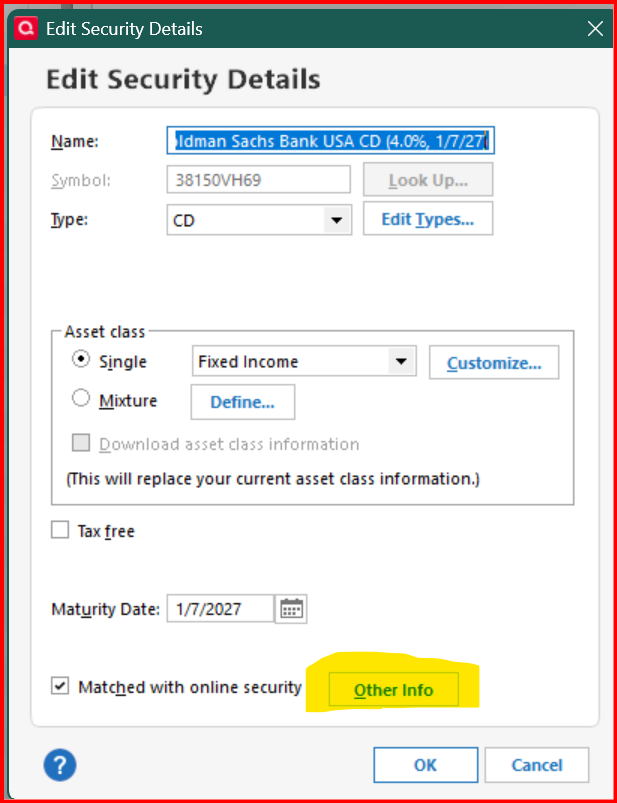
At the bottom of the settings window, click on "Other Info". Then check "Ignore prices from broker download"
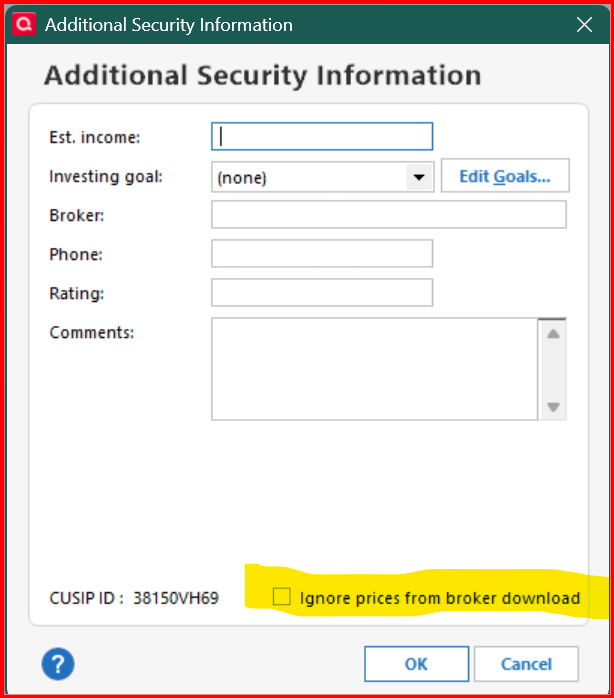
When they resolve the pricing issue, remember to uncheck this option, so to resume pricing.
0 -
Go to Tools > Security List > for the securities in question, uncheck the boxes for Download Quotes and Watch List.
BTW, to me it appears with the EWC+ connection the quotes and shares quantities are being downloaded as fractional shares instead of full shares. Just my guess. Last night I mentioned this to a member of Quicken's Development Team while on a call with him discussing all the issues being experience by me and reported in this forum. He said he would look into it and message it to Fidelity.
Quicken Classic Premier (US) Subscription: R67.7 on Windows 11 Home
0 -
All of my Fidelity accounts in Quicken are a mess. Securities are missing, transactions are wrong or have the wrong dollar amount.
I'm trying a backup database, but I'll miss dozens of transactions in other accounts.
What a huge, huge mess!!!
Quicken Deluxe for Windows 11 Pro. Latest subscription version. I've been a user for decades.
- Jim S.
2 -
If those dozens of transactions in other accounts were manually entered, then yes that would be an issue but it would be a 1X time issue and fix. Keeping the current Fidelity EWC+ connection is not something that will get fixed overnight. It will take at least days if not weeks before this issue gets fixed. And the worst part is that we still don't fully understand everything that might possibly be an issue with that EWC+ connection so more issues might be indentified going forward as we work with our Fidelity accounts.
If those dozens of transactions in other accounts were downloaded, then restoring the backup file will allow you to download those transactions, again. You just need to remember to set up the applicable EWC or EWC+ connections for those other accounts, again, and to make sure to decline any reauthorization prompts in the future until the EWC+ issues are resolved or we are forced to migrate.
Quicken Classic Premier (US) Subscription: R67.7 on Windows 11 Home
2 -
@gourmatt to clarify -
CD prices are not in Quicken's price feed, since they aren't published prices. They usually are updated from the transaction update file from the brokerage.
Otherwise, the process that @Boatnmaniac shared is for security prices updated through Quicken's update file. This is typically how prices are updated for securities with published prices.
I just wanted to make sure to note the difference.
1 -
After upgrading to the new Fidelity Connection, I have run into the following issues:
- On CDs they were previously showing quantity of based on hundreds ($1000 would be quantity of 10 at price off $100 similar to the ways are downloaded/priced). In the new connection the quantity started showing up as 1 at price of $1 per. I came up with a workaround but didn't know if this is going to change back at some point in the future. My work-around (after dealing with placeholders that I didn't want) was to do a stock split transaction to get the quantity and pricing to match the download. However, I had to adjust the historical pricing to match. Fortunately, I only had four CDs impacted so it didn't take but about 30 minutes to fix.
- For the Fidelity Money Market Account, when downloading the month-end interest on 8/1, Quicken tried to treat it as a ReinvDiv transaction which created issues with placeholders. I basically had to delete the transactions and enter them manually. I double checked that I had not checked the Never interpret downloaded Money Market funds as cash in Edit/Preferences/Downloaded transactions. Is this going to be an ongoing issue or will the Money Market Funds act like they used to and just download as a Div and not a ReinvDiv (with Placeholder implications/disasters)?
- The most significant issue that I am having is on ReinvDiv transactions, the number of shares are rounding to the hundredth and not the thousandth like previously handled. I am having to manually adjust each downloaded ReinvDiv transaction to get the proper number of shares. Is there a way to get the rounding to be handled correctly?
Thanks for input and efforts to get the interface working correctly again!
0 -
CaliQkn just to clarify. . . The CD information is made available from the broker, Fidelity in this case. The root cause is that Quicken coded EWC+ wrong for CDs. Now, with EWC+ Quicken uses different data categories for CD market value and CD cost basis. It used to pull the same type of data, being the full investment value of the CD at time of purchase (Cost Basis) and at the time of update (Market Value.) So if you had a $50k CD they both showed as around $50k pre-EWC+. However, erroneously now with EWC+, it pulls this information from the wrong category for market value. Now, it is pulling market value from the number of lots, not the value of the investment. CDs are sold in lots of 1000. EWC+ is incorrectly pulling from number of lots, not market value. So now, your CD with a cost basis of $50k is reported as $500, not $50k. With EWC+, Quicken is now erroneously not using the same downloaded data to calculate market value and cost basis. To fix this, EWC+ has to use the same category of downloaded data for cost basis and market value.
It seems like this should be an easy fix. It seams like EWC+ just has a simple coding mistake in which the wrong data category available in Fidelity's data stream was chosen to report "market value."
0 -
I had the same issue after re-authorizing the Fidelity Netbenefits connection. Nothing was updated: no transactions downloaded, and share prices were not even updated.
I was able to restore some of the functionality by deactivating the account in online setup, and then reactivating it. Reset did not work, even though it should do the same thing.
Share prices are now being updated, but the transactions downloaded are not accurate. Will have to wait two weeks until the next transactions to see if the problem persists.
0 -
@schafari it sounds like the price in Fidelity's update file is incorrect and should be multiplied by 100.
From other posts I've read, there might also be an issue with the units as well. 1 vs. 100. See below -
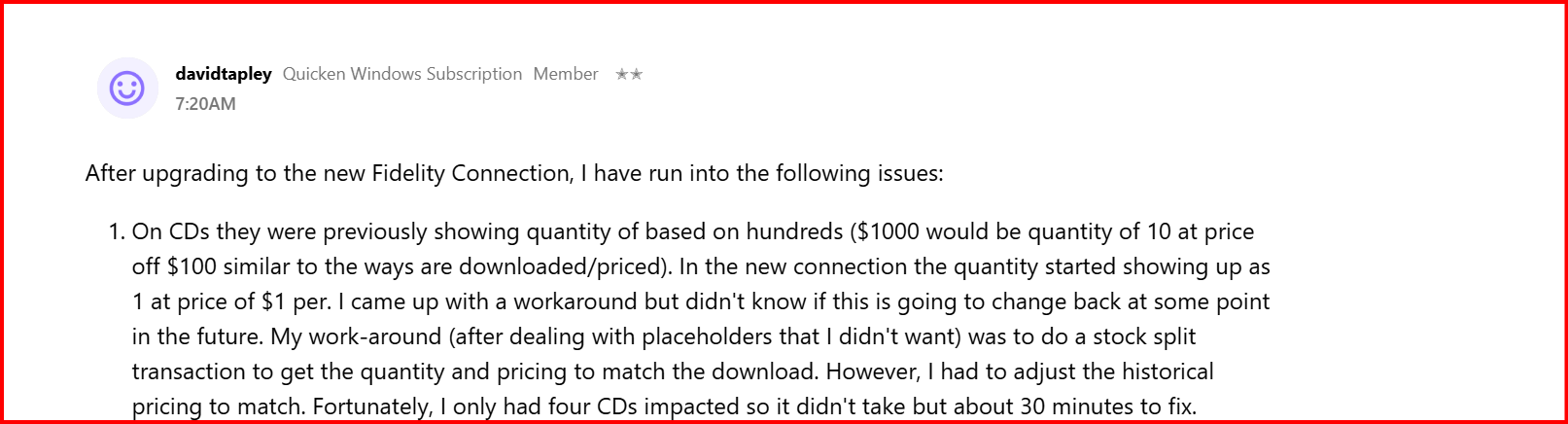 1
1

