What’s Going On Between Fidelity and Quicken?
Comments
-
Fyi - I also have a Schwab account that shows as EWC+ and works fine. A google search indicates that Schwab switched to EWC+ in 2021. My involvement with the connection change was in 2023 when Schwab fully integrated TD Ameritrade into Schwab. No problems for me at all.
Fractional securities: Schwab maintains data with 4 decimal places online and in the download just fine. Another google search about Fidelity’s transition to EWC+, indicates it was first supposed to be only for Simple investing accounting, which may explain the 2 digit instead of 3 downloads. I suspect that certain coding for the Simple investing emphasized dollar holdings and scrimped on transactional details to improve download size/speed. Then “some bright person” decided Fidelity could use this simplified code as backbone to finish the migration to EWC+ for Complete investment accounting.0 -
Hi,
I also am a user with decades of experience and have never had issues like this with Fidelity. I have spoken with both sides as well - and neither is really of any help. I scanned the 7 pages of input above me and didnt see an underlying issue that I am suffering from. First I was successful at relinking and the only issue there was that my system downloaded tons of duplicate transactions. Quicken DID help there in that they said that you can hold the shift key to highlight succcessive transactions in the download area and then delete multiples at the same time. But here are the ongoing issues for me:
- Someone is rounding share quantities in the transactions - to hundreths instead of thousanths. As a result - all my holdings are now off by thousanths - three delicimal places. This never happened before and it continues to happen.
- Fidelity has defined a new default cash sweep account - but shows no transaction to sweep the cash - so my cash is overstated and the fund holding the cash is understated.
If folks just hit accept all - when this nightmare started - then that would account for a lot of the issues.
If anyone has a solution for my two - please advise.
In the mean time - I did one time catch a knowledgable Fidelity eomloyee who is a Quicken adviser - -and they admited that Fidelity has no test accounts. Also they know the problems - but now the general group is pushing out lazy, one note solutions. Our Quicken community is made up of experts and novices and the info Fidelity gave me yesterday was for a novice who would be dumb enough to follow their instructions and jump through hours of hoops for nothing.
There are at least two real bugs - the ones that I listed. The rest - lets be frank - may be Quicken user inexperience or worst case - need a new test file to see if they can bridge the gap. Also - make sure that a VPN or anti-virus is not gumming up your works - and finally - once this is done - redouble your personal security protocols.
Best to all!
3 -
I forgot to mention one other change that may be affecting your balances. They changed the unit of measure on my CD's holdings. When I bought the CD's, they were incremented in something other than 1 to 1. In other words they may have been purchased in 100's instead of 1's. So to fix my values - I had to modify the purchases to reflect 1 to 1 ( One share = one dollar) - rather than ONe share =100 dollars. Prior to making those changes - my balances were way off.
1 -
@Chris_QPW Anticipating that the Fidelity connection issues will not be resolved by 8/20, does your ImportQIF product support Fidelity CSV files? The product was very valuable for me when Vystar's EWC+ connection was broken for months. Also, Fidelity CSV data has 3 decimal places in the transactions.
Deluxe R66.23, Windows 11 Pro
1 -
Ever since the Fidelity connection method changed in July, none of my Fidelity accounts (4 of them) update correctly. 401k Contributions and Investments no longer are downloaded. IRA and Brokerage Money market securities for the Core cash positions are no longer recognized. Dividends and mutual fund reinvestments are not tracked properly. I've been having to make manual adjustments to every account to get Quicken to match the information in my Fidelity Accounts (on Fidelity). After many, many years of managing my Fidelity accounts in Quicken with very few issues, it has now become counter-productive to even try and connect to Fidelity. I have resorted to entering my activity manually in Quicken. This won't go on indefinitely. Either Fidelity or Quicken must go if this isn't resolved soon.
Quicken Classic - Business and Personal - Version R63.21 - Build 27.1.63.21 - Windows
1 -
Yes, assuming the 8/20 cutoff is no longer in play and it's now a matter of "when it's fixed"?
0 -
Is there any way to tell if this has been fixed for me or not, without re-linking my accounts (and discovering it still broken)? Right now things are not linked, because downloaded transactions were all garbage (securities-related transactions with no associated security, for example). I don't want to continue downloading garbage while waiting for a fix, but neither do I want to have to enter everything manually if it's been fixed. Every time I link my accounts and find out it isn't working right, I have to do a lot of manual work to clean things up. So for now I'm leaving things unlinked.
0 -
Hello @Mark Shapiro,
Thank you for reaching out with this question. I'd recommend following the alert linked below for updates:
Additionally, it's a good idea to keep an eye on posts on the Community, since that can help give an indication what issues people are still encountering.
Thank you!
Quicken Kristina
Make sure to sign up for the email digest to see a round up of your top posts.
1 -
Note sure what you mean by unlink the accounts but I have turned off OSU for Fidelity even though it is set for DC connection. Then Fidelity is not updated during OSU.
I just perform an update the account level when desired. There was no need to deactivate the Fidelity accounts to halt downloads. I did this in preparation to stop downloads for Fidelity depending on reports posted here on 8/20 if DC connection is still available.
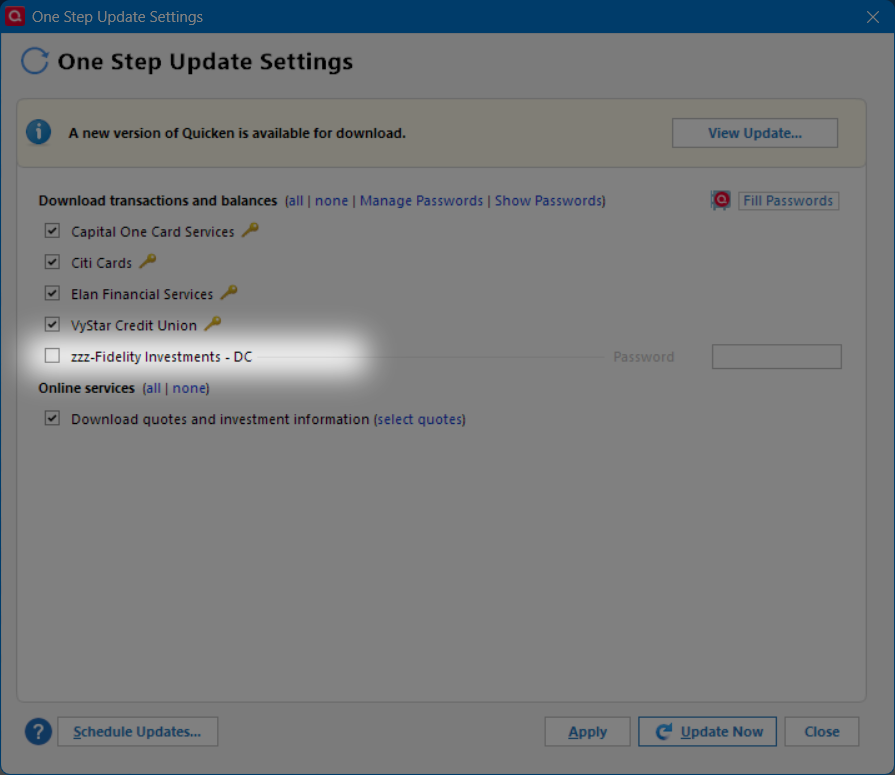
Account level update:
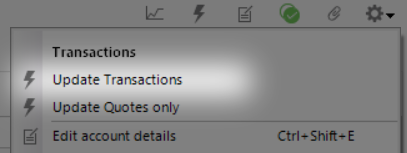
This works as long as Quicken doesn't force reauthorization on 8/20 for Fidelity regardless of the OSU settings. I'm hoping it won't. But deactivating the connection for the accounts should definitely cover the scenario of reauthorization being forced.
Deluxe R66.23, Windows 11 Pro
0 -
Response from the Fidelity Support forum on Reddit when requesting to keep the DC connection until EWC+ issues are resolved:
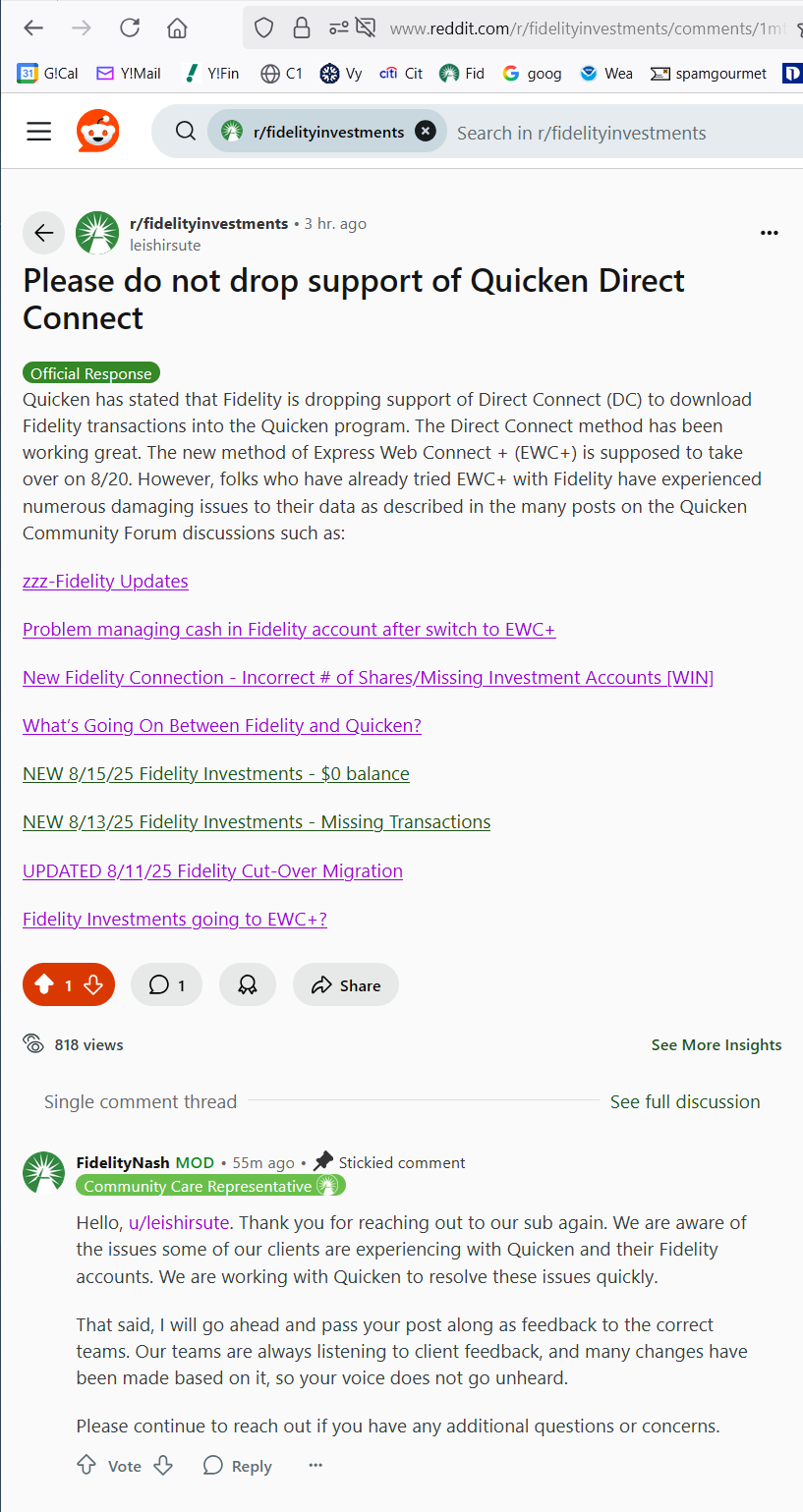
Maybe if Fidelity gets enough requests on their Reddit forum they will get an idea of the impact of the EWC+ change.
Deluxe R66.23, Windows 11 Pro
1 -
Seeing the same issue with rounding. Also not sure where this is occurring. What I do know is when running investment reports from Quicken, exporting to excel rounds to 2 places. Exporting the same report to .txt maintains the 3-place share data. Running a report from the investing tab only allows export to excel so rounding to 2 places.
Ended up going thru all activity from 7/31 comparing Quicken to Fidelity share values and correcting Quicken. Suppose this process will be the norm till things get straightened out. Real disappointment no testing was done on this.
“Never stop dreaming,never stop believing,never give up,never stop trying, andnever stop learning.”
Quicken user since 19930 -
Hello All,
The migration will not start back up tomorrow. It will remain paused while both Fidelity's team and ours work to resolve the issues that have been identified.
Thank you for your continued patience while we work with our service provider and Fidelity to address the reported issues.
Quicken Kristina
Make sure to sign up for the email digest to see a round up of your top posts.
6 -
Thank you for recognizing that it's not ready.
0 -
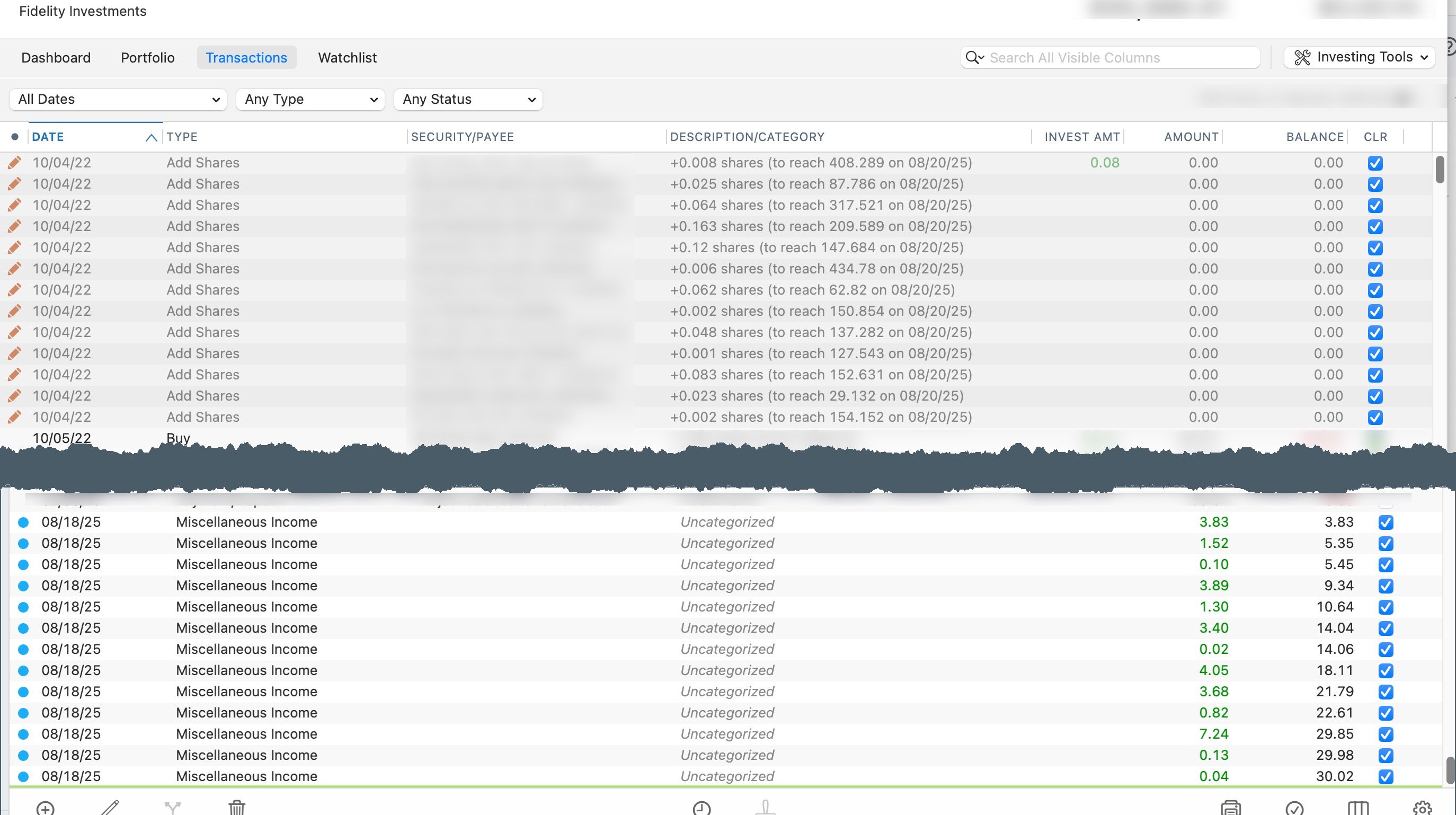
Hello everyone, I wanted to share some recent issues I've been experiencing with my Fidelity account. I use Quicken for Mac and have always used the detailed tracking method. However, about a month ago, I noticed that all my downloads started including Miscellaneous Income transactions for the current day, along with unusual Add Share transactions dated 2022. It took me a few hours to figure out and fix the first couple of downloads, but I am now considering turning the download off until this has been fixed.
 0
0 -
That might be an Excel formatting issue for those cells. If you change the properties for the excel cells does that change what it shows for the shares?
I am also having trouble with downloading Fidelity info from Quicken - biggest one for me is showing the missing MMF shareds when i want to show cash. Schwab is downloading fine (as of 8/20).
0 -
I have Q for Mac Classic and can download all transactions, but T-Bill redemptions are now characterized as "Deposit/Payment" without attribution to the the specific bill and thus require manual reconciliation for each bond matured, all new since the updated connection.
0 -
This content has been removed.
-
Fidelity investments update some days and not others. This started a few weeks ago and there seems to be no rhyme nor rhythm to what day it will update. WF still not updating for a few months Quicken is not a cheap app. I should not have to be manually updating/ going to bank to download these investments and banks. Clearly neither of these concerns are limited to me and are ongoing. Please fix
0 -
@Quicken Kristina So if I understand you correctly, users who were not already cut over to the new system are fine, they will continue to use the old system until the problems have been fixed.
However, users like me who were previously cut over to the new system are basically out of luck, it's broken and will remain broken until Quicken and Fidelity can figure out the problem and fix it? [Edited - Language]
Am I understanding it correctly? Is there a way for me to go back to the old system until the new one is fixed?
1 -
I, stupidly, promptly converted to the EWC+ connection method. I even disabled all Fidelity connections and reestablished/verified my various accounts. Consequently, I haven't had any transaction downloads for one month now. I see no ETA for a fix. This had rendered your program completely useless to me.
1 -
Are you able to restore a backup when fidelity downloads were using dc connection ?
Deluxe R66.23, Windows 11 Pro
1 -
Hello @Mark Shapiro
Currently, the only way I'm aware of for those who already converted to Express Web Connect+ to revert back to Direct Connect is to restore a backup from before you migrated to the new connection method.
I hope this helps!
Quicken Kristina
Make sure to sign up for the email digest to see a round up of your top posts.
1 -
This worked. Thank you. I restored back to 6/30. Now, transactions are downloading.
1 -
Not stupidly at all. Quicken sent us email in June about the connection updates and said no action necessary until further instructions were provided. The further instructions never came. I never did anything intentionally, but I'm pretty sure that if after a One Step Update I get an error message with a "fix it" button, I'm going to click on the fix it button. Now today I discovered that I haven't been getting any new Fidelity transactions downloaded since 7/31, and the Fidelity accounts were all set to EWC+. Thanks to this thread, I tried restoring a file from 7/31 that still said Direct Connect and all of my missing Fidelity transactions showed up. Now it's a matter of updating the rest of my Quicken manual transactions for the past 3 weeks and reconciling all of my manual accounts that I had just caught up on from the past 2 months. It will be hours of work. It's disappointing that after all the pains from the recent Vanguard fiasco we now have to go through the same thing with Fidelity.
1 -
The problem with using a backup from late July is that you lose all the manually entered data in every other Quicken account (banks, brokerages, etc.) from the last 3+ weeks. Don't I recall that we had this same or similar problem with Schwab accounts when they transitioned their download process a few years ago. Looks like Quicken didn't learn from that!
1 -
Backup your current file. Note the date on the late July file you would restore from, then from your current file export to a QIF file transactions from all accounts since that date. Then restore the backup file and import the QIF file into the restored backup before doing an update. Then do an update. After updating you may have to delete duplicate transactions from the update. Check each account, and you should be restored.
2 -
Great tip! Too bad it comes a day too late (I'm just finishing my manual re-entries). But I will save this for next time. And I'm sure there will be a next time.
0 -
I have now been unable to use Quicken for one month. Still surprised and disappointed that we have not received some form of communication from the CEO.
5 -
Hello All,
We just posted a new Fidelity alert with the latest updates on what’s been fixed, what’s in progress, and available workarounds. You can view the full details in this Community Alert.
Highlights include:
- Duplicate Transactions (Windows) > fix included in R64 release.
- Missing Transactions (401k, Brokerage, IRA) > fixes verified/rolling out.
- Bond redemptions showing as cash > fix live.
- $0 account balances > fix verified/complete.
- In progress: incorrect CD balances, doubled cash balances in Money Market accounts.
Please bookmark the alert thread to stay updated.
Thanks for your patience while we work through these!
-Quicken Anja
Make sure to sign up for the email digest to see a round up of your top posts.1