Transferring Shares between accounts with the same broker

Retired Banker
Retired Banker Quicken Windows Subscription Member

I am using Classic Quicken, version R63.21. Attempting to transfer shares of investments between two accounts at the same broker, Charles Schwab.

I attempt to use the "Shares Transferred between Accounts" transaction option, but Quicken will not allow me to select a "Target Account" on the next screen.

Is there a work around for this problem?

Answers

  • Jim_Harman
    Jim_Harman Quicken Windows Subscription SuperUser ✭✭✭✭✭

    What type of account is this, and how are you accessing the Shares transferred between accounts?

    For me, Shares transferred between accounts is not supported for IRAs or 401(k)s and when it is supported, there is only one screen to enter the transfer.

    QWin Premier subscription
  • NotACPA
    NotACPA Quicken Windows Subscription SuperUser ✭✭✭✭✭

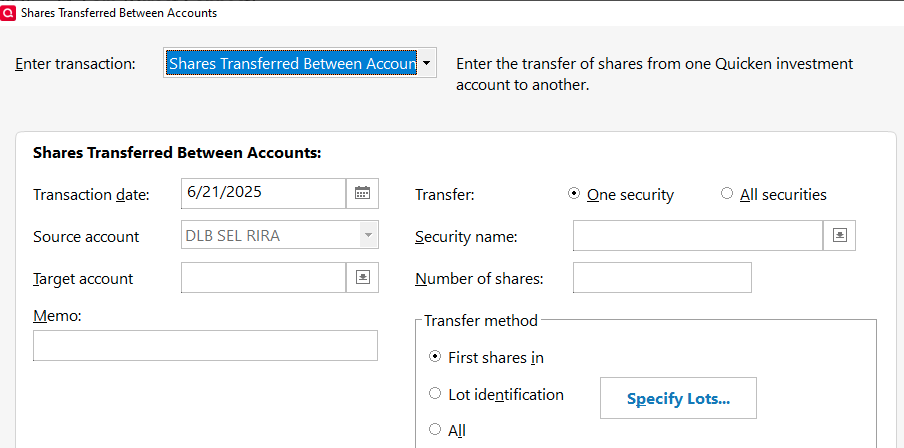
    WHAT "next screen"?

    Target account is the field immediately below Source account, at least in Business & Personal.

    What Q version are you running?

    image.png

    Q user since February, 1990. DOS Version 4
    Now running Quicken Windows Subscription, Business & Personal
    Retired "Certified Information Systems Auditor" & Bank Audit VP

  • NotACPA
    NotACPA Quicken Windows Subscription SuperUser ✭✭✭✭✭

    I didn't actually execute the transfer … but my graphic was from within a Rollover IRA.

    SO, when would I have been stopped?

    Q user since February, 1990. DOS Version 4
    Now running Quicken Windows Subscription, Business & Personal
    Retired "Certified Information Systems Auditor" & Bank Audit VP

  • Retired Banker
    Retired Banker Quicken Windows Subscription Member

    I'm running the current version of Quicken Classic R63.21. Have done a Roth IRA Conversion from a Traditional IRA account. This type of transaction isn't recognized in the standard "One Step Update", so have to enter it into Quicken manually.

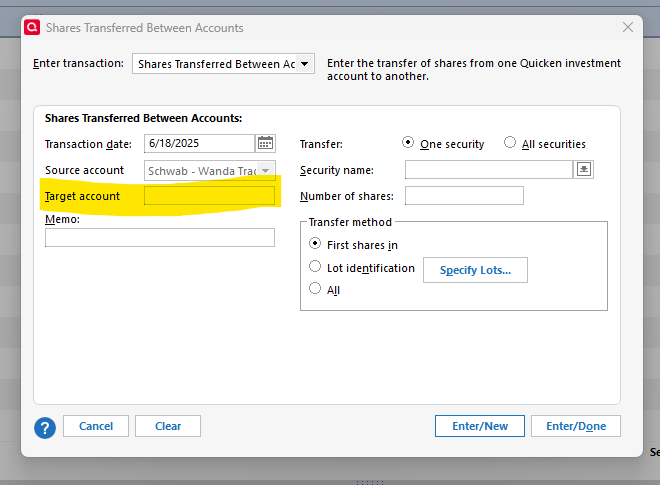
    In the source account, I select "Enter Tranactions", then "Shares Transferred Between Accounts", I get the below screen.

    The Source account is identified correction, but Q won't allow me to select the Target account (highlighted)

    Has anyone else experienced this issue?

    I've been a Quicken user since the dark ages (mid 1990's) and retired CPA/Banker.

    image.png
  • Jim_Harman
    Jim_Harman Quicken Windows Subscription SuperUser ✭✭✭✭✭

    Two notes:

    I tried the Shares transferred between accounts again in an IRA and today the selection is available; it was not in the Enter Transactions dropdown list yesterday. It appears that for you the selection is available but it won't let you specify a destination account.

    Also if you want Quicken to record the tax implications of a Roth conversion, you can't use a Shares transferred between accounts to record the transfer. You must record a Sell of the shares transferred, move the cash through a taxable account, and Buy the shares in the Roth account. Here is the process I would use:

    1. In the Account Details for the IRA, make sure the Tax Schedule for Transfers Out is set to 1099-R:Total IRA Taxable Distrib. In the Roth account, make sure the Tax Schedule for Transfers In is blank.
    2. Sell the shares for the conversion in the IRA.
    3. In a taxable account, record a Deposit with the Category set to the IRA account name in [square brackets] of the full amount of the conversion. If taxes were withheld, split the transaction and record them as negative amounts.
      If the deposit is made to a banking account between Jan. 1 and April 15, you will see a dialog titled “Confirm Your Contribution Tax Year”, even though this is a distribution and not a contribution. Select the current year, not the default of the previous year, and click on OK. This seems to be a bug.
    4. In the same taxable account on the same day, separately record a transfer of the net amount to the Roth account. I record these as two transactions because Quicken sometimes gets confused with zero-amount transactions.
    5. Also on the same day, Buy the converted shares in the Roth account
    6. Delete or do not accept any downloaded transactions associated with the conversion.

    I have focused on getting the Tax reports and Tax Planner correct. My conversions have all involved moving cash, but if the shares were moved in kind, I think you might as well record it as a Sold in the IRA and Bought on the same day for the same price in the Roth account. This resets the cost basis.

    When measuring performance of a period that includes the transfer with the Investment Performance Report or the Avg. Annual Return (%) columns in the Portfolio views, you should include both accounts.

    QWin Premier subscription
  • NotACPA
    NotACPA Quicken Windows Subscription SuperUser ✭✭✭✭✭

    I just now executed a "Shares transferred" transaction between 2 Rollover IRA accounts. Both were Brokerage type accounts that hold multiple funds.

    I selected the Target account via the Dropdown arrow on the right side of the Target box … and the transaction went thru without a hitch.

    Q Business & Personal, R63.21.

    @Retired Banker what puzzles me about your graphic is the absence of the dropdown arrow on the Target field.

    SO, what specific Q product are you running? And, have you tried either Validating your Q data file, or reinstalling the program?

    Also, are your retirement accounts designated a being "Single Mutual Fund"? (OK, grasping a straws a bit)

    Q user since February, 1990. DOS Version 4
    Now running Quicken Windows Subscription, Business & Personal
    Retired "Certified Information Systems Auditor" & Bank Audit VP

  • Retired Banker
    Retired Banker Quicken Windows Subscription Member

    Thanks Community! Didn't think to Validate my Q data file. After doing that step, was able to perform the intra account transfer!

  • NotACPA
    NotACPA Quicken Windows Subscription SuperUser ✭✭✭✭✭

    Most users don't realize that some of what appears on your screen is NOT hard-coded into the program but rather is dependent upon your data file.

    This was yet another example. It's only in your data file that the "Target" accounts can be found.

    Q user since February, 1990. DOS Version 4
    Now running Quicken Windows Subscription, Business & Personal
    Retired "Certified Information Systems Auditor" & Bank Audit VP

This discussion has been closed.