I don't use Quicken very often and when I update the accounts (bank and investment) all of the values displayed by Quicken differ significantly from the actual value of the account.
How do I go about fixing this? It makes Quicken useless to me.
When was the last time that you reconciled your accounts?
Since setting up your accounts for download, have you changed the connection method, say from Direct Connect to Express Web Connect … or any other such change?
Have you verified that your opening balance in the accounts is correct?
Do you use QWeb or Q Mobile?
What banks or brokerages are you downloading from, and what download method? Direct Connect, EWC, Web Connect?
Which figures are you comparing to what? In the account register there are both current amounts and future amounts, if you have any future-dated transactions input or scheduled. Either can, your option, be displayed on the account side-bar. How does what's in the register compare?
Probably around January of this year was the last time I reconciled at least some of the accounts.
The connection method has not been changed
The opening balances seem to be correct. The amount that they accounts are off by are significant.
I do not use QWeb or QMobile
E*Trade, Vanguard, and Marcus Bank. All use direct connect.
I'm using the total market value. Also the number of shares held is wrong and there is something going on with how Quicken is showing the cash balance in the E*Trade account. I'm not using Quicken for paying bills and I didn't know that it is possible to enter future-dated transactions.
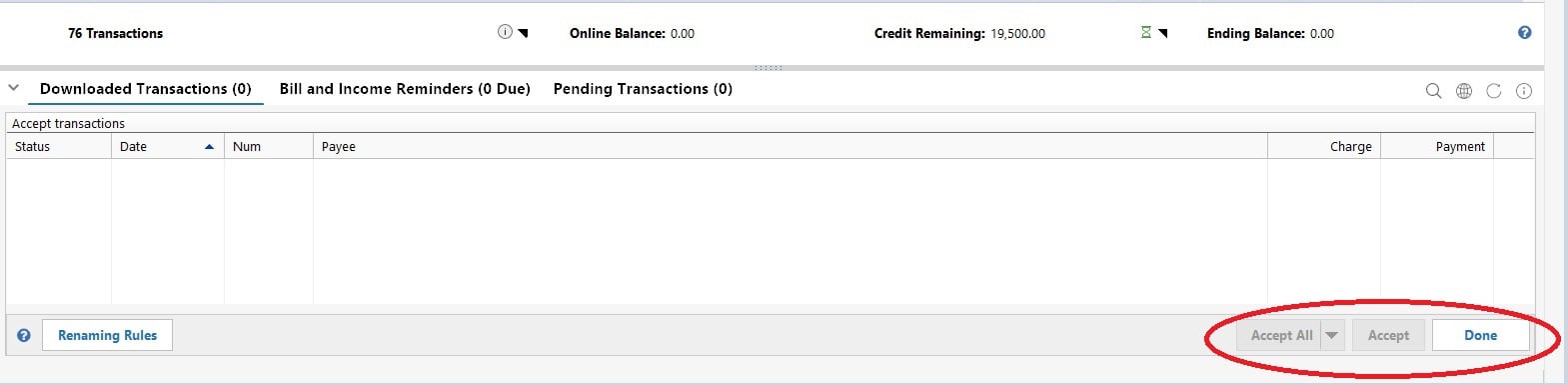
When you download an account, there is a list of the account's transactions at the bottom of the account's screen. You have to Accept the downloads to have them entered into your account, unless you set Quicken up to automatically accept all downloaded transactions. I recommend NOT automatically accepting, because if there's a hiccup in the download process (Quicken or the financial institution), all of that bad data will be added into your account and you'll have to manually undo it. It's much easier to simply review what was downloaded and click Accept All. If you do find an error, you can either try to correct it (several options for this) or just delete it and enter the correct data manually. The number of shares is probably wrong because you never accepted the reinvest dividend transactions; a similar issue is probably what is happening with your E*Trade account's cash balance.
@Ducksoup_SD How to I check to make sure I'm not automatically accepting transactions?
@SuaveAlligator So is it all investment accounts that are incorrect?
Have you compared, account by account and security by security the holding in Q to a recent brokerage statement?
Have you looked for Placeholder transactions, which are normally hidden but can be viewed by clicking on EDIT, Preferences, Investments, "Show Hidden Transactions"?
Placeholders are created by Q when the downloaded quantity for a security doesn't match what you've recorded in Q. They bring Q into alignment with the download … but they also restrict future updates to that security.
SO, you need to look for any placeholders and resolve why they happened, usually by pulling out those old statements, since the issue began, and figuring out what's missing or otherwise in error. Once the error has been corrected, the particular Placeholder transaction can be deleted … although they may be multiple for a single security.
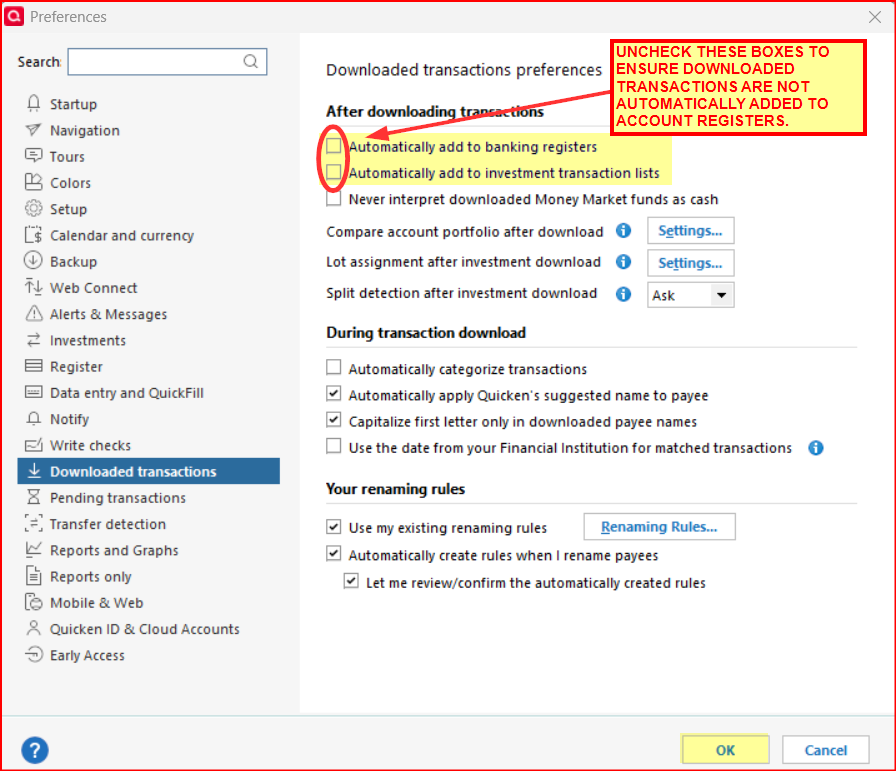
Go to Edit > Preferences > Downloaded Transactions > Make sure the boxes for Automatically add to… to banking registers/investment transaction lists are unchecked > OK.
How often do you download from your accounts? I found a long time ago that ETrade (at that time) only downloaded the most recent month's transactions, so if I didn't download regularly, I missed things getting into Quicken.
Good point. Fidelity's website now advises that Quicken users should make sure to download their accounts at least 1X per month or their downloads will very possibly not include some older transactions.
Fidelity and E-Trade are not the only ones that limit the the time period for transactions downloading. It used to be the norm for financial institutions to download transactions (after the initial connection setup) for the last 90 days but a fair number will now download transactions for only the last 30 days or so.
I only compared the securities for E*Trade after comparing them I removed and added the account back. The values are much closer but still off slightly.
Per the suggestion from Boatnmaniac I've disabled automatic the automatic banking and investment adding.
The placeholder transactions as far as I can tell have the correct share count and are just missing the cost information. Based on this I think I just have to enter the average cost. Will this fix the problem?
If you mean adding the average cost only to the placeholders, then probably not. What I would do is 1) calculate the total share count for a security, including the placeholders. The total should match what ETrade has for you. If not, stop and figure out why. 2) Add the total cost of the transactions for that security in your existing records. Subtract from your ETrade total cost. That's the amount of cost you need to add. 3) In the placeholder, use the "add missing transaction" function to add a "reconciliation" transaction for any date older than the placeholder, with the placeholder's share count, and the total missing cost. 4) That should give you a correct total share count, correct total cost, and a zero placeholder. Assuming yes, you can delete that placeholder. Then repeat for each of the other securities.
Then going forward, download your ETrade transactions at least monthly (I do it daily as part of my morning OSU). Any share buy and sell with a non-zero total is probably good to accept as is. Dividends reinvested or not are probably good to accept as is. Note that if ETrade finds a fractional discrepancy, like your dividend reinvested was 5.55, but the shares purchased were 5.55001, you'll get two records, a dividend record and a buy record. Both can be accepted as is. Option buy and sell and close can generally be accepted as is (I only do simple puts & calls, so I can't speak for more complex option activity).
If you participate in ETrade's stock lending program and receive dividends from that, they come in as a cash income transaction and can be accepted as is. The "lend" and "return" activity come in with a zero value, and I delete those to make sure they don't impact my own share counts.
@SuaveAlligator Placeholders aren't created, by Q, for cost info … only for share/unit info.
They're created when the downloaded quantity doesn't match Q's records.
SO, have you previously corrected the quantity figures so that the Placeholder isn't needed? If so, you can safely delete them.
And, what amounts are "off slightly"? The quantities, the valuations (Qty times quote), or cash?
Can you pull older account statements to try to research this?