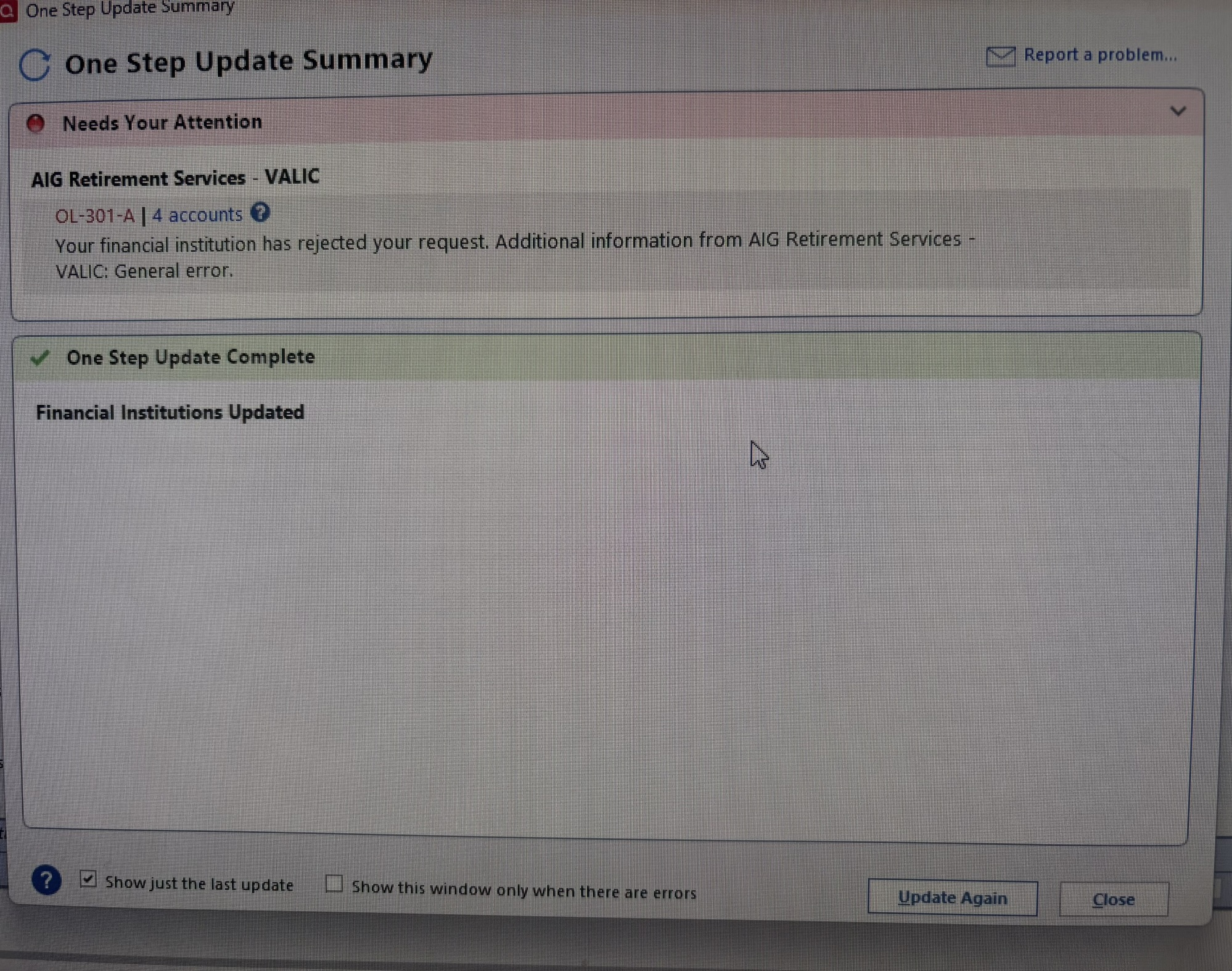
AIG/Valic ongoing download issues
I have posted a previous discussion on this issue which has been occuring on and off since January. That post in now closed, but I have been having ongoing issues since then with downloading into Quicken. I have submitted multiple reports, deactivated and reactivated and continue to get error messages, occassionally my accounts will update, but the problem happens frequently. When will this be fixed? It's been 6 months now.
Comments
-
Hello @lorabmcphail,
Thank you for reaching out and sharing that you're still experiencing issues. I’m sorry to hear this has been ongoing for so long!
To help us better understand what’s happening and assist you more effectively, could you please provide the exact error message you’re receiving? If possible, a screenshot of the error would also be helpful. Please refer to this Community FAQ for instructions on how to attach a screenshot. Alternatively, you can also drag and drop screenshots to your response if you are not given the option to add attachments.
Additionally, please answer the following questions:
- Where is your Quicken data file stored? Is it saved locally on your computer’s C: Drive, or is it on a cloud-based or external location such as OneDrive, Dropbox, or a USB drive?
- Are you using a VPN while attempting to update your accounts? If so, does turning it off make any difference?
- Do you have antivirus or security software that could be interfering with Quicken? If so, have you tried temporarily disabling it to see if the issue persists?
- When this issue first began, has it been consistent or intermittent since then?
- Were there any system or software changes (updates, new installations, etc.) around the time the issue started?
Once we have more information, we’ll be better equipped to investigate further and work toward a resolution.
Looking forward to your response!
-Quicken Anja
Make sure to sign up for the email digest to see a round up of your top posts.0 -
Saved to Cloud
No VPN
Have been using same security software for over 2 years
This issue has been ongoing since January, occassionally it will update, but rarely
No changes other than regular software updates.
I report the problem every day to Quicken that I get OL-301-A
0 -
When I try to add account, I get a General Error Message stating Quicken is having trouble connecting to AIG
0 -
Hello @lorabmcphail,
Thanks for providing more information.
The OL-301 error occurs when there is an issue connecting to the financial institution while using Direct Connect. The error is typically caused by an issue on the bank's servers that Quicken uses to download transactions. You can find more information regarding an OL-301 error message in this Support Article.
As per the FAQ: You will need to contact your financial institution for assistance. Quicken does not have access to the financial institution's servers to be able to correct the problem. This may require you to request to speak with an online services specialist who handles transaction download issues at the financial institution. If your financial institution states it can't assist, an escalation with them may be necessary.
I apologize that we could not be of more assistance! Please let us know how it goes!
-Quicken Jasmine
Make sure to sign up for the email digest to see a round-up of your top posts.
0
Categories
- All Categories
- 56 Product Ideas
- 36 Announcements
- 225 Alerts, Online Banking & Known Product Issues
- 22 Product Alerts
- 703 Welcome to the Community!
- 671 Before you Buy
- 1.2K Product Ideas
- 53.7K Quicken Classic for Windows
- 16.3K Quicken Classic for Mac
- 1K Quicken Mobile
- 812 Quicken on the Web
- 111 Quicken LifeHub