Update caused data corruption
When I logged on to Quicken yesterday, I did the standard requested update. I found my data files were completely messed up. Transactions were missing, accounts that were balanced at the end of last month are totally out of whack.
I tried restoring from a backup and spent the morning updating, then two of the accounts went haywire again.
Anyone have an idea what’s going on or what I can do about it?
Answers
-
Hello @rfrd00,
Thank you for taking the time to bring this issue to our attention!
To better assist you, could you please provide the following details:
- Where is your Quicken data file stored?
Is it on your local hard drive (C: Drive) or a cloud-based/external drive (e.g., OneDrive, Dropbox, USB, etc.)? - Aside from restoring a backup, have you tried any other troubleshooting steps? If so, could you let us know what you've already attempted?
Check back and let us know!
-Quicken Anja
Make sure to sign up for the email digest to see a round up of your top posts.0 - Where is your Quicken data file stored?
-
@Quicken Anja If you don't mind, I have some other troubleshooting steps to try that might help.
@rfrd00 - these troubleshooting steps may not apply to your situation, but they might be worth a try, otherwise please continue working with Quicken Anja to resolve your issue.
Do you have SYNC turned ON, and use Mobile & Web? If it is ON and you don't use Mobile or Web, then turn SYNC to OFF.
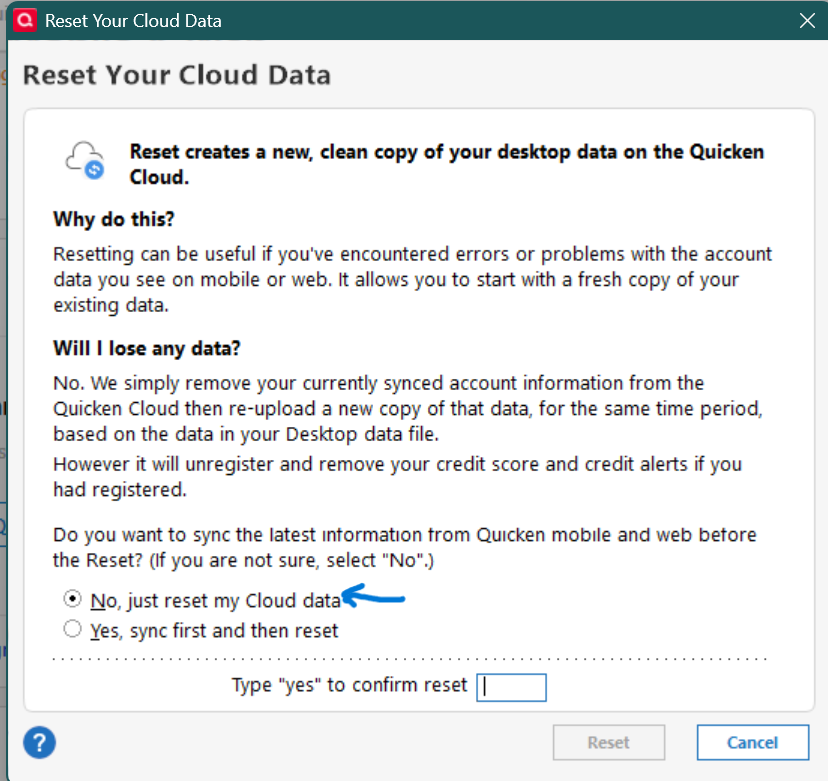
If it is ON and you use Mobile or Web, try resetting the cloud data -
(Always be sure to make a backup of your data file before doing any troubleshooting.)
Before you reset make a backup of your Quicken Data File and make sure the data file is updated and doesn't have the the missing data issue.
Then reset the cloud data file, following the instructions in the attached Quicken Support help documentation.
Make sure to select the first option (No) when asked to sync to the latest version -1 -
My datafile is located on the C Drive. I save backups in 2 different locations, also on the C drive.
I restored a backup from an earlier date and tried resurrecting data, but when I switch to a different account the account I was working on gets all wacky again.
It really feels like there is some sort of bug in my software.
0 -
It's probably not a systemic Quicken bug as others, including myself, are not experiencing the issue. But, know that all Quicken data files are stored on the "C Drive". However, if you didn't change anything, it's probably located in a Onedrive hot folder. What's the full path to your data file?
0 -
This content has been removed.
Categories
- All Categories
- 137 Product Ideas
- 35 Announcements
- 215 Alerts, Online Banking & Known Product Issues
- 21 Product Alerts
- 691 Welcome to the Community!
- 663 Before you Buy
- 1.2K Product Ideas
- 53.2K Quicken Classic for Windows
- 16.2K Quicken Classic for Mac
- 1K Quicken Mobile
- 808 Quicken on the Web
- 109 Quicken LifeHub