Tax Planning

djmsaxon
djmsaxon Quicken Windows Subscription Member

I've used Quicken for over 15 years. My tax planning "wages" do not include my scheduled paychecks (Scheduled Bills and Deposits are grayed out) even though I used the paycheck wizard to set them up. Instead, it only uses "Estimate Based on YTD Average", which is incorrect. Also, my Social Security "Other" income is set up to include income, Medicare payment and tax withheld. Quicken keeps changing this entry - the income and Medicare payment amounts are reversed so that my social security income is understated. I have to go in each time I review the planner and manually correct those entries.

One of the main reasons I use Quicken is so that I can project tax owed. This just started within the last couple of months.

Is there a fix in the works for this?

Tagged:

Comments

  • Jim_Harman
    Jim_Harman Quicken Windows Subscription SuperUser ✭✭✭✭✭
    edited July 17

    There is a new issue in R63.21 with the Tax Planner not correctly recording income set up via the Paycheck Wizard. Please see this discussion. Is this what you are seeing, or has this been going on for several months or more?

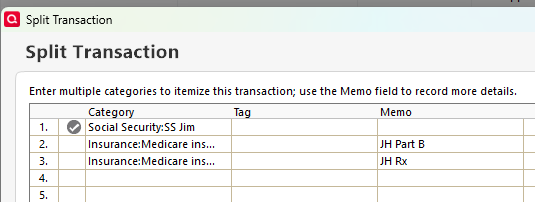
    For the Social Security income, The Tax Planner uses the Tax line items that are assigned to the Categories you use for the SS income and withholding. Quicken does not include built-in Categories for SS income. You must create them and add the correct Tax line items. The split Deposit transaction should look something like this

    image.png

    with the withholding entered as negative numbers.

    The Category List entry or my SS income looks like this

    image.png

    Also I have found that sometimes the Tax Planner settings for Scheduled Bills and Deposits get changed without warning to Estimate based on YTD Daily average or No projected amount. I'm not sure what triggers this; it may be related to Quicken software updates.

    QWin Premier subscription
This discussion has been closed.