AmEx Savings transactions still dated one day after the actual transaction, prevent reconciliation

seadan
seadan Quicken Windows Subscription Member ✭✭✭

This is a follow-up to

Page Not Found - Quicken

@Quicken Kristina Any updates on the escalated ticket? Do you have a ticket # I can use to check status with support? This issue is still ongoing. The workaround works, but it would be great if this issue were properly resolved.


Comments

  • Quicken Kristina
    Quicken Kristina Quicken Windows Subscription Moderator mod
    edited July 25

    Thank you for the follow-up,

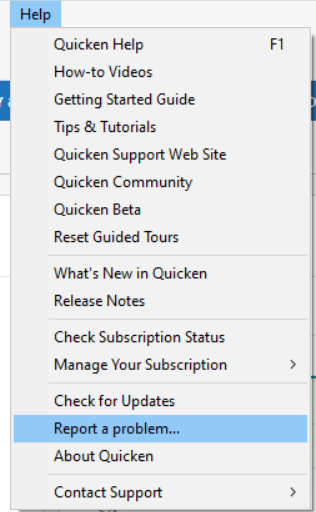
    Our teams are still working on the issue. They did ask that you please navigate to Help>Report a Problem and send an updated problem report with logs attached.

    Report a Problem QWin.png

    Please let me know once the updated problem report is sent, so I can forward it to our teams.

    Thank you!

    (CTP-13890)

    Quicken Kristina

    Make sure to sign up for the email digest to see a round up of your top posts.

  • seadan
    seadan Quicken Windows Subscription Member ✭✭✭

    I've completed this and uploaded the logs.

  • Quicken Kristina
    Quicken Kristina Quicken Windows Subscription Moderator mod

    Thank you for letting me know,

    I forwarded the logs to the team working on the issue.

    Thank you!

    Quicken Kristina

    Make sure to sign up for the email digest to see a round up of your top posts.

  • UKR
    UKR Quicken Windows Subscription SuperUser ✭✭✭✭✭

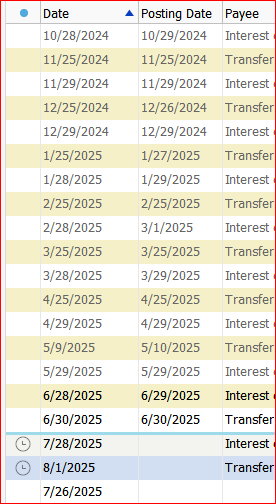
    For this discussion let's assume the interest transaction is dated on the 28th, with a Posting Date of the 29th.

    The way I see it is, the bank is posting the Interest paid transaction to the next day so that interest calculation for the transaction begins on the next day. If it were to begin today, on the day the transaction was processed in the computer, you would be paid too much interest, for one day.
    Think of it as "a one day hold on the deposit", similar to your checking account's check deposits.

    Until this can be changed by AmEx or Quicken, I would try to set the Reconcile End Date to the 29th, not the 28th.

  • [Deleted User]
    edited July 26

    [Deleted by CaliQkn - comment not related to issue]

  • UKR
    UKR Quicken Windows Subscription SuperUser ✭✭✭✭✭

    Maybe this helps show the situation:

    image.png

    The Interest transactions always show with a Date = 28th
    and a Posting Date = 29th (or 3/1 in February) … unless I changed the transaction's date to the 29th so I can reconcile without the interest transaction missing during Reconcile.

    It's really unusual for these interest transactions to be recorded on one day and posted effective the next, on a day after the statement end date.
    None of my other bank accounts appear to be doing that.
    And that's why AmEx savings accounts cause a problem in Reconcile.

    Right now I can change the transaction date to the 29th and reconcile OK, or I can leave it unchanged and reconcile next month, when it appears. Or I can leave the transaction as downloaded, set Reconcile End Date to the 29th and reconcile.

    Either way, it's unusual for a bank to include the transaction in the statement's ending balance, as if the money's available already on the 28th, but download a Posting Date of the next day, the 29th, and cause Quicken Reconcile to trip over it.

    IMHO, the Downloaded Posting Date should be set equal to the transaction date, the 28th.

  • [Deleted User]
    edited July 26

    @seadan @UKR -

    My apologies, I didn't realize there was a link to a prior thread and the issue was with the post date for interest income.

    I think I have documented proof that this is a bug that may be on the Quicken side.

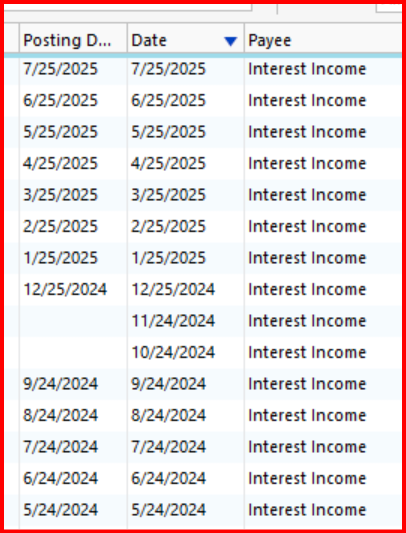
    For my account the interest post date is the 24th of each month. I went back and looked at the post dates and it looks like starting with December 2024, the post dates changed to the 25th of each month.

    image.png

    The other strange thing is for 10/24/2024 and 11/24/2024 I cannot put in or edit the system generated Post Date. I think it's because they were manually entered.

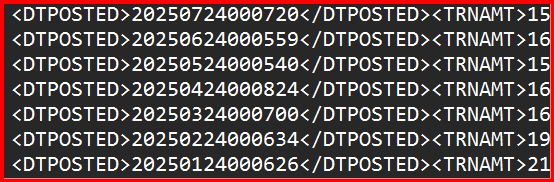
    I have also confirmed that the Quicken QFX file and the CSV file from the American Express website both have the correct posting dates of the 24th of each month.

    7/24/2025

    Interest Payment

    6/24/2025

    Interest Payment

    5/24/2025

    Interest Payment

    4/24/2025

    Interest Payment

    3/24/2025

    Interest Payment

    2/24/2025

    Interest Payment

    1/24/2025

    Interest Payment

    image.png

    The transaction history from my American Express account also show the correct date of the 24th for the interest payments. Therefore the QFX, CSV, and transaction history from American Express all show the correct interest post date of the 24th. But, Quicken shows the 25th starting in December 2024.

    I cannot find the 25th anywhere except the Post Date in Quicken starting in December 2024. This seems like a Quicken issue.

  • [Deleted User]
    edited July 26

    @seadan I hope that Quicken will look at the documentation I provided to help determine the issue that caused a change in the post date. If needed I can submit the documentation if I am asked to do so.

  • Quicken Kristina
    Quicken Kristina Quicken Windows Subscription Moderator mod

    Hello @CaliQkn,

    Thank you for letting us know that you also see the issue, and for providing the additional information about what shows up in your Quicken file vs what shows on American Express' website and files downloaded from their website.

    If you update the problem account(s) by importing the QFX file, does it show the correct date, or does it still show the 25th?

    If you're willing, please navigate to Help>Report a Problem and send a problem report with log files attached to assist with the investigation.

    Thank you!

    Quicken Kristina

    Make sure to sign up for the email digest to see a round up of your top posts.

  • [Deleted User]
    edited July 27

    @Quicken Kristina you are welcome. I would be more than willing to do a "Report a Problem" and provide additional information to troubleshoot this issue.

    As for QFX files, they haven't worked for about two years now. I have reported this issue many times without any response, so I just gave up. When you try to import a QFX file for the AmEx HYS Account, you get this error -

    image.png

    The reason why is that the QFX file has several errors that need to be corrected.

    image.png

    The FID and the INTU.BID are incorrect. The FI, "18858" is no longer being used and was deleted from the FIDIR list over a year ago.

    Before that there were issues with the file header that prevented it from being loaded. I think it was error OL-221-A or OL-220-A. The header needed to be edited in Note Pad in order to work.

    Also the Online Balances in the file are incorrect. The Online Balance reported in the file is the beginning date instead of the ending date of the date range selected.

    So bottom line the QFX file is not usable and hasn't been for a while now. But that is another issue.

    How should I proceed with submitting this current issue? What type of files would be needed? All log files? Should I send the screen prints I included in my comments in this thread? Or should I just reference this thread?

  • [Deleted User]
    edited July 26

    Correction: QDF s/b QFX (I could not edit the original post) -

    "So bottom line the QFX file is not usable and hasn't been for a while now."

    Update: I was able to update the original post.

  • @Quicken Kristina feel free to use and submit the documentation I provided to troubleshoot the issue you are already working with @seadan.

    I have not heard back from you regarding the questions I had and I am not comfortable with submitting my log files to Quicken Support. I am not sure what pertinent information could be gained from me so doing so.

  • Quicken Kristina
    Quicken Kristina Quicken Windows Subscription Moderator mod

    Thank you for your replies @CaliQkn,

    Our teams prefer for you to send all logs, but if you're not comfortable doing that, the ones most likely to show the information they need are the QCS log and the OFX log. There is no need to send the images you already posted to this discussion. I already uploaded those to the ticket. There is no need to reference the thread in the problem report, but I do recommend including the ticket number: CTP-13890.

    The issue you mention with QFX files not being able to import is a separate issue. Since the QFX files are generated by American Express, and it is errors in the QFX files that prevent them from importing properly, I recommend contacting American Express directly about that problem. If they're unwilling to help with that issue, please let me know.

    I hope this helps!

    Quicken Kristina

    Make sure to sign up for the email digest to see a round up of your top posts.

  • [Deleted User]
    edited July 27

    Thanks @Quicken Kristina. I will go ahead and submit the "Report a problem" for this issue and include all logs. Thank you for attaching my screen prints to the issue documentation.

    Sorry for my hesitancy. I just am very cautious about handing over personal information. But I will do what I can to help get this issue resolved.

    In regard to the QFX file, I have contacted American Express in the past, and it went nowhere, but I will try again when I get a chance.

  • seadan
    seadan Quicken Windows Subscription Member ✭✭✭

    @CaliQkn Thanks for all your additional details, and glad to know it's not just me experiencing this (I kind of figured as much but good to have confirmation). It's definitely a bug that was introduced when the savings accounts transitioned to the new connection method. Most likely a time zone handling issue where Quicken is using a different timezone than Amex when parsing the date and that's causing it to move forward a day. I recall having a similar issue with Schwab in the past that Quicken finally addressed.

    Seems like this should be pretty easy for a developer to track down given the wealth of information on a repro, hopefully the priority will get raised so we don't have to wait another 6+ months for an update.

  • @seadan you are welcome. Hopefully they will find a solution for the issue, but it might take some time.

This discussion has been closed.