Fidelity mutual fund merger has me confused how to enter into QWin

Rocket J Squirrel
Rocket J Squirrel Quicken Windows Subscription SuperUser ✭✭✭✭✭
edited August 30 in Investing (Windows)

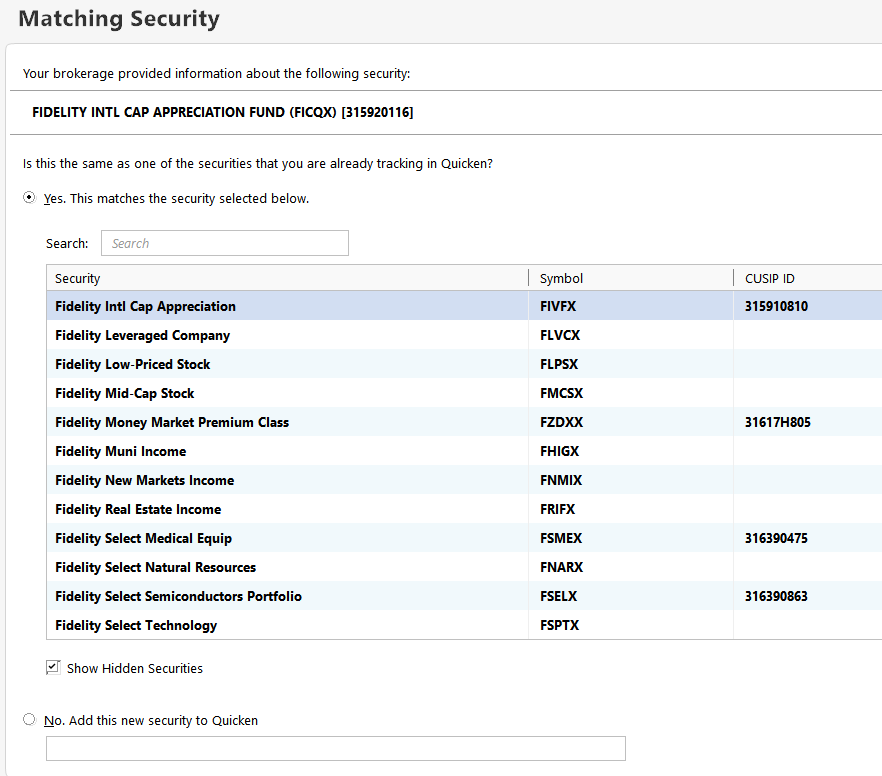
Fidelity Investments has removed FIVFX and put its former assets into FICQX. Both mutual funds appear to be named FIDELITY INTL CAP APPRECIATION FUND. The transactions from the Fidelity site are shown below. I tried to do a Mutual Fund Conversion in QWin, but the resulting number of shares is wrong and I can't figure out the solution. What's the right way to handle this?


image.png

Quicken user since version 2 for DOS, as of 2025 using QWin Premier (US) on Win10 Pro & Win11 Pro on 2 PCs.

Answers

  • Rocket J Squirrel
    Rocket J Squirrel Quicken Windows Subscription SuperUser ✭✭✭✭✭

    Also, when I click the red flag next to the account name in the Account Bar, QWin reveals its own confusion.

    image.png

    Quicken user since version 2 for DOS, as of 2025 using QWin Premier (US) on Win10 Pro & Win11 Pro on 2 PCs.

  • q_lurker
    q_lurker Quicken Windows Subscription SuperUser ✭✭✭✭✭

    iPhone Stocks app (I think from Yahoo) identifies FIVQX as Fidelity Advisor International Value fund.

    I would first confirm with Fidelity. I would then create that security in Quicken after which the download should match up on security names and tickers.

    IIRC, the mutual fund conversion has problems if the initial fund is setup using Average Cost for the basis calculation. Is that your case?

  • Rocket J Squirrel
    Rocket J Squirrel Quicken Windows Subscription SuperUser ✭✭✭✭✭
    edited July 26

    iPhone Stocks app (I think from Yahoo) identifies FIVQX as Fidelity Advisor International Value fund.

    FIVQX is not involved here. The 2 symbols in question are FIVFX and FICQX. No average cost.

    The account is a trad IRA so the simplest thing to do would be a sell and a buy and not care about lots and costs.

    Quicken user since version 2 for DOS, as of 2025 using QWin Premier (US) on Win10 Pro & Win11 Pro on 2 PCs.

  • Chris_QPW
    Chris_QPW Quicken Windows Subscription Member ✭✭✭✭

    I'm sure others will give you much better answers, but I was curious of how of this works and figured I would try to find out what exactly this all does. Here is what I see.

    First observation. Quicken tracks securities by CUSIP and as such the name isn't "important" (side note importing securities in QIF is by security name, and by CUSIP with QFX), but can certainly get confusing when trying to pick the right one if there are more than one that have the same name. So, for your case the first thing I would do is rename the old security. In my test case I'm starting with a different security, so I don't have that problem.

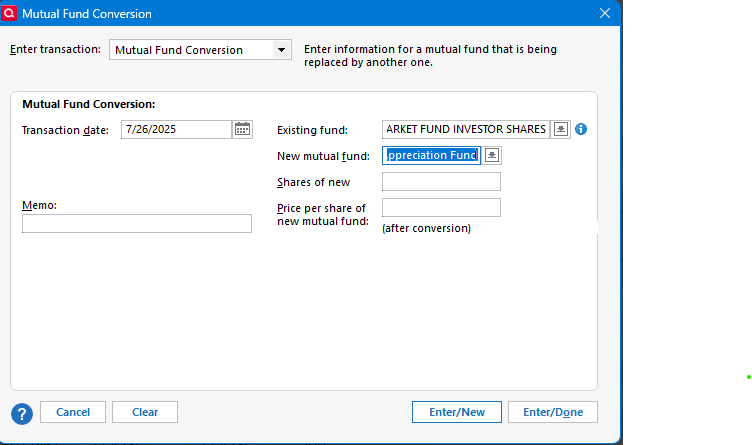
    The next question is exactly what does Quicken do with the Mutual Fund Conversion, and what are all the entries into the that dialog (side note, why is the text box for the new security smaller than the one for the existing one!).

    You enter the existing security and then for the new security you are going to have to create it in Quicken.

    image.png

    The first thing that jumps out at me is that the CUSIP isn't filled in. This is why later when you download transactions from Fidelity it asks you to match the security. You need to match to the new security you created.

    image.png

    The next is the number of new shares and the price per share (after conversion).

    Given that you got the wrong number of shares the assumption I would have to make something was entered wrong here.

    What I did for my example is use a Vanguard Treasury fund, which is a fixed $1 making it very easy for me to do the calculations. And I used the current price of FICQX (which you can't count on because you need the price it was when the conversion was done).

    My logic when this way. If I have a dollar value in the old security at the time of conversion, then I should end up with dollar in value of the new security. So, you figure old security number shares X price = conversion value. Then the new number of shares and the price in the conversion needs to be this exact same value, where the number of shares is the important number. Given if you know what the ending resulting number of shares are in FICQX then you can figure the price by total value/number of shares. In my case, I don't know the number of shares, but I know the total value and I know the price of FICQX, so I used those to get the number of shares.

    So, what does Quicken's Mutual Fund wizard actually do?

    It first removes all of the shares of the old security.

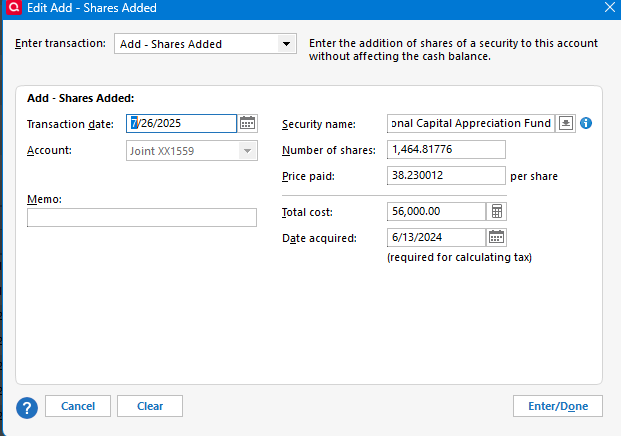
    And then it adds shares for every lot that you had for the old security. Note that its goal is to match the amount of the original by transaction, and it is going to use the price given to set the tax cost basis.

    Example:

    image.png

    I stated the price for FICQX is 38.23. The original purchase in this transaction was $56,000. Quicken used these to determine the number of shares that transaction would have had in the new security.

    Signature:
    This is my website (ImportQIF is free to use):

    http://www.quicknperlwiz.com/

  • Tom Young
    Tom Young Quicken Windows Subscription SuperUser ✭✭✭✭✭

    I asked Google "How many shares of Fidelity Advisor International Capital Appreciation Fund were received for each share of Fidelity International Capital Appreciation Fund tendered in the July 2025 merger" and it replied:

    "In the July 2025 merger, shareholders of Fidelity International Capital Appreciation Fund received one share of Fidelity Advisor International Capital Appreciation Fund for each share of Fidelity International Capital Appreciation Fund tendered, according to Fidelity. This indicates a 1:1 exchange ratio" (Clearly the Fidelity Advisor International Capital Appreciation Fund got renamed in the transaction.)

    I wouldn't be surprised if that's incorrect as typically different classes of the shares of of mutual funds do have slightly different prices. But if you know how many shares you tendered and how many shares you received it's easy enough to figure out the ratio, and I'd expect that the mutual fund conversion "wizard" would handle the conversion correctly.

  • q_lurker
    q_lurker Quicken Windows Subscription SuperUser ✭✭✭✭✭
    edited July 27

    Sorry for the mixup on the tickers.

    Fidelity has a Q&A about this (and other similar) mergers. That doc in part says:

    For Merger #3 (Fidelity International Capital Appreciation Fund into Fidelity Advisor International Capital Appreciation Fund): Pending shareholder approval, Fidelity will launch a new retail class of the acquiring fund. The new class will serve as a destination for the corresponding class and assets of the Retail fund. Going forward, there will be one fund with multiple share classes (retail, A, M, C, I, and Z) for this strategy. For example:

    Fund Name – Fidelity Advisor International Capital Appreciation Fund

    Class Legal Name – Fidelity International Capital Appreciation Fund

    • Even though the new retail class will be a class of the Advisor Fund (legal name: Fidelity Advisor International Capital Appreciation Fund), it will be called Fidelity International Capital Appreciation Fund.

    • This is consistent with retail classes of other Fidelity Advisor funds, such as: Fidelity Advisor Stock Selector Mid Cap Fund: Fidelity Stock Selector Mid Cap Fund; and Fidelity Advisor Value Strategies Fund: Fidelity Value Strategies Fund.

    Their choice to name that new class within the Advisor grouping as 'Fidelity International Capital Appreciation Fund' (same as the old FIVFX fund) is sort of easier on them but really confusing for the rest of us. It would have made more sense to assign the name as Fidelity Advisor International Capital Appreciation Fund Class X, Y, or B similar to the other classes in that group. Oh well.

    With this newer perspective I would:

    1. Backup the data file
    2. Rename the FIVFX security to Fidelity International Capital Appreciation Fund - Old. I would also uncheck the box for that security regarding being matched with an online security.
    3. Add a new security Fidelity International Capital Appreciation Fund - New with ticker FICQX.
    4. Do the Mutual Fund conversion. Fidelity indicates this is a 1:1 merger, so I would enter the 'New shares' field with the same number of shares as you had of FIVFX. That should be consistent with what Fidelity is showing you for your new FICQX holding. (Not clear what went wrong with your prior conversion.)
      1. The proper conversion should Remove all FIVFX shares (one transaction) and Add Shares of FICQX for each lot removed. The share quantities should match with the prior FIVFX acquisitions whether by purchase or reinvestment.
      2. For the price, I see FICQX at 38.23/share on June 25. You should see that same price for both FIVFX and FICQX on that date in your Quicken records.
    5. Go to the applicable transaction list in Quicken. Actions Gear. Reconcile Shares. You should get the same Matching Securities you earlier cited. Therein you can make sure the security reported by Fidelity is properly matched to the 'new' one you created in Quicken.

    EDIT: I no longer think this is a 1:1 merger. Enter the actual shares of FICQX received, not the number of shares of FIVFX you had. This therefore means each Add Shares transaction will be a different share quantity than the FIVFX counterpart as well. The closing price for FIVFX on 6/25 appears to be 29.7277 suggesting you would have received 77.76% as many FICQX shares as you had of FIVFX.

  • q_lurker
    q_lurker Quicken Windows Subscription SuperUser ✭✭✭✭✭

    @Chris_QPW

    … Quicken tracks securities by CUSIP and as such the name isn't "important" (side note importing securities in QIF is by security name, and by CUSIP with QFX), but can certainly get confusing when trying to pick the right one if there are more than one that have the same name.

    I'd offer the opinion that Quicken tracks securities 4-ways — by name, ticker, CUSIP, and an internal pointer.

    Name is where it starts. This is born out by Quicken's absolute rule that each security name must be unique. Name is how the program primarily communicates with the user. And yes, the QIF import is name-based. Name need not match anything in the real world.

    Ticker is needed for downloading quotes and related information from Quicken's third-party data supplier. But not all securities have tickers and having a ticker for every security is not a program requirement. While Quicken mildly attempts to not have the same ticker apply to multiple Quicken securities, it can be done. I attempt to have a ticker assigned to every security even though that requires extra creativity on my part.

    CUSIP as an identifier came along with the OFX protocol, I believe, such that yes, QFX communications are by CUSIP. That includes communications via Direct Connect, Web Connect (QFX download and import), and EWC methodologies. Brokerages send trades, holdings, and prices with a CUSIP identifier and a CUSIP-name association, but that associated name need not match the name used within a user's Quicken file.

    Finally, there seems to be an internal 'pointer' identifier. In particular, what I have seen from the QPH File Processor program is that the QPH file has prices for all securities whether they have a ticker or not. If a ticker does exist, the prices are associated to that ticker. But the prices still exist in the file for non-tickered securities; one just can't tell what specific security the price applies to. Obviously Quicken can tell, so there must be (I conclude) some internal pointer reference not specifically name, ticker, or CUSIP related. Seems very reasonable given how limited by database expertise is. (It is this QPH File Processor experience that leads me to want a ticker for every security. That way I can extract the prices from the QPH file by security if needed. Haven't needed to in quite a few years now.)

  • Tom Young
    Tom Young Quicken Windows Subscription SuperUser ✭✭✭✭✭
    edited July 27

    @q_lurker

    That may be the AI talking with reference that 1:1 ratio. I saw the same things you posted published by Fidelity but couldn't find the proxy associated with the merger, and just sorta figured prices between the regular fund and the "Advisor" fund could be different., resulting in a ratio not 1:1. This notion was likely influenced by Squirrel's statement that the shares came out wrong, but maybe the problem came from the name change.

  • q_lurker
    q_lurker Quicken Windows Subscription SuperUser ✭✭✭✭✭

    Thanks, @Tom Young . I have changed my position and edited my earlier post to not reflect a 1:1 ratio.

  • Chris_QPW
    Chris_QPW Quicken Windows Subscription Member ✭✭✭✭

    My statement about QIF and QFX where just that, how the securities are identified during the import. Quicken clearly has other matching add associated data like the symbol that it uses internally. Your description @q_lurker is that much more complete picture of the system. BTW if one is ever going to do an export in QIF it is a very good idea to make up a symbol for securities that don't have one, because the QIF export will not export prices for any security that doesn't have one.

    Signature:
    This is my website (ImportQIF is free to use):

    http://www.quicknperlwiz.com/

This discussion has been closed.