Unable to add Bealls, Belk or Lowes credit accounts to my Classic for Mac Account

I've been able to load all major credit accounts (Amex, MC, Visa) but receive error to re-enter my credentials with the above consumer accounts. I've confirmed that credentials are correct. I've tried for two days. Any advise/suggestions?
Comments
-

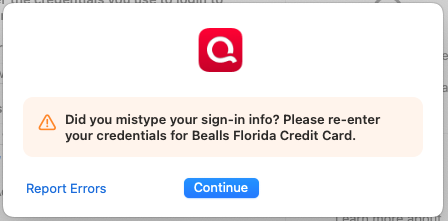
Error message I receive when trying to upload credit account
0 -
Hello @jpearce669,
Thank you for letting us know you're seeing this issue. To start troubleshooting, please backup your Quicken file, then follow these steps from this article on FDP-103 (invalid credentials) errors:
First, deactivate all the accounts with the affected financial institution
- Open Quicken.
- Go to the Accounts menu and choose Hide and Show Accounts.
- Uncheck any accounts with this specific financial institution (FI) that are hidden in Lists.
- When complete, click on the account name for your account(s) in the Accounts toolbar in Quicken.
- Click the Settings icon in the bottom right corner of the screen.
- Select the Downloads tab.
- Click on Disconnect Account.
- Click Done. Do this on each account with this FI.
- Quit Quicken.
Second, delete Quicken passwords from the Keychain
Users on Sequoia MacOs
- Open Finder and type "Keychain Access" into the Search bar in the upper-right corner.
- Double-click the Keychain Access icon in the Finder window.
- If prompted to open the Passwords app, select Open Keychain Access instead.
- On the left panel in the Keychain app, set the Keychains to login and the Category to Passwords.
- Find and delete any entries that show Quicken or Quicken Connect and this FI name.
- Quit the Passwords app and open Quicken.
Users on older MacOS versions
- Open Finder and go to Applications > Utilities > Keychain Access app.
- On the left panel in the Keychain app, set the Keychains to Login and the Category to Passwords.
- Find and delete any entries that show Quicken or Quicken Connect and this FI name.
- Quit the Keychain Access app and open Quicken.
Third, re-add the accounts
- Go to Accounts > Add Account.
- Type the name of the financial institution and make the appropriate selection.
- Enter your login credentials and click Continue.
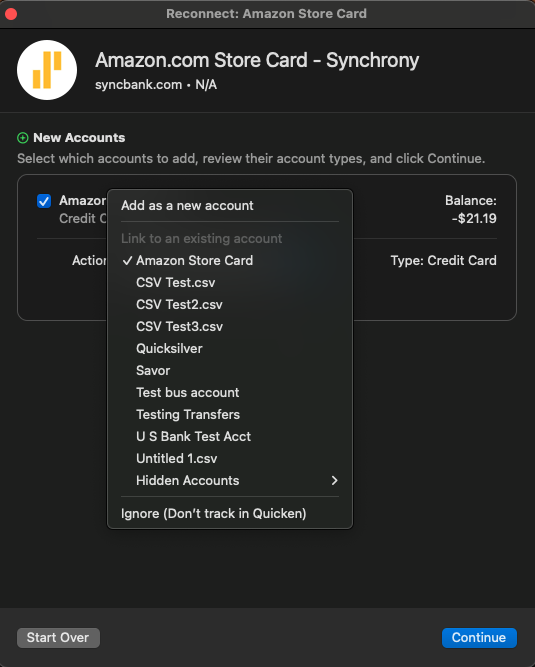
- When Quicken has returned all accounts discovered for this FI, very carefully LINK each of the found accounts to the appropriate account you already have setup in Quicken.
Please let me know how it goes!
Quicken Kristina
Make sure to sign up for the email digest to see a round up of your top posts.
0 -
Hi Kristina, thank you for the above steps. This did not work. When I followed the first step to deactivate any accounts with the affected institution, there were none to deactivate. Next I followed step two to Find and delete any entries that show
QuickenorQuicken Connectand this FI name. There were not files matching this criteria. I did then try to reenter the Bealls account (step three) and I received the same message as before. Any other suggestions? I do appreciate your help. Thank you! Just to mention, this is the second account I'm setting up. Once this is completed I need to set up a business account.- My personal account
- My Mother's account
- My business account
I don't know if this makes a difference. I did try to add my mother's credit cards to my account and received the same error message. I have not yet created the business account.
Thanks again!
0 -
Thank you for your reply,
To clarify, does your mother's account use separate login credentials? Is it connected to your personal account in any way (such as being an authorized user account)?
When you said you tried to add her credit cards in your account, did you mean that you maintain separate Quicken files for your finances and your mother's finances, and you see the same FDP-103 error in both files?
In the title of your post, you list 3 financial institutions: Bealls, Belk, and Lowes.
Which financial institution is your mother's account with? What is the exact URL (web address) you use when logging into the account directly through the financial institution website?
Which financial institution is your business account with? What is the exact URL (web address) you use when logging into the account directly through the financial institution website?
Are all of these accounts that you're trying to add to your Quicken files, or were they previously connected/working in Quicken?
Thank you!
Quicken Kristina
Make sure to sign up for the email digest to see a round up of your top posts.
0 -
I think I understand what you're asking. They are separate files under the same login credentials. I have not yet created the business account. Is this the correct way to keep the finances separate? My mother is elderly and I am her caretaker. I handle her finances but want to create separate budgets and keep the accounts separate. All three of the financial institutions: Bealls, Belk and Lowes are my mother's credit cards and I would want them under her account.
There is a payments page on each site. I've just recently set up the fine for my Mother. I have not previously connected these financial institutions to any Quicken account
I hope this is the information you need. Thank you very much for your assistance.
0 -
Thank you for your reply,
Yes, using separate Quicken files is the proper way to keep the finances separate. It ensures that her accounts won't impact your net worth and vice versa. If you use the companion apps, it also allows you to share access just to her file, so that she can view her account information through Quicken on the Web or Quicken Mobile (once everything is connected).
When you are trying to connect these cards in the file you set up for your mother, are you making sure to use the primary cardholder's login? Did you confirm that these accounts are set up for online access through their respective financial institution websites?
When you login to the credit card accounts, if you click to view the account, are you redirected to another website? If so, what URL are you sent to?
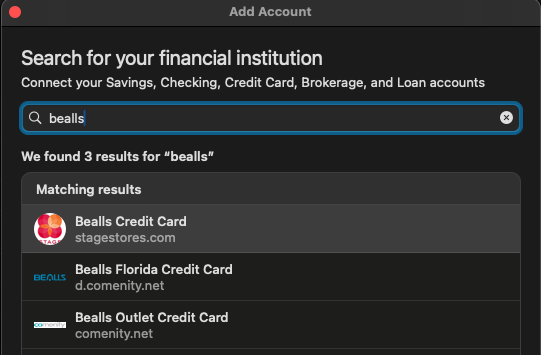
I can see there are a few different options for Bealls. I can see the connection option you've been trying to use is the Bealls Florida Credit Card. Have you attempted either of the other connection options?
Thank you!
Quicken Kristina
Make sure to sign up for the email digest to see a round up of your top posts.
0 -
Hi, I believe I tried all three of the Bealls options. I will check again and also see if there are different URLs when I log into the accounts. I have been using the primary user's account when I log in. Thanks again for your help. I'll let you know if this doesn't work.
0 -
I was able to link the Bealls account. The actual site was d.comenity.net. That is now set up. Still having issues with Belk and Lowe's. Both are through Synchrony.com. They user the same user id and password and when you log into the site it presents both accounts. When I try to link the account there are various Synchrony options, but Synchrony.com isn't one of them. Is there a way to bypass the selection page and enter Synchrony.com manually? I'm not sure how I could list the account separately if both present on the same website?
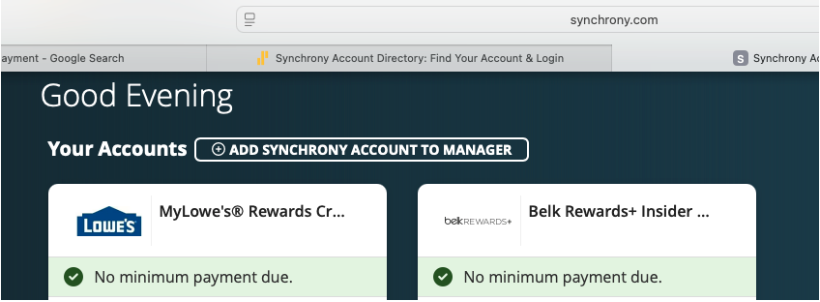
[Edited - Removed partial account numbers]
0 -
Thank you for your reply,
I'm glad to hear the Bealls account is now set up.
Synchrony has a lot of connection options because they service a lot of different credit cards. When you are logged in on Synchrony's website and you click to view one of your accounts, do you get redirected to another site? If so, what is the URL (web address) you get redirected to? That may help track down which connection option you should be using.
Thank you!
Quicken Kristina
Make sure to sign up for the email digest to see a round up of your top posts.
0 -
the only other URL it takes me to is Lowes.syf.com. I've tried that multiple times and it won't connect. I believe I reported that before. I am able to make a payment on the Synchrony site. I'd like to remove the Belk account from Synchrony. Apparently all of their stores have closed and they only have an online presence which my mother will not use. I can't seem to find a way to do that. At this point it's only the Lowe's card I need to add. Thanks!
1 -
Thank you for your reply,
Based on the URL you provided, the connection option that should work is Lowe's Consumer Credit Card. However, I can see that you receive the FDP-103 error when attempting to connect using that option.
If you have already verified that you are using the correct password, and that the account is not locked on the financial institution side, then I recommend you contact Quicken Support directly for further assistance, since they have access to tools we can't access on the Community and they are able to escalate the issue as needed. The Quicken Support phone number can be found through this link here. Phone support is available from 5:00 am PT to 5:00 pm PT, Monday through Friday.
I apologize that I could not be of more assistance!
Quicken Kristina
Make sure to sign up for the email digest to see a round up of your top posts.
0
