How do you make good use of the Check # field?
I'd like to learn from the experts various use cases of the Check # field (NUM) in the banking register. In my view this is yet one more way to sort or tag transactions (DEP, TXFR, etc.). In reality I have never used it and for sure over 99% of my transactions are blank. I have not written an actual check in over 15 years. What are some good examples or creative ways to make the best use of this field, if any? FOMO. Thank you.

- Q Win Deluxe user since 2010, US Subscription
- I don't use Cloud Sync, Mobile & Web, Bill Pay/Mgr
Best Answers
-
Hello @BK,
Thanks for reaching out!
You're absolutely right that the Check # (NUM) field can be another way to tag or sort transactions—but whether or not it’s useful really comes down to personal preference and how you personally manage your finances.
Here are a few ways we've seen users make good use of it:
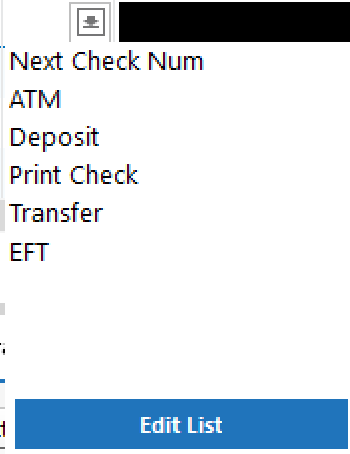
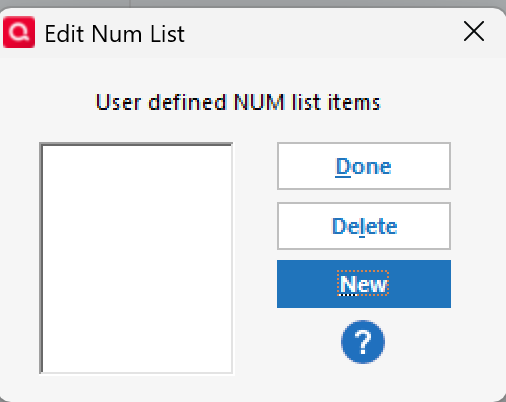
- Tagging transaction types: Instead of check numbers, you can use labels like DEP (Deposit), ATM, ACH, which are already saved within the field by default and can be selected by clicking the downward arrow in the field. Or you can create custom ones like RENT, REIMB, or MANUAL to quickly spot what a transaction is. To create custom labels, click the downward arrow, and select Edit List. On the following screen, you will see the option for New.
- Flagging reimbursements: Label outgoing funds you expect to be reimbursed (e.g., REIMB) so they’re easier to track.
- Business bookkeeping: For small business or freelance use, it can track invoice numbers or client-specific payment references.
That said, since you’re not writing physical checks anymore, it’s totally fine to leave the field blank if it doesn’t fit your workflow. It’s just one of those features you can tailor to your liking if you find a purpose for it.
These are just some ideas to get the ball rolling—I'll leave this discussion open in case others want to chime in and share how they personally use the field in their own setups.
Hope this helps!
-Quicken Anja
Make sure to sign up for the email digest to see a round up of your top posts.1 -
@BK I use the Check #, and Reference # number fields to remind me what payments are pending and how they are paid. Most of my bills and payments are made made via automatic payment. For those transactions, I use "APAY" so I know there isn't anything I need to do except wait for the payment to post. For automatic deposits, I use "DDEP" and that tells me that I don't need to do anything except wait for the deposit to post.
If I leave the Check #, or Ref # field blank, that means there is something I need to do, such as a manual transfer, write a check, or make a manual payment or deposit. I also use the Flag field to make it more apparent that there is something I need to do.
After the manual payment or deposit has been scheduled, I remove the flag and enter a code in the Check # or Ref # field to designate that it's been paid and how it's been paid. Then that tells me that there is nothing more I need to do except wait for the transaction to post.
These are some of the custom codes I use:
- ECHECK
- ZELLE
- DEBIT
- BILLPAY
Bottom line, I use the Check #, Reference #, NUM fields to keep track of how a transaction is paid, and if it's been paid or not, and if there is anything I need to do for the transaction.
3 -
I'm old and old-fashioned. With the exception of real paper check numbers (yes, I do write paper checks every month) and the occasional DEP or TXFR, I don't use the Check# field for anything else. I see no need for other codes. That means, I can keep it simple.
2
Answers
-
Hello @BK,
Thanks for reaching out!
You're absolutely right that the Check # (NUM) field can be another way to tag or sort transactions—but whether or not it’s useful really comes down to personal preference and how you personally manage your finances.
Here are a few ways we've seen users make good use of it:
- Tagging transaction types: Instead of check numbers, you can use labels like DEP (Deposit), ATM, ACH, which are already saved within the field by default and can be selected by clicking the downward arrow in the field. Or you can create custom ones like RENT, REIMB, or MANUAL to quickly spot what a transaction is. To create custom labels, click the downward arrow, and select Edit List. On the following screen, you will see the option for New.
- Flagging reimbursements: Label outgoing funds you expect to be reimbursed (e.g., REIMB) so they’re easier to track.
- Business bookkeeping: For small business or freelance use, it can track invoice numbers or client-specific payment references.
That said, since you’re not writing physical checks anymore, it’s totally fine to leave the field blank if it doesn’t fit your workflow. It’s just one of those features you can tailor to your liking if you find a purpose for it.
These are just some ideas to get the ball rolling—I'll leave this discussion open in case others want to chime in and share how they personally use the field in their own setups.
Hope this helps!
-Quicken Anja
Make sure to sign up for the email digest to see a round up of your top posts.1 -
@BK I use the Check #, and Reference # number fields to remind me what payments are pending and how they are paid. Most of my bills and payments are made made via automatic payment. For those transactions, I use "APAY" so I know there isn't anything I need to do except wait for the payment to post. For automatic deposits, I use "DDEP" and that tells me that I don't need to do anything except wait for the deposit to post.
If I leave the Check #, or Ref # field blank, that means there is something I need to do, such as a manual transfer, write a check, or make a manual payment or deposit. I also use the Flag field to make it more apparent that there is something I need to do.
After the manual payment or deposit has been scheduled, I remove the flag and enter a code in the Check # or Ref # field to designate that it's been paid and how it's been paid. Then that tells me that there is nothing more I need to do except wait for the transaction to post.
These are some of the custom codes I use:
- ECHECK
- ZELLE
- DEBIT
- BILLPAY
Bottom line, I use the Check #, Reference #, NUM fields to keep track of how a transaction is paid, and if it's been paid or not, and if there is anything I need to do for the transaction.
3 -
I'm old and old-fashioned. With the exception of real paper check numbers (yes, I do write paper checks every month) and the occasional DEP or TXFR, I don't use the Check# field for anything else. I see no need for other codes. That means, I can keep it simple.
2 -
Thank you all for your great responses. Cheers.
- Q Win Deluxe user since 2010, US Subscription
- I don't use Cloud Sync, Mobile & Web, Bill Pay/Mgr1 -
You're welcome, @BK —glad we could all offer some helpful perspectives. Great question to get the ideas flowing!
-Quicken Anja
Make sure to sign up for the email digest to see a round up of your top posts.0
Categories
- All Categories
- 56 Product Ideas
- 36 Announcements
- 225 Alerts, Online Banking & Known Product Issues
- 22 Product Alerts
- 703 Welcome to the Community!
- 671 Before you Buy
- 1.2K Product Ideas
- 53.7K Quicken Classic for Windows
- 16.3K Quicken Classic for Mac
- 1K Quicken Mobile
- 812 Quicken on the Web
- 111 Quicken LifeHub