Account Type Option Flaw with Manual vs Synced

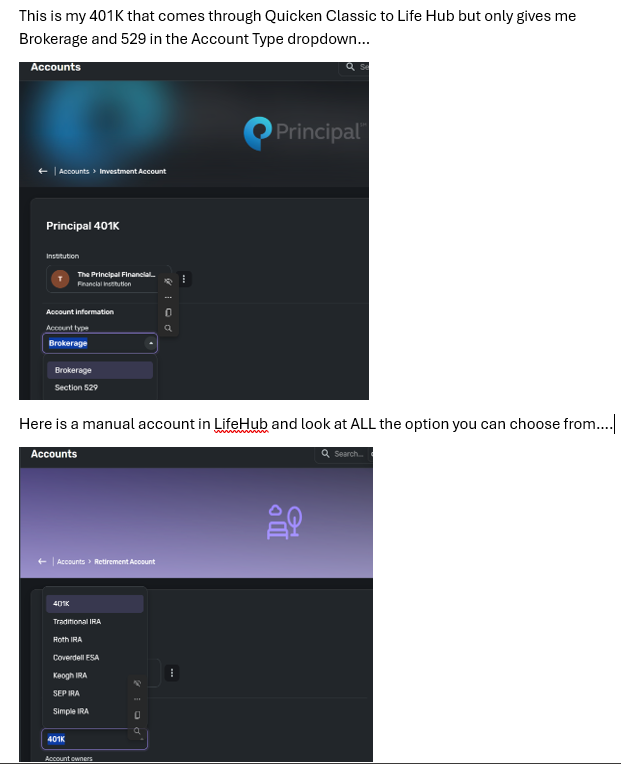
Hello Team. I am using LifeHub and have my Quicken Classic Windows (R63.21) synced to Lifehub feeding my accounts. I found a problem with LifeHub. If you create a manual Retirement account in LifeHub you get the option to select a variety of types (401K, Roth, IRA etc..). However, my 401K in Quick Classic syncs over to LifeHub as just an "Investment". I don't get to recategorize it to a Retirement. This is a flaw. Please see my image
Answers
-
Hello @sauerbrunndaa,
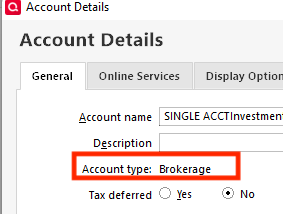
Thank you for letting us know you're seeing this issue. To clarify, what account type does the investment show as in your Quicken file?
To view the account type, in your Quicken file, navigate to Tools>Account List, click the Edit button next to the account, then look on the General tab in the Account Details window.
I look forward to your response!
Quicken Kristina
Make sure to sign up for the email digest to see a round up of your top posts.
0 -
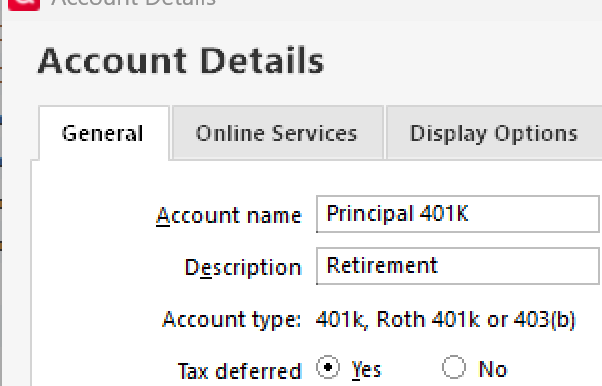
It is an offline account in Quicken that i set up as a Retirement 401k. That is why I'm so confused why it feeds to lifehub as just a broker.
 0
0 -
Thank you for your reply,
For further assistance with this issue, I recommend contacting our Quicken LifeHub support directly, as they have access to tools we can't access on the Community and they're able to escalate the issue as needed. You can find Support's contact information at this link:
Once on that page, click the message icon in the lower right, and it will bring up a window showing how to contact Support.

Thank you!
Quicken Kristina
Make sure to sign up for the email digest to see a round up of your top posts.
0

Categories
- All Categories
- 16 Product Ideas
- 34 Announcements
- 248 Alerts, Online Banking & Known Product Issues
- 20 Product Alerts
- 517 Welcome to the Community!
- 682 Before you Buy
- 1.5K Product Ideas
- 55.6K Quicken Classic for Windows
- 16.8K Quicken Classic for Mac
- 1K Quicken Mobile
- 834 Quicken on the Web
- 126 Quicken LifeHub