New Merrill Connection - Matching Security Query and Repeat Downloads
Comments
-
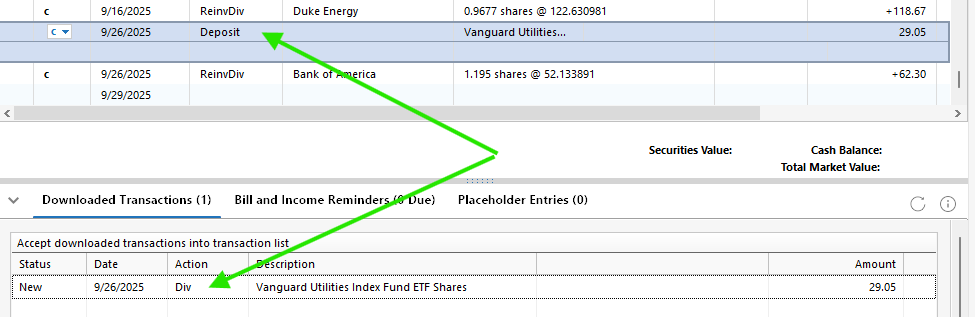
This example in another account shows the recent accepted Deposit transaction and the downloaded Credit transaction that has not been accepted or deleted yet. (Note-some info has been redacted for privacy)
 0
0 -
@MangoMan Yes, this is the pending transactions issue I described at the end of this thread:
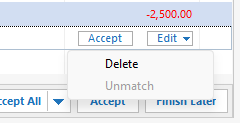
The deposit and credit transactions (recognizable by their limited detail) are the pending transactions and I have to delete them manually until Quicken fixes this. The Dividend Reinvestment transaction will be downloaded as soon as it all the pending transactions have been posted as final on the website, usually for me this is the next business day.
I am no longer seeing any mismatched security issues either.
1 -
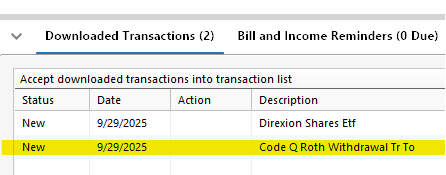
Also, something I have see several times now - I did a distribution today from an IRA account and Merrill downloads it as a NULL description transaction. It treats it as New in the Downloaded Transactions list and doesn't even recognize a matching transaction already entered in the Register.
 0
0 -
Have you checked the website to see if it's another pending transaction?
1 -
Thank you for your replies @MangoMan & @lcdetwiler,
The pending transactions issue is a known issue that our teams are already working to resolve (CTP-14623).
There was an issue with fees downloading with "Null" in the description, but that issue should be resolved. When did you first notice this issue with distributions showing "Null" in the description? As @lcdetwiler asked, is this happening when they're showing pending on the financial institution's website?
Thank you!
Quicken Kristina
Make sure to sign up for the email digest to see a round up of your top posts.
0 -
It is listed as Pending. I don't recall when distributions started showing up as Null. I don't do them that frequently, but this one just occurred yesterday. I have noticed that transactions I make download the same day.
0 -
@Quicken Kristina - In this morning's download it showed up again, properly described this time, but still marked as "New". Still doesn't match up with the transaction already entered in the Register and no option to do so.
 0
0 -
Thank you for your reply,
Since it is not recognizing the match, does that mean the information in the Security field is not identical for the transaction in the register and the newly downloaded transaction (for more information on how Quicken determines a match for investment transactions, click here)? If that is what is happening, are you able to edit the transaction so that Quicken recognizes the match? For more information, see this article:
Did the "Null" transaction vanish, or is this now a duplicate, one that says "Null" and the other with the correct information?
Thank you!
Quicken Kristina
Make sure to sign up for the email digest to see a round up of your top posts.
0 -
@Quicken Kristina - I already deleted the downloaded Null transaction earlier. It is a Distribution from an IRA account (cash transaction) and there is NO security involved. I did not receive a second, correct transaction as a download (thus far).
0 -
@Quicken Kristina @Quicken Alyssa Quick Update - I won't be tracking this issue or providing further updates. I am going to change all of my DRIP elections to Cash Only until this problem is fixed for good. I spent almost an hour this morning trying to resolve all of the transactions that downloaded in the "tiny, little Downloaded Transactions" window (which can't be resized). Being the end of the month there are always a lot of DRIP transactions we receive. I also don't like posting this information online and also making sure any private info has been redacted - time consuming and potentially harmful.
I hope your team is able to resolve this quickly. Next time do more testing with the financial institutions when rolling these "features" out and listen to customer complaints better. We have been posting about the DRIP 3 transaction issue (Debit, Credit, Purchase) for a long, long time. You are the ones who have access to the Internet technical support staff at these financial institutions to inquiry about these things unlike us end-users.
0


