Again, I have not been able to download from Quicken since 08-04-2025. I have seen others with this issue, but Quicken says it is corrected. I am here to say it is not. I have sent a report to Quicken!
Hi @Jako,
Thank you for sharing your experience and keeping us informed about what you’re facing. I’ve reviewed your account and don’t see any internal errors or ongoing issues on our side. Your last connection attempt appears as though it was successful.
Could you please provide more details about what exactly is happening when you try to download transactions? For example, are you seeing any error codes, does Quicken appear to connect but no new transactions download, or is something else occurring? The more specifics you can share, the better we can assist.
Looking forward to your reply so we can help get this sorted out for you.
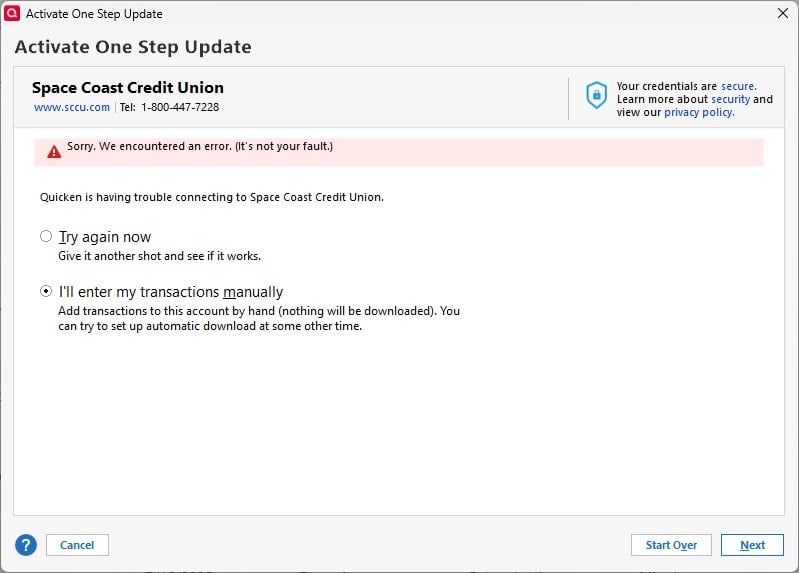
Today, again I attempted to download from my bank. The error message states unable to connect to you bank, not your fault!
and yes, you are correct it did download the other day after making contact with Quicken.
@Jako Thanks for the update. When checking your account, we now see an internal FDP-106 (CC-506) error. This type of error typically occurs if the account name was changed at your bank’s website or if your bank created a new account for you (for example, in cases of lost or stolen accounts).
To address this, Quicken recommends a deactivate and reactivate process for your account. This ensures that Quicken properly links to the correct account and downloads the latest transactions. You can find the full instructions in this support article.
If the issue persists after following these steps, contacting Quicken Support directly is recommended for further assistance so our agents can collect and review your log files, and escalate furher if needed.
Thank you!
thank you
You're welcome!
@Quicken Anja I was getting those CC-506 errors for the past two or three days. Decided today to deactivate my four accounts and try reactivating. I'm getting the dreaded "Sorry. We encountered an error. (It's not your fault). Nothing has changed in any of my accounts (none created out of thin air, no account name changes. I didn't touch a thing). Of course, I tried again. Same error.
Hello @jtemplin,
We appreciate you chiming in!
When reviewing you're account, I can see that internally you are receiving the same FDP-106 (CC-506) error. Can you please confirm if you followed the instructions in the support article I provided previously exactly as written without skipping any steps? Skipping steps can sometimes change the results.
If you did complete all the steps exactly, then—as noted at the bottom of the article—we advise that you please contact Quicken Support direclty so an agent can review your log files and escalate if necessary.
FYI: I followed all the instructions. Only 2 of my 4 accounts were presented to me for linking. I cancelled the reactivation. I will try again over the next few days. If I get nowhere, I'll have to resort to talking to support.
As a last test before I let this go for a few days: I created a virgin .qdf file. I tried to add my SCCU accounts; I selected SCCU in the Add Accounts wizard, and when it went off to find my accounts, it also came back with the dreaded "Sorry. We encountered an error. (It's not your fault)."
A vent: SCCU, after a terrible initial EWC+ transition, had been running fine for a good number of weeks. Now, problems again, and I suspect not of my doing. I may resort to manual entry (these are low transaction accounts). I'm reaching the point where this isn't worth the trouble.
@jtemplin thanks for following up and confirming!
If you still wish to wait a few days—that's fine. However, since you’re continuing to get the “Sorry. We encountered an error. (It’s not your fault)” message even in a new test file, and if it continues, we would still recommend contacting Quicken Support directly for this error as well.
This type of error is referenced in our support article for CC-501 / “It’s not your fault” messages, which explains that it usually occurs when Quicken is blocked from connecting to your account on the bank’s end.
You can find the full article here for reference.
Okay, this is getting old! Again, issues with Space Coast Credit and Quicken. Now it tells me when attempting a download. My log in information is incorrect, it is correct and you Quicken are incorrect. Come on people get it right. We all pay for this service, which as of late has been poor.
@Jako @jtemplin one thing you can try if you haven't done so already is connect with Web Connect and download transactions from your SCCU online account for a period of time, and then try upgrading the connection to EWC+. Sometimes all it takes is to establish a WC connection to get things started.
The other thing to try before you attempt to reconnect is to check for 3rd party authorizations for Quicken in your SCCU online account. If they exist, delete or disconnect them. There might be some old authorizations that are preventing a new connection.
Otherwise, I agree with @Quicken Anja to contact Quicken Support, if you haven't done so already.
@CaliQkn Thanks for the suggestions, but I was unwilling to try that since it's obvious (to me anyway) that this is a back-end problem, most likely with SCCU. I decided to be patient and wait, trying once a day to reconnect my accounts.
Sure enough, this morning, all four of my accounts were presented and correctly linked. Transactions from the past several days of the "outage" were also downloaded correctly.
It looks like whatever was broken on the back end is now fixed. Fingers crossed it stays that way at least for a while.
@Quicken Anja