Suncoast CU
I have spent hours on the phone with Quicken support. I have just reviewed some of the posts about downloads. With Direct Connect and Suncoast Credit Union. Yesterday represinitive did a great job everything up and running perfectly. Today logged on to update and error on connectivity with SCU. Did they tell anyone they changed their account numbering system? True. Document in my hand. I suspect this could be causing some of these problems.
Comments
-
Hello @sepright,
Thank you for sharing your experience! To help troubleshoot, what error message/code did you see when you tried to update the Suncoast Credit Union account? Did this happen in the new file you created with the support representative on the 7th, or in your original file? Is this the same issue you were encountering when you contacted Support on the 6th and 7th, or is this a new issue?
You mentioned that Suncoast Credit Union recently changed their account numbering system. Did the document they sent you say when the change took effect? When you spoke with their support, were they able to confirm whether they'd already updated their servers that communicate with Quicken?
I look forward to your response!
Quicken Kristina
Make sure to sign up for the email digest to see a round up of your top posts.
0 -
This is in reference to case number: 11893486. Problem reoccured 8.11.25🙄
0 -
Thank you for your reply,
Thank you for providing the case number. When I reviewed that case, it appears the problem account was already disconnected before you reached out. When did you first notice the issue? Were there any error messages/codes? How did the account get deactivated?
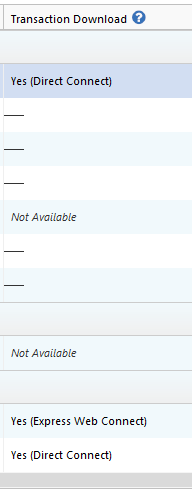
You mentioned the problem reoccured today. What error message/code are you seeing? If there is no error, then what behavior are you observing? Is the problem account disconnected, or does Quicken still think it's connected? You can verify if the account is connected by navigating to Tools>Account List and checking the Transaction Download column next to the problem account. If it is connected, it will say Yes (Direct Connect) in that column.
Thank you!
Quicken Kristina
Make sure to sign up for the email digest to see a round up of your top posts.
0 -
I have the same problem. The error I see is that the password is not correct but I can enter the password in the SCU and have no issues. Nothing has changes and this used to work until about 10 days ago.
0 -
frustrating
0 -
Thank you for sharing your experiences.
If you haven’t already, please provide the information @Quicken Kristina asked earlier in the thread. Specifically about:
- The exact error message or code you’re seeing.
- Providing a screenshot would also be helpful. If needed, please refer to this Community FAQ for instructions on how to attach a screenshot. Alternatively, you can also drag and drop screenshots to your response if you are not given the option to add attachments. - Any relevant details from SCU regarding account numbering changes
Providing these details will allow us to better understand the problem and offer more targeted assistance.
We appreciate your help in supplying this information!
-Quicken Anja
Make sure to sign up for the email digest to see a round up of your top posts.0 - The exact error message or code you’re seeing.
-
I have relevent info from SCU. Please provide a secure link to send this to you.
Started about 2 weeks ago
This did not duplicate with your rep.
It is the same issue
No answwer on if they contacted Quicken
0 -
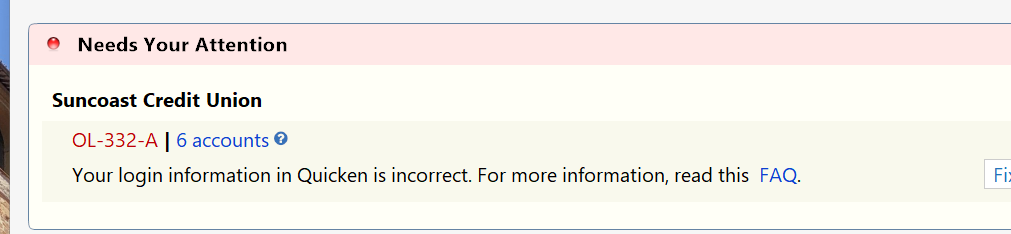
@sepright Thanks for sending the screenshot!
Since you are receiving an OL-332 error, please review this support article for more info and troubleshooting. This error normally occurs when an incorrect Customer ID or password is entered in Quicken. The article notes that many financial institutions may lock your account if incorrect credentials are entered multiple times, so it’s important to carefully verify your Customer ID and password before troubleshooting further.
I’ll also send you a direct message so you can share any additional details you wish to share privately if needed. Please navigate to the inbox in the top right-hand corner of the Community page and check your inbox.
Thank you!
-Quicken Anja
Make sure to sign up for the email digest to see a round up of your top posts.0 -
I contacted SCU and they claimed no changes to account numbers. I can log in to SCU website with no issues. I have deactivated downloading in Quicken, exit Quicken, restarted and added all 4 accounts and still get this error. Started happening intermittently around 8/5 but has not worked at all since 8/13.
0 -
I have the same issue. For about 1-2 months now the SCU, based in Tampa, Florida, downloads do not work. If I log into the SCU account on the website and then try quicken download (after reconnecting the accounts) it may / may not work. Please help on this. Had the same problem with Edward Jones and that seems to be resolved now.
0 -
I have same problem. Website works correctly, but quicken gets OL-332-A.
0 -
Hello @Squad47,
Thank you for letting us know you're seeing this issue. If you haven't already done so, I recommend you start troubleshooting by following the steps in this article on OL-332 errors:
Please let me know how it goes!
Quicken Kristina
Make sure to sign up for the email digest to see a round up of your top posts.
0
Categories
- All Categories
- 56 Product Ideas
- 36 Announcements
- 225 Alerts, Online Banking & Known Product Issues
- 22 Product Alerts
- 702 Welcome to the Community!
- 671 Before you Buy
- 1.2K Product Ideas
- 53.7K Quicken Classic for Windows
- 16.3K Quicken Classic for Mac
- 1K Quicken Mobile
- 812 Quicken on the Web
- 111 Quicken LifeHub