Unable to delete cloud accounts.

I am unable to delete unused cloud accounts in Quicken for Mac. When using app.quicken.com, it reports that I have six accounts. I would like to delete the five unused accounts. When I open Quicken for Mac to delete them, I only see one account listed - the one I want to keep. The five accounts I want to delete were probably created with the Windows version of Quicken, which I no longer use. How can I delete the five unused accounts?
Answers
-
Hello @gwz_jr,
Thanks for reaching out with this question.
You can delete the Cloud Accounts that you don't want on the Quicken for Mac desktop application using the instructions below. It is recommended to save a backup (just in case).
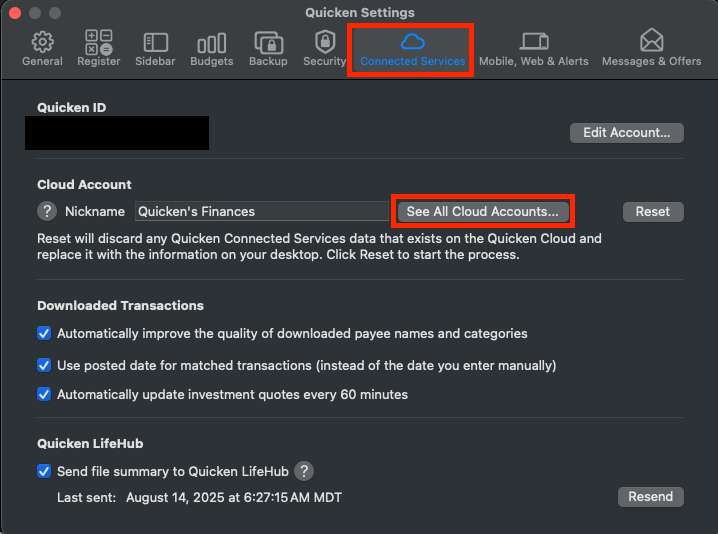
- Navigate to Quicken > Preferences
- Click "Connected Services"
- See All Cloud Accounts
- Click on the account you want to delete
- Click the Minus (-) button in the bottom left corner.
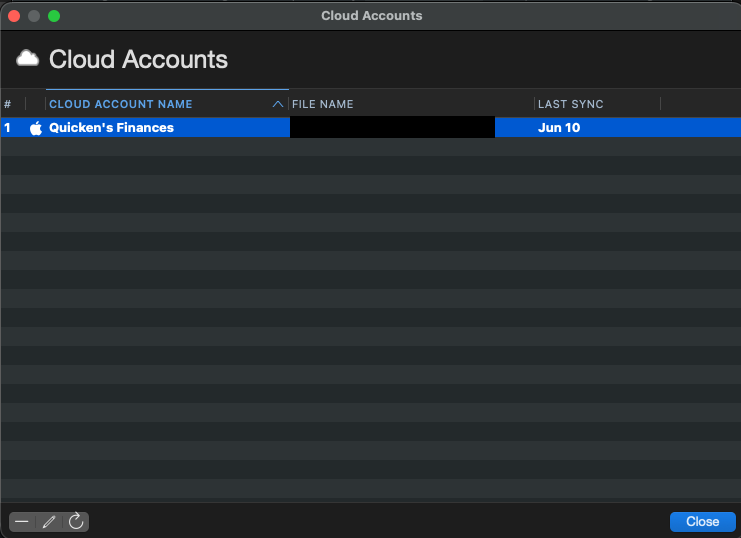
- Delete Cloud Account.
I hope this helps!
-Quicken Jasmine
Make sure to sign up for the email digest to see a round-up of your top posts.
0
