Reauthorizing account

MWB
MWB Quicken Windows Subscription Member ✭✭✭

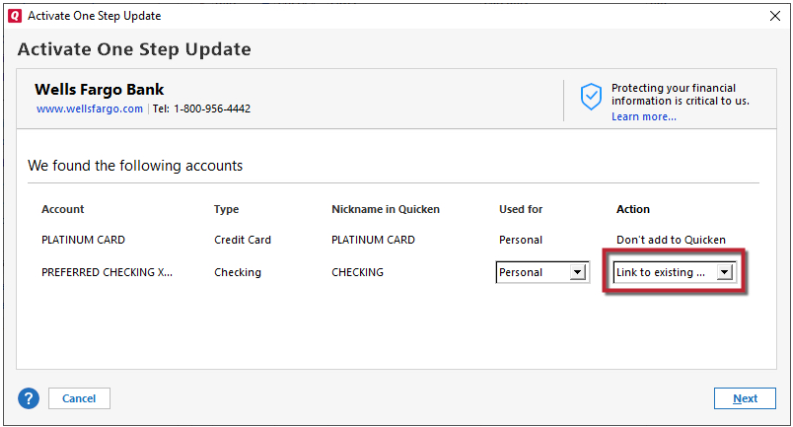
When I try to re-authorize an account, everything works as one would expect, until I get to a list of accounts on my Brokerage (Merrill). I choose the accounts that I want to sync but then there is an option to "not add to quicken", "add to quicken" and "link to existing".

Clearly I want to link to existing but under the drop down for that item it lists a whole host of my filed accounts EXCEPT the accounts that I want to link to are absent, in spite of them being there in my account list.

If I choose "add to quicken" instead, and give it the same name as the account already there, it doesn't work because the account already exists. How do I solve the "link to" issue?

[Edited - Readability]

Answers

  • Quicken Kristina
    Quicken Kristina Quicken Windows Subscription Moderator mod

    Hello @MWB,

    Thank you for sharing your experience. Based on your description of the issue, it sounds like you are unable to reauthorize the accounts because Quicken already thinks they're connected. That would explain why they do not show up on the list to link to, but already exist when you try to manually add them with the same name.

    To resolve this issue, first backup your Quicken file. Then, deactivate the accounts you need to reauthorize. Once you have deactivated those accounts, navigate to Tools>Add Account and follow the prompts. Once you get to the Add/Link screen, you should now have the option to link to the appropriate nickname in Quicken.

    Link to Existing.png

    Please let me know how it goes!

    Quicken Kristina

    Make sure to sign up for the email digest to see a round up of your top posts.

This discussion has been closed.