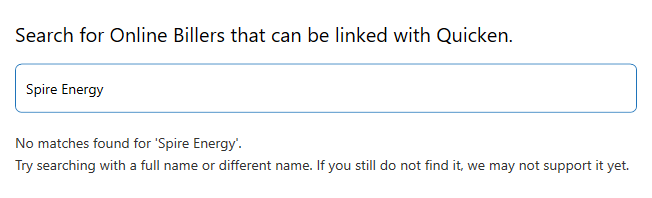
With the new update to Quicken Classic dated 08-18-25, the online biller Spire Energy is no long listed. I used to get the bill each month. It now is not available
Hello @Phil H.,
Thanks for bringing this issue to our attention!
A few things that might help figure out the situation with Spire Energy:
Looking forward to your response.
Prior to new update the connection was there as online
Spire Energy does not appear in the biller list but shows up on the bills page with "Reconnect"
The pdf copy of the Spire bill appeared each month on the bill page and when it was to be paid
I have not removed and added since the it does not show up on the add-bill list
BTW Jasmine, you will notice that the amount of $18.64 and date was in the system since it was downloaded from Spire before the update. I think y'all just haven't got it in the new biller you use.
Thanks for providing more information.
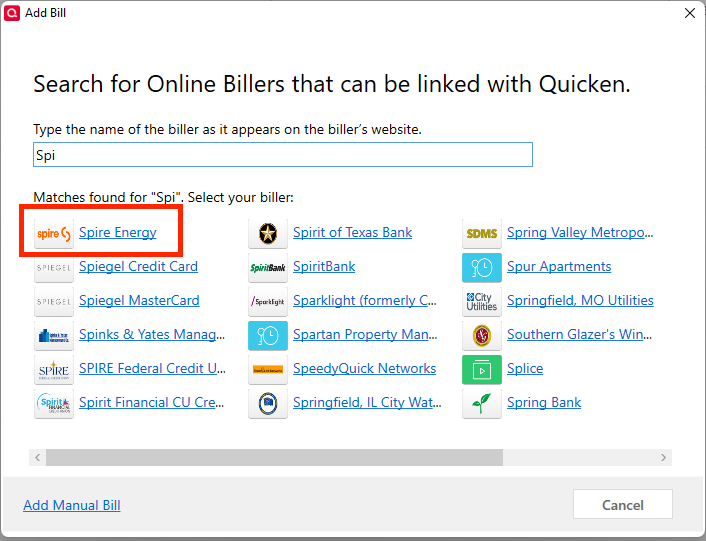
From my Quicken for Windows file, I am able to search and find "Spire Energy". Would you mind sharing a screenshot of what you see?
If needed, please refer to this Community FAQ for instructions on how to attach a screenshot. Alternatively, you can also drag and drop screenshots to your response if you are not given the option to add attachments. Please remember to redact any personal information as needed.
Looking forward to your response!
Jasmin: This is what I see
Jasmine: I tried some of the other names that your screen shot shows and I can't find those also. I wonder if I should do a full update?
Thanks for responding!
Could you please clarify what you mean by "do a full update"?
I appreciate it!
Mondo Update
Mondo Patch
Or I can uninstall and re-install.
Oh, I see. Yes, please update to the latest version of Quicken.
Let me know how it goes!
Jasmine:
6. I have a laptop with QKN installed and the version of R63.21 Build 27.1.63.21.
7. I installed the new update to bring it to R64.19 Build 27.1.64.19 and I have the same issue again. The biller needed to be reconnected but it can't find the bill. The Issue is in R64.19. My plan is to wait until it's fixed and refuse any updates.
Thanks for you help
BTW, you need to check your software version, if it's at R63.21 then I can see why you can see "Spire" as a biller
Jasmine. Did you verify that you were running R64.19 software when you displayed the "Spire Energy" link??
Thanks for reaching out!
I went ahead and checked on my end while running R64.19, and I can confirm that Spire Energy does not appear in the online biller search list. This means, unfortunately, that it is no longer supported by our new Online Biller service provider.
At this time, the best workaround would be to set up the bill as a manual bill reminder so you can continue to track due dates and amounts.
I know this isn’t the answer you were hoping for, but I appreciate you bringing this to our attention and helping us confirm the change.
Thank you!
Do y'all have a list of who is on the biller list??
At this time, we don’t have a published list of supported billers available. We’ve already submitted a request to have a customer-facing list created, but we don’t have an ETA yet on when that might be available.
In the meantime, I’m sharing this article on Improved eBills because it explains some of the recent and upcoming changes with our new bill provider. It also provides context on why some billers may not appear when you try to connect them, which may help explain what you’re seeing.
Hope this helps!