R64.19 Scheduled Transaction Issues, Balance changed, Windows Classic Premier

AWinTx
AWinTx Member ✭✭✭

One of the worst updates ever…. My main checking account which I balance just about every 2 weeks is now off, my recurring paycheck (biweekly) showed up as a charge with some random value, recurring transactions showed up in another account, running validation fixed 7 scheduled transactions, and it disconnected my Chase accounts so I had to re-add them. Spent an hour trying to fix miscellaneous issues.

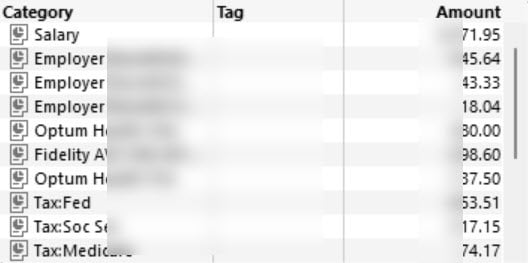
First issue I noticed was my paycheck was missing. I created a new income reminder from my last paycheck. Once I viewed my register, I noticed (after seeing my checking account in a downward progression of negative balances) that my recurring transaction was there but was listed as a payment.

Quicken-PayIssue2.jpg Quicken-PayIssue1.jpg

Then when I was looking at a Savings account that I infrequently access but was accessing earlier, two recurring transactions appeared in that account so I had to edit the transactions and change the Payor to my Checking account.

I'll wait a day or two to see if my balance adjusts after a day or two of no transactions. Otherwise, I'll have to perform some forensic accounting over 13 years of transactions.

In addition, I had to reset my Chase accounts. Some accounts didn't show up as being able to be linked or added but the transactions did appear to come through on those accounts.

Comments

  • pspottswood
    pspottswood Quicken Windows Subscription Member ✭✭

    I too am having problems with my paycheck reminder. It has all the right amounts in the reminder and the right net amount for the total, but in the reminder list, it shows a net amount of zero. I found that if I edit the paycheck and not make any changes to it, but save it, then the amount goes back to the net amount that it should be. However, as soon as a due a one-step update, the net amount goes back to zero.

  • AWinTx
    AWinTx Member ✭✭✭

    @pspottswood - That is a good call out because I performed my daily one-step update and hadn't noticed that. It reset to the incorrect amount in my original post. I think what is happening is that with the new update it is taking a recurring Paycheck and converting it to a Split transaction and then other display rules kick in.

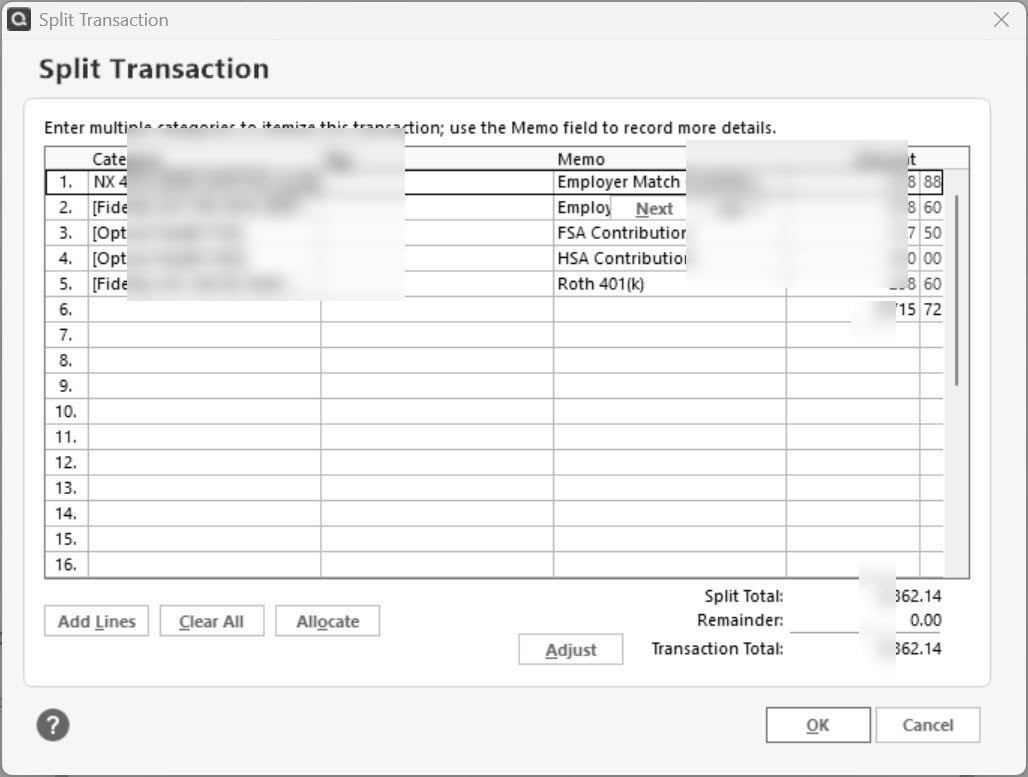
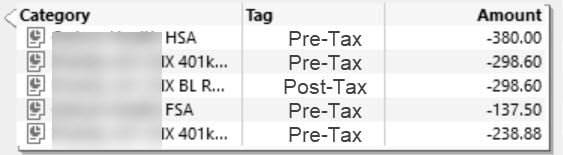
    If I right-click on the amount in the register, this is what appears in the "Split". Not there is no scroll bar:

    Quicken-PayIssue3.jpg

    This is only a subset of deductions. It is missing a couple of Pre and Post-Tax deductions so I can't speak to why it only chose 5 out of 11 deductions except maybe 5 is some arbitrary limit.

    If I take a look at a posted "Paycheck", I see everything looking as it should with both my salary and all the deductions (tax, pre/post):

    Quicken-PayIssue4.jpg

    So, if you look at my original post, the first picture shows my future paycheck as a "Split" and not as a "Paycheck". I bet that is happening to you, too. Thanks for confirming it is messed up!

  • Quicken Anja
    Quicken Anja Moderator mod
    edited August 22

    Hello All,

    Thank you for taking the time to report this issue!

    We will be forwarding this issue to the proper channels to have this further investigated. However, we request that you please navigate to Help > Report a problem within your Quicken program and submit a problem report with log files and screenshots attached in order to contribute to the investigation.

    image.png

    It would also aid the investigation to include a sanitized file when submitting the problem report. A sanitized file is a data file that removes personally identifiable information so you can comfortably share this file with the Quicken team.

    While you will not receive a response through this submission, these reports will help our teams in further investigating the issue.

    We apologize for any inconvenience in the meantime! Thank you.
    (CBT-775/CTP-14228)

    -Quicken Anja
    Make sure to sign up for the email digest to see a round up of your top posts.

  • pspottswood
    pspottswood Quicken Windows Subscription Member ✭✭

    https://community.quicken.com/profile/AWinTx I have not entered the Paycheck reminder yet, so it is not in the register yet. It is in the "Bills and Reminders" that I am seeing the issue with the Net Amount changing to zero. Also, although it changes to zero there, in the Upcoming Bills and Income info that shows up under the Projected Balances, it does show an amount, but it is much less than the Net Amount that it should be.

  • AWinTx
    AWinTx Member ✭✭✭

    Adding what shows up in my register for my next paycheck. @Quicken Anja - I have opened a support ticket. If you can escalate, that would be a great help. Future Income reminders are converted to Split transactions, not Paychecks.

    Quicken-PayIssue5.jpg
  • Quicken Anja
    Quicken Anja Moderator mod
    edited August 22

    @AWinTx Thanks for sharing the details. It's been escalated (CBT-775/CTP-14228), and the ticket is open and active. At this time, there isn’t an ETA for a fix, but the team is aware and tracking the issue.

    We’re still in need of log files to assist with the investigation, so please submit them via Help > Report a Problem. Let me know once this is done so I can attach them to the ticket.

    Thank you for your patience in the meantime!

    -Quicken Anja
    Make sure to sign up for the email digest to see a round up of your top posts.

  • AWinTx
    AWinTx Member ✭✭✭

    @Quicken Anja - I have uploaded the files and shared a link to the sanitized file through Quicken. I have also called the support line to open a ticket on my end so that the files and this thread are coordinated. The ticket ends with the digits 157. I spent about 45 minutes sharing my screen so the first level could take screenshots although I had to point her here to show the original problem.

    I now can't seem to reproduce the issue of the paycheck showing as a payment when adding reminders but they show in the reminder transaction as a split transaction and no longer as a Income. Updating the account no longer changes the amounts either.

    I decided to then go to the Paycheck Wizard and create a new Reminder. I then updated the account and it didn't change the total like originally reported. I then entered the transaction and did an update on the account and there were no changes. The transaction shows up in 2 weeks as a split transaction in the register but when I edit it, it is the Paycheck wizard format, which is how it should be.

    I have to say the Quicken support process is painful - If you Report a Problem through the application no ticket is created. One is for the most part anonymous and one can only hope someone reviews it. If I call up and report a problem, first level has no access to the ticket (CBT-775) you referenced so there can't be a way to link my support ticket to what is reported here in the Community. In addition, in some cases, they need to just open the ticket and let the caller move on instead of going through 45 minutes of holds and explanations. Then add to that the fact that I opened a ticket and I don't even get an email confirmation so did I really open a ticket?

  • Quicken Anja
    Quicken Anja Moderator mod
    edited August 22

    Hi @AWinTx,

    Thank you for taking the time to provide such a detailed update and for going through both the Report a Problem process and a call with Support. I know it can be frustrating when it feels like you’re repeating yourself and not seeing the connection between the different channels. I want to reassure you that the information you’ve provided here is extremely valuable.

    I see that your reference number for your Support contact is T11914157. While it’s true that frontline agents don’t have direct access to our internal escalation (CBT-775/CTP-14228), that ticket goes straight to our Product and Development team for review. What I can do is link your support ticket (T11914157) in the CBT-775/CTP-14228 ticket, so that everything stays coordinated. I’m also attaching the files you submitted via Report a Problem to the CBT ticket so they’re reviewed alongside the rest of the case details.

    You’re always welcome to check back in here and tag any of us moderators for a ticket status update. In the meantime, your input has helped make sure this issue is being looked at with the right context, so thank you again for the time and effort you’ve put in.

    Hope this helps!

    -Quicken Anja
    Make sure to sign up for the email digest to see a round up of your top posts.

  • AWinTx
    AWinTx Member ✭✭✭

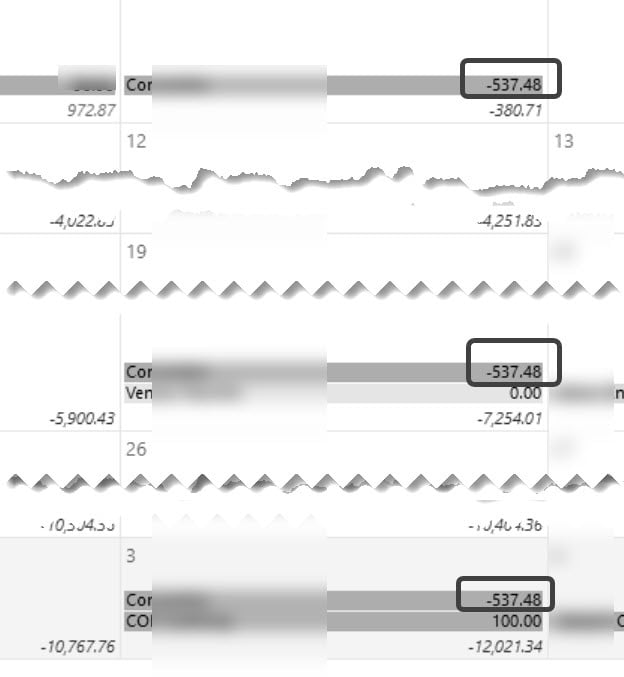
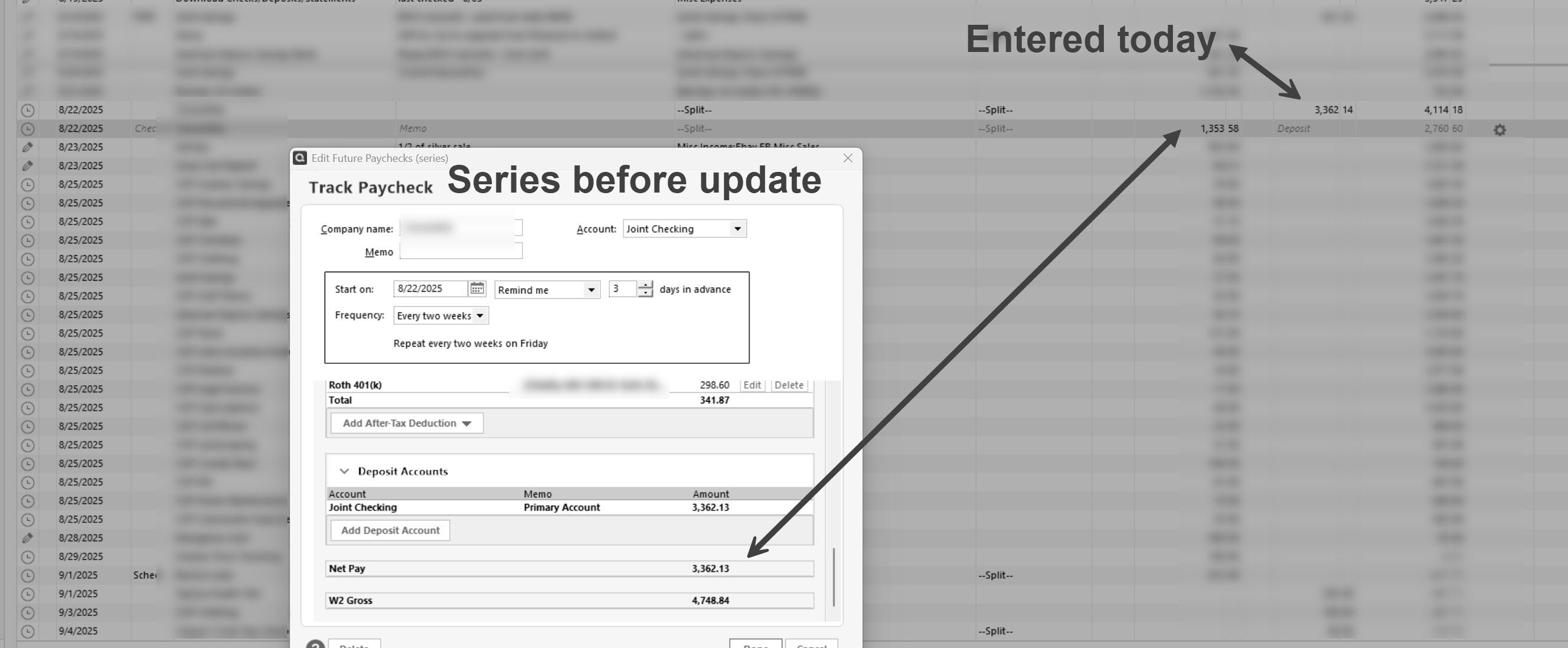
    @Quicken Anja - thanks - not trying to beat a dead horse but I found another anomaly just now. As mentioned, I added future paychecks using the wizard yesterday. Now today, in the register, I see 1353.58 payment and in the calendar view, I see a 537.48 payment. When I opened it in the calendar view in the Track Paycheck window and save it, the numbers go back to the actual net pay. All I've done today is a One-Step update and then make some changes to other accounts.

    Calendar view:

    Quicken-PayIssue6.jpg

    and Register:

    Quicken-PayIssue7.jpg

    So something was definitely off for the same transaction to display two different amounts in two different views.

  • AWinTx
    AWinTx Member ✭✭✭

    Bear in mind, these are payments, not income!

  • Quicken Anja
    Quicken Anja Moderator mod

    @AWinTx Thank you for continuing to share these additional findings and screenshots. I know it takes extra time to document each anomaly, and I want to reassure you that this information is very helpful.

    The behavior you’ve described with the differing amounts between Calendar View and the Register appears to be part of the same underlying issue that’s already escalated (CBT-775/CTP-14228). I’ll be adding your latest details and screenshots to that ticket so our Product team has full visibility into what you’re seeing.

    If you haven’t already, please also submit this new example through Help > Report a Problem in Quicken so the logs can capture what happened right after it occurred. That data often provides additional clues that screenshots alone can’t.

    We appreciate your patience while this is being investigated!

    -Quicken Anja
    Make sure to sign up for the email digest to see a round up of your top posts.

This discussion has been closed.