incorrect balances for Fidelity accounts
Comments
-
@Quicken Kristina, the incorrect online balance is exclusively on the reconcile screen. The sidebar is correct as is the "Cash" line on the Portfolio view for that account. The Portfolio view does not display a line for SPAXX as it has always recognized it as cash.
1 -
Thank you for your reply,
To clarify, is the reconcile screen showing the full market value of the account rather than just the cash balance?
Thank you!
Quicken Kristina
Make sure to sign up for the email digest to see a round up of your top posts.
0 -
@Quicken Kristina still having the issue with my fidelity cash account when the account have more than one cash fund. Is this going to be resolved?
0 -
Thank you for your reply @ericrose12,
Which specific funds is this happening with? Are they being represented as cash, holdings, or are they reflecting both in the cash balance and as holdings?
Thank you!
Quicken Kristina
Make sure to sign up for the email digest to see a round up of your top posts.
0 -
The reconcile window has always shown the cash balance only. It is now showing the wrong cash balance.
0 -
Thank you for your reply,
To clarify, how is the cash balance wrong? Too high? Too low? Is it acting like the market value has been added into the cash balance?
Thank you!
Quicken Kristina
Make sure to sign up for the email digest to see a round up of your top posts.
0 -
The cash balance in the Portfolio view is correct (shows as "Cash"). The "Balance" column in the transaction register is correct (matches the "Cash" value in the Portfolio). It's the reconcile window that's wrong. And, to clarify, the reconcile window does not include the value of securities. It has always shown the cash balance only. The reconciliation is for cash only.
0 -
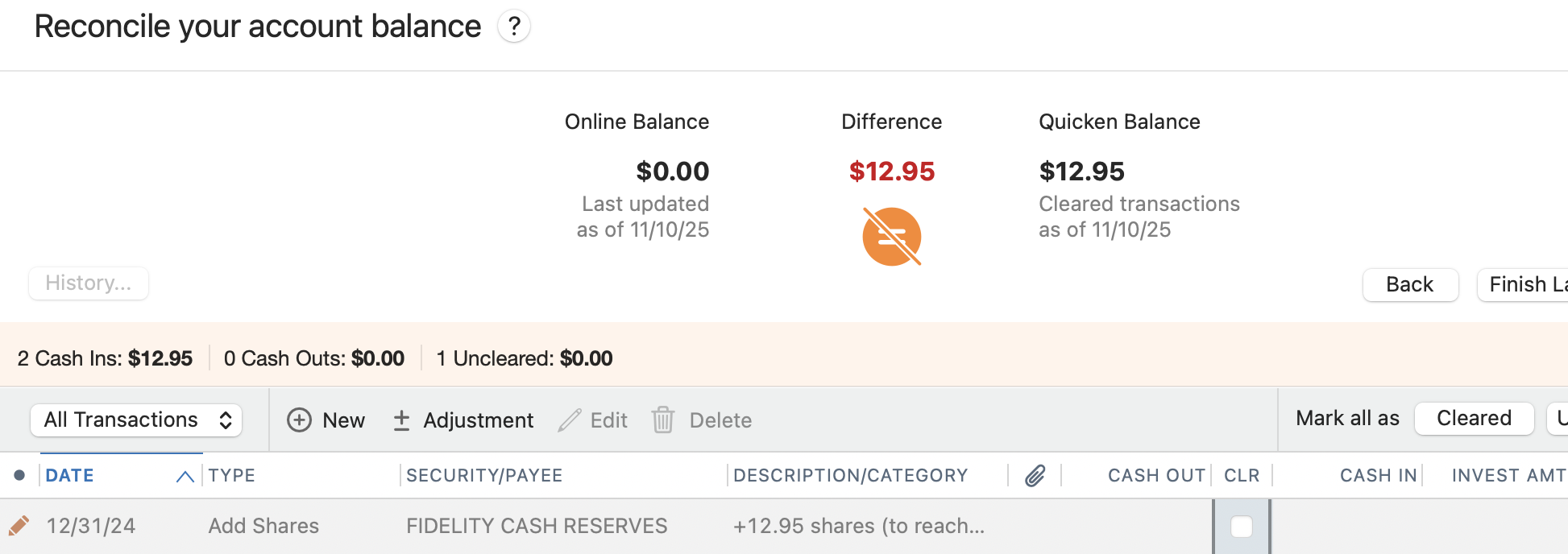
This is what is happening in one of the fidelity accounts - There is a constant placeholder entry… I modify the placeholder and then I can reconcile the Quicken account. However this is happen whenever there is activity within this account.
A different quicken account - a placeholder does not show in the reconcile window but does show in the transaction history all the way at the bottom with the oldest date. Once again I have to edit the placeholder to reconcile the account.
The funds are FIDELITY CASH RESERVES and MONEY MARKET
 0
0 -
Thank you for your replies,
You stated that the online balance in the reconcile screen (which should be the cash balance) is incorrect. How is it incorrect? Too high? Too low? Acting like it includes the market value, even though it shouldn't?
Based on your description (and the screenshot), it sounds like the fund is being interpreted as a security instead of as cash. Is that placeholder re-appearing every time you update that account?
Thank you!
Quicken Kristina
Make sure to sign up for the email digest to see a round up of your top posts.
0 -
@ericrose12 and I are saying the same thing.
0 -
@Quicken Kristina yes it is when there is new cash activities which should be processed for that cash / mutual fund.
0 -
@Quicken Kristina, as I explained in my November 2 post, it's not a matter whether the amount is too high or too low. That is going to depend on an individual's account. It's the fact that the reconciliation window is not recognizing cash accounts like cash. I don't know how QMAC is interpreting the cash account other than it's not interpreting it as cash.
This started happening when QMAC/Fidelity switched to a different method of downloading transactions.
0 -
Thank you for your replies,
Are the funds being double counted (as both a security and as cash)? Are the placeholders functionally creating a duplicate security, or are they adding a security which should be counted as cash? There is a Community Alert for the change in how Fidelity Money market funds/cash are handled. It is possible that this change is causing what you are seeing in your accounts.
Thank you!
Quicken Kristina
Make sure to sign up for the email digest to see a round up of your top posts.
0 -
No, this is not the problem. My Fidelity money market funds (on all my Fidelity accounts) have always been handled as cash by QMAC. My registers are correct as compared to my Fidelity statements. It is the auto-reconcile window that is not working properly by not treating the money market funds as cash (which is contradictory to the Community Alert).
0 -
Thank you for your reply,
Since this is happening only in the reconcile screen, it is possible that the issue is file specific. Please try restoring a backup from before the problem started and test to see if the issue happens in that restored file.
Thank you!
Quicken Kristina
Make sure to sign up for the email digest to see a round up of your top posts.
0 -
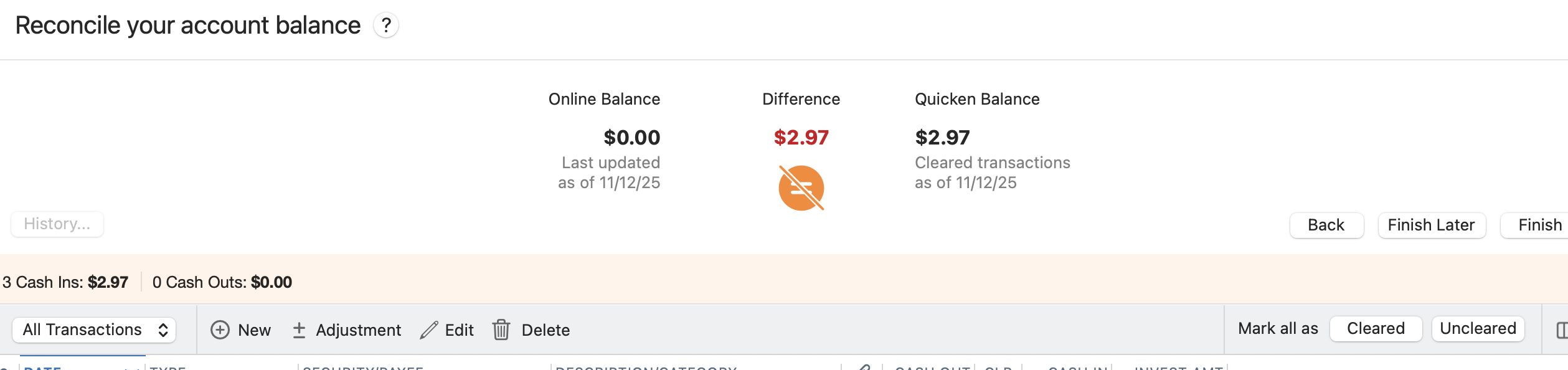
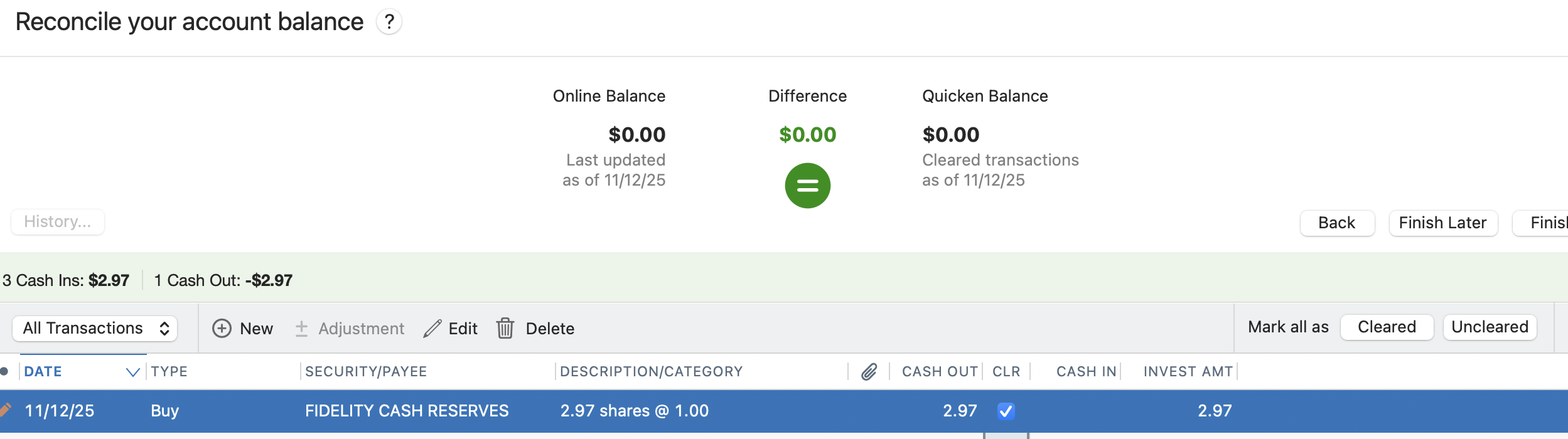
I read the community alert and that is exactly what I am doing I reconcile with the online balance and put a manual entry in for the "Fidelity Cash Reserves" cash fund. The actual CASH in quicken should be zero. I reconcile again today and needed to add another entry.
 0
0 -
Thanks @ericrose12 for confirming that I'm not the only one experiencing this.
@Quicken Kristina, this issue has been occurring for quite some time now (at least since Quicken and Fidelity changed the downloading process around the end of September. I don't have a backup that old.
0 -
Thank you for your replies,
Due to the nature of the issue, I recommend that you contact Quicken Support directly for further assistance. They have access to tools we can't access on the Community and they're able to escalate the issue as needed. The Quicken Support phone number can be found through this link here. Phone support is available from 5:00 am PT to 5:00 pm PT, Monday through Friday.
I apologize that I could not be of more assistance!
Quicken Kristina
Make sure to sign up for the email digest to see a round up of your top posts.
0


