Fidelity Investment Update Incorrect beginning 8/28/25
Beginning 8/28/25, the updated balances from my two Fidelity Retirement Accounts are incorrect (about 5-10% lower than the balances in the accounts). At the time of update, I do remember getting two prompts asking if I wanted to download cash balances or something else, but not sure if it was even concerning the Fidelity accounts; it did say cash balance was the preferred answer. Ever since, the balances do not match the Fidelity balances on the Fidelity site. Prior to that date, the account balances matched the online Fidelity site. Is something going on with the Fidelity downloads or is there a setting I can change in Quicken to correct future updates? Could the update possibly be dropping the first or last transaction???
I am using Quicken Classic Premier for Windows, R64.19, Build 27.1.64.19, Windows 11 Home version.
Answers
-
Hello @Nozgroup,
Thank you for letting us know you're seeing a balance issue. Based on your description of what you saw before the issue started, I suspect the prompt you saw was asking if you wanted to track your cash balance in a money market fund. See this article for more information:
Are you able to identify what changed? For example, did any holdings disappear? Did any new transactions or placeholders appear in your Quicken register?
If there isn't anything obvious in your account register to explain the change, then the simplest fix may be restoring a backup from before the issue started, if you have a recent backup you can use.
I look forward to your reply!
Quicken Kristina
Make sure to sign up for the email digest to see a round up of your top posts.
0 -
I saw the same issue when I downloaded the latest data today. According to my Fidelity account there were 9 new actions, but Quicken only downloaded 7. Furthermore, all of the new transactions were for mutual funds, but Quicken did not download the fund associations and logged all of the them as simple cash contributions which totally messes up the tracking of the fund data.
1 -
Hello @tfichtner,
Thank you for letting us know you're seeing a similar issue. Based on what you describe, it sounds like the discrepancy you are seeing is due to a couple missing transactions.
Have you tried following these troubleshooting steps from our article on missing transactions/transactions not downloading:
- Is this the first time this has happened, or are you frequently getting downloads that are missing transactions?
- If this is not the first time, do the missing transactions download on their own later, or do you need to manually add them?
- Are the transactions showing pending or posted on the financial institution side?
- If they are posted, what day did they post?
- Have you made sure your account register is sorted by the Date column, in case the transactions downloaded, but are hidden by the sort order?
I look forward to your response!
Quicken Kristina
Make sure to sign up for the email digest to see a round up of your top posts.
-1 - Is this the first time this has happened, or are you frequently getting downloads that are missing transactions?
-
@Nozgroup, same issue here and it is reported in other threads on Quicken and elsewhere. The last few updates are very bug ridden messes. My Fidelity account is way off now, where it had been prefect for a long time. It isn't missing transactions or anything like that of which I am aware. It would take a huge effort on my part to find the discrepancy (it would be easier to switch to a new tool) but it all came along with the latest two updates which broke a number of things for me. In regard to Fidelity, the new Online Bills System has trouble keeping the connection authorized over time, could not get the share counts right and offered to make place holders, and has the over all balance thousands for dollars off, making reports meaningless! This is very frustrating, more so here at month's end where I may need to export Quicken's reports and manually update the correct balances . . . all the while wondering how many other balances Quicken has wrong now! That is effort I should not have to do.
This is math . . . it should not be so hard to get right. It should not be so hard to tell us when it will get fixed. I mean we are paying for that right?1 -
And . . . in my Cash Balance. Go to Account Overview for the Fidelity Account and in that dialog, the Security Value is the correct balance for my account, the Cash Balance is incorrectly added to that to create an inflated Total Market Value. The cash balances in Fidelity are held in a 'security', and should not be added on as the security is already there.
Did you not run a test case again the Account Overview's calculations? Why would you even be in this code adding plus signs?
Please have your coder remove the plus sign, your QA team test the removal of the plus sign and release a corrected version ASAP.0 -
My Fidelity balances are now downloading the correct amounts. The update went in sometime between 9/25/25 and 9/28/25. Thanks for correcting them.
0 -
I am truly mystified that Quicken and Fidelity Investments haven't fixed this ongoing problem yet. It's been months with continuous errors. Even after following all of the directions from Quicken on this issue, I still continue to get errors and notices that my accounts need fixing. Since it worked almost perfectly before the changeover, can't they figure out how it worked before and use that knowledge to make the new update work? This has seriously tarnished the reputations of both Fidelity and Quicken. I am now questioning about the technical competence of the Quicken team.
0 -
I have this problem, too. "
And . . . in my Cash Balance. Go to Account Overview for the Fidelity Account and in that dialog, the Security Value is the correct balance for my account, the Cash Balance is incorrectly added to that to create an inflated Total Market Value. The cash balances in Fidelity are held in a 'security', and should not be added on as the security is already there" I have removed all the securities and cash from this account, and yet the ghost balance of $2,395.91 remains.
"
0 -
Hello @Snooseville Sue,
Thank you for letting us know you're seeing issues with cash representation in your Fidelity account(s). If you haven't already done so, I recommend following these directions from our Community Alert about the change in how money market/cash holdings with Fidelity reflect in Quicken:
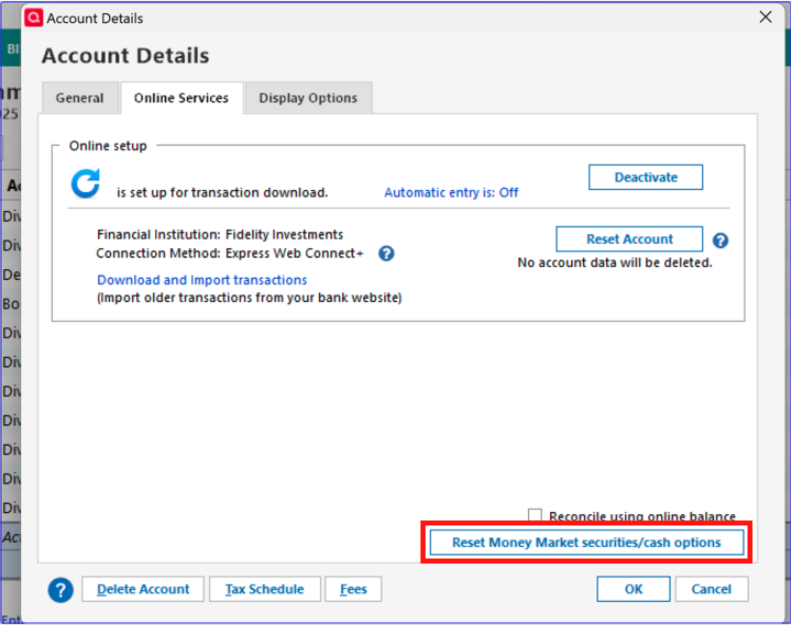
- Quicken Windows users may need to change the Money Market representation if they are not prompted. You can do this by clicking the Cash link in the account or in the Account Details>Online Services Tab, the “Reset Money market securities/cash options to trigger the choice of cash or security again. The cash balance will still be the same that Fidelity reported for the one or more money market securities they have.
Please let me know how it goes!
Quicken Kristina
Make sure to sign up for the email digest to see a round up of your top posts.
0
Categories
- All Categories
- 56 Product Ideas
- 36 Announcements
- 223 Alerts, Online Banking & Known Product Issues
- 22 Product Alerts
- 701 Welcome to the Community!
- 671 Before you Buy
- 1.2K Product Ideas
- 53.7K Quicken Classic for Windows
- 16.3K Quicken Classic for Mac
- 1K Quicken Mobile
- 813 Quicken on the Web
- 111 Quicken LifeHub