First Internet Bank of Indiana stopped working this month (August 2025)
First internet Bank of Indiana switch their systems to a new design. I can still log in using web browser and see my account and make payments.
I have tried switching from Direct Connect to Express Web Connect and that didn't work either. I sent an email to their support but have not heard back from them. Their previous system required that you request Quicken+Quickbooks access before connecting (which I had done years ago). There doesn't appear to be any mention of Quicken on their new help or web interface anywhere— not even a file download.
Anyone here use or
Quicken Classic Premier R65.17 on Windows10 now. I started with MYM (Managing Your Money) on DOS
Comments
-
Support confirmed that Direct Connect is no longer offered. However, every time I try to set up online Quicken only offers Direct Connect. I had previously found an "advanced" screen somewhere that offered the other options but I cannot find it again.
Quicken Classic Premier R65.17 on Windows10 now. I started with MYM (Managing Your Money) on DOS
0 -
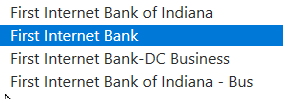
I found the issue is that I needed to switch to "First Internet Bank" (without the Indiana).
Unfortunately, the "Account type" switched to "Loan" (that is now correct), whereas previously it was incorrectly downloading as a line of credit account. Cleanup time.
Quicken Classic Premier R65.17 on Windows10 now. I started with MYM (Managing Your Money) on DOS
0 -
Hello @dhcernese,
Thanks for the update and for sharing the steps you took. Sharing these details will help others experiencing the same problem.
If you notice any further issues with this connection or other accounts, please let us know.
Thank you!
-Quicken Anja
Make sure to sign up for the email digest to see a round up of your top posts.0 -
OK, I thought mine had been fixed using the above steps but today One Step update reported "4 files updated, 0 new transactions" when there were actually several transactions ready for download - I had to download those manually into a QFX file and import. Bummer
0 -
Thanks, this worked for me!
My old accounts were configured as Financial institution "First Internet Bank of Indiana".
The Financial institution text for one of the accounts couldn't be changed - but I changed the Financial institution to "First Internet Bank" on a savings account and through that one I was able to sync all the accounts using Express Web Connect, including the account where I was unable to change the name. I also updated the website on each account from www.firstib.com to www.firstinternetbank.com
0 -
Switching from "First Internet Bank of Indiana" to "First Internet Bank" solved the issue for me, but I used a variation of the steps. I could not find a way to change the Financial Institution of my existing accounts with First Internet Bank, so what I did instead was the following:
Note: before you start, I recommend backing up your Quicken file and also making a note/screenshot of the stating balances of your first IB accounts.
1. Add new account in Quicken
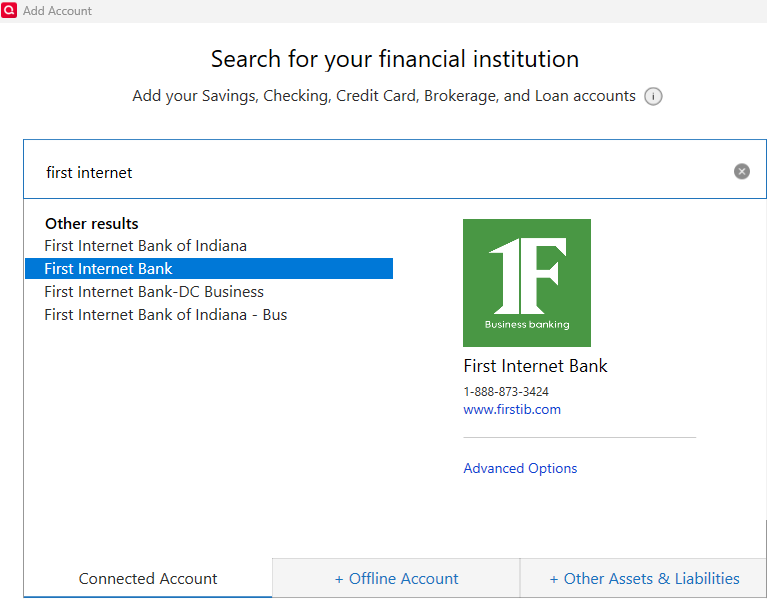
2. In the search for your financial institution box, I typed "first internet" and then I chose the second one as you can see below.
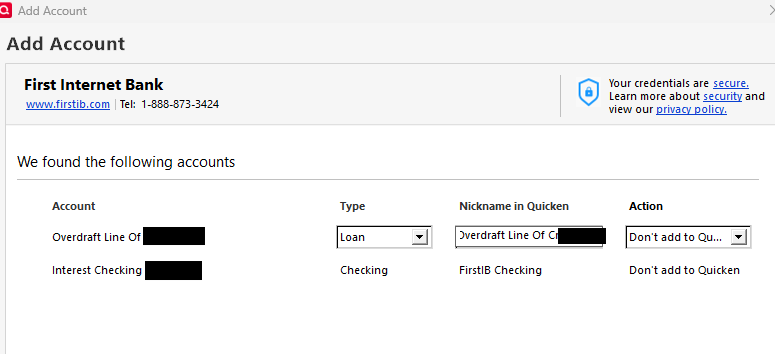
3. After logging in and performing the search, Quicken found my account (in my case it was two accounts), I made sure that I selected "Don't add to Quicken" under Action. Instead, I let Quicken match those accounts to my existing accounts in Quicken.
4. At this point, Quicken started to download transactions, but this took a very long time (likely hours). I went ahead and left the PC and let it run. I only came back to it the next day and Quicken had indeed completed downloading transactions from my First IB account, which was cool! However, I did notice that my balance was off
5. Note: In my case, after performing the download and running a normal Reconcile for the account, I noticed that my Online Balance and Current Balance did not match. This was due to Quicken having changed my starting balance (in my case this goes back to 2010). I was able to open my backup file and see that the initial balance was different from what I had in my updated account. Once I manually modified that starting balance back to what it should have been, everything was matching. So this is why I recommended making a note of your starting balance before starting the process.
I hope this helps.
0 -
Hello @Pazzy,
Thank you for taking the time to share your process in detail! I’m sure other users will benefit from the step-by-step breakdown you provided.
Thank you!
-Quicken Anja
Make sure to sign up for the email digest to see a round up of your top posts.0 -
These steps did NOT work for me.
0
Categories
- All Categories
- 56 Product Ideas
- 36 Announcements
- 225 Alerts, Online Banking & Known Product Issues
- 22 Product Alerts
- 702 Welcome to the Community!
- 671 Before you Buy
- 1.2K Product Ideas
- 53.7K Quicken Classic for Windows
- 16.3K Quicken Classic for Mac
- 1K Quicken Mobile
- 812 Quicken on the Web
- 111 Quicken LifeHub