Why is Voya 401(k) so annoying?

SomeItalianGuy
SomeItalianGuy Quicken Windows Subscription Member ✭✭
edited October 1 in Investing (Windows)

Besides my current employer's Voya 401(k) / Roth 401(k), I have a separate rollover IRA account with T. Rowe Price as well as my wife's personal IRA, also with T. Rowe Price.

Tracking the T. Rowe Price accounts works perfectly in Quicken, but the Voya account just has too many annoyances. One of them is that none of the Voya investments have findable asset classes, so it is impossible for me to look in a single place to determine the overall asset allocation across all three of these retirement accounts.

As an example, some of my Voya money is invested in "1122 Vanguard Totl Stck Mkt Index Fd Adm" clicking that link takes me to a prospectus titled "Vanguard® Total Stock Market Index Fund - Admiral™ Shares". If I Google that fund name, I come up with ticker symbol VTSAX with the last closing price of $154.83.

But! Voya's last closing price for 1122 Vanguard Totl Stck Mkt Index Fd Adm is just $37.360589.

How does this work?

The thing is, Quicken can find the asset class for VSMAX, but not for 1122 Vanguard Totl Stck Mkt Index Fd Adm, and I do not see any way that I can enter it manually.

So, it seems that there is no way possible for me to track the allocation of my combined retirement accounts in Quicken.


Comments

  • Q97
    Q97 Quicken Windows Subscription Member ✭✭✭✭

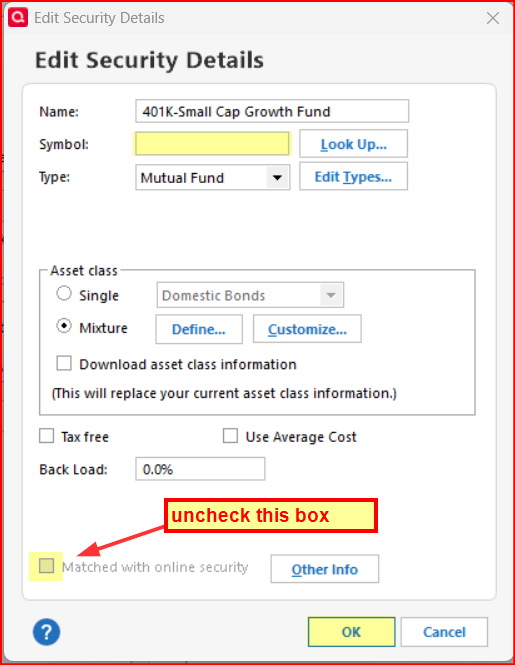
    It's common for a 401(k) to use "trusts" instead of mutual funds. For these, you can set the asset class to "Mixture" on the Edit Security Details page to enter the percentages manually and uncheck "Download asset class information."

  • Boatnmaniac
    Boatnmaniac Quicken Windows Subscription SuperUser, Windows Beta ✭✭✭✭✭

    The reason why you cannot get accurate pricing of that Voya fund is one that is very common with 401(k) accounts. Most 401(k) accounts are comprised of some or all unique private funds (or "trusts" as mentioned above) that are modeled after publicly traded funds but the securities allocations and, therefore, the fund prices do not correlate with the publicly traded fund. But I think the basic asset class information would be the same for both.

    Since your have set up the 401(k) private fund with the ticker for the publicly traded fund you are not getting the correct data downloaded into Quicken during OSU for the private fund. It is instead downloading data for the publicly traded fund which you do not want.

    Because of this the ticker for the publicly traded fund does not apply to the private 401(k) fund and should be removed from the Security details in Quicken so incorrect security pricing and data is not downloaded. You can do this by going to Edit Security Details and removing the Ticker Symbol and unchecking the box for matched with online security.

    image.png

    The only way to get the exact and correct price and asset class data of the private fund is to get it from the 401(k) fund. If Voya downloads data for this private fund during OSU then you might be able to get it linked to the security in Quicken or maybe it will add a new security for it in Quicken. Since the Ticker has been removed and it is no longer matched with the online security then the downloaded price should not get overwritten by data that is downloaded from the 3rd party provide for securities prices. However there is no assurance that this will work.

    If Voya does not download it during OSU then you might need to go to the Voya website to get the data for it. If you can manually download it in QIF, CSV, Excel or OFX format then perhaps you can use the free ImportQIF app to modify and manually import the file into a QIF format that Quicken can use. You can read up on it and download it from here: https://www.quicknperlwiz.com/ . (This is a safe program…no malware or adware…developed and maintained by a long-time Quicken user who is still active in this Community. I have not used it myself but many others have posted that it works well.)

    The only other option for you that I can think of is to manually enter the Asset class and price quotes data. You will need to get this from your online Voya account which should provide the specifics for this security when you view it in your Positions or Holdings view there. You will not be able to get this data from the securities exchanges since it is not publicly traded and the Ticker is not applicable.

    Quicken Classic Premier (US) Subscription: R65.15 on Windows 11 Home

  • Jim_Harman
    Jim_Harman Quicken Windows Subscription SuperUser ✭✭✭✭✭

    @Boatnmaniac I think your recommendations are a little off.

    With securities that are not publicly traded, it is correct to remove the ticker symbol. We should also un-check the Download quotes box for the security in the Security List. This will prevent Quicken's quote provider from downloading the price for the publicly traded version of the fund.

    But if the fund is held in an account that is set up for transaction downloading, you should not un-check the Matched with online security box. That would prevent the transactions and the correct price from downloading from Voya.

    To set the asset classes in Quicken, you should un-check the Download asset classes box in the Security Details and enter the correct asset class mixture manually.

    QWin Premier subscription
  • Boatnmaniac
    Boatnmaniac Quicken Windows Subscription SuperUser, Windows Beta ✭✭✭✭✭

    It's been so long since I last had to deal with this kind of issue that perhaps my memory has failed me some. I was thinking that the incorrect CUSIP ID would need to be removed and the only way I know of to do that is to uncheck the box for Matched with online security.

    I was also thinking that Voya would download the security information for their private fund which could then be matched to the existing security adding the correct CUSIP and perhaps the correct asset class.

    Am I misunderstanding this?

    Quicken Classic Premier (US) Subscription: R65.15 on Windows 11 Home

  • Jim_Harman
    Jim_Harman Quicken Windows Subscription SuperUser ✭✭✭✭✭

    Perhaps we are both right.

    It is not clear whether the OP's Voya account is set up for downloading, or whether they also hold the publicly traded VTSAX in another account.

    In any event, they will have to stop Quicken's quote downloads for this security and set the asset classes for the fund in the Voya account manually. The correct percentages should be the same as for the public Vanguard fund.

    QWin Premier subscription
  • SomeItalianGuy
    SomeItalianGuy Quicken Windows Subscription Member ✭✭

    @Jim_Harman , @Boatnmaniac , @Q97

    Thanks all for your replies.

    To answer some of your questions: up until last week I had the Quicken Voya account setup for online updating. Besides daily price updates, I also capture the weekly contributions (from my paycheck entry) and the weekly purchase of the single fund that I have been dropping my weekly contributions into.

    Over the years, I have transferred varying amounts from that single fund into other Voya funds and those transactions were always downloaded into the same Quicken Voya account. So, until last week, my Voya account listed transactions against a number of different funds and, basically, just showed me a grand total of the value of all funds.

    I decided to try something out of left field and went ahead and setup a bunch of offline individual Quicken accounts for each of the current and previous holdings. I then cut individual transactions from the main account and pasted them into the new accounts, changing the cash source or destination as needed.

    At this time, I have several Quicken investment/401(k) accounts for each of the funds plus one online "clearing" account through which I am processing my weekly payroll contributions and, for the time being, still holds about 1,000 weekly buy transactions for the primary fund that all my weekly contributions are directed to. I may or may not eventually move those fund transactions to their own account as well. (Quicken does not make this process very easy, so moving 1,000 transactions will be a daunting task)

    As for asset classes, what I worked out is that I can setup a security, for example VSMAX - Vanguard Small Cap Index Admiral Shares, let Quicken download the asset class data for it, and then manually update the asset class for Voya's associated fund (0757 Vanguard Small-Cap Index Fund Adm) in the security list. Someone mentioned above that the Voya version is probably "modeled after" the Vanguard version and thus may not have the same asset class distribution - if so, then maybe I just need to give up. :)

  • Jim_Harman
    Jim_Harman Quicken Windows Subscription SuperUser ✭✭✭✭✭

    I think you will find that the Voya funds' asset allocations are the same as the corresponding Vanguard funds.

    Note that the allocations that Quicken downloads do not always match up with the allocations from other sources. Quicken only has Large and Small cap but others often include Midcap.

    Usually Quicken's Small cap is close to the small plus mid cap reported elsewhere.

    QWin Premier subscription
This discussion has been closed.