Quicken 2017 on new Win 11 laptop

jeesh999
jeesh999 Quicken Windows 2017 Member ✭✭

Is it possible to get 2017 Deluxe running on a new machine if you don't have a CD and/or can't run an installation on the new machine? I've copied everything over (including old CONFIG folder) and when I click on qw.exe nothing happens.

Below seems to be a method that has worked for folks back in 2023, and I feel like it is more or less what I tried, but it hasn't worked. For step 2, is he running the exe from the USB? There's no step where he says he copied things to new machine so that confused me. Also, I couldn't find a QuickenDeluxe2017 .exe file just qw.exe. How did he run the installation mentioned in step 3? Thanks.

"I've had the same problem and have just resolved my issue after 3 days of trying. Here's what I did: (1) On my old computer I copied the entire folder named Quicken located at C:\ProgramData\Intuit\ to a USB. Make sure you have Show Hidden Files enabled so you can see it. I also made a backup copy of my Quicken data file.

(2) On my new computer using an account with Administrator privileges I ran my QuickenDeluxe2017 .exe file. I turned off Antivirus and Firewall beforehand. Not sure if that did anything, just adding for thoroughness.

(3) After installation I DID NOT open the program. At that point I navigated on the new computer to C:\ProgramData\Intuit\, deleted the existing Quicken folder, and copied in the Quicken folder from my old computer.

(4) I then copied my data file to the Desktop and then opened Quicken. From there I went to File --> Restore from Backup, and went through that process. Once done, everything worked and all my files are present.

(5) I then logged in to my standard user account, copied my data file to the desktop, opened Quicken and repeated the Restore from Backup process. All files in 2017 format present with no (known) issues."

Comments

  • Chris_QPW
    Chris_QPW Quicken Windows Subscription Member ✭✭✭✭

    I believe his QuickenDeluxe2017.exe file, is in fact the Quicken Deluxe 2017 install program. He wasn't just trying to transfer files over from the old machine instead of using the install program.

    I think people have attempted just copying at the program files, but one has to realize that the installer put entries into the Windows registry, and it will not work without them. I have heard of programs that might be able to transfer a program from one Windows Machine to another, but I have never used one.

    The main reason for this procedure that is "more than an install", with copying the config files is because after you install Quicken 2014 to 2017 on a new machine the first thing it is going to do is ask you to log in to connect the Quicken Id to the data file. But the problem is that for anything older than Quicken Subscription that the server is no longer available. And then all you would get for the login screen is a blank page. But it was found that if you copied the config files (especially the Quicken.ini file) this would bypass ask to log in.

    Signature:
    This is my website (ImportQIF is free to use):

    http://www.quicknperlwiz.com/

  • jeesh999
    jeesh999 Quicken Windows 2017 Member ✭✭

    Thanks so much. So there's no good way to get where I want without a 2017 CD, correct? (I have access to a 2010 CD but I'm guess I don't want to try and go backwards either)?

  • Chris_QPW
    Chris_QPW Quicken Windows Subscription Member ✭✭✭✭

    That is correct normally you need the install program (you can search for programs that might do the transfer for you). And yes, the data files aren't backwards compatible.

    Going backwards is "possible", but not for the faint of heart, since it involves exporting a QIF file and importing it, which can have lots of problems.

    See this for reference on that:

    Note you can also get an install program for free from Quicken Inc for 2013 Deluxe, which is the last version of Quicken that is truly totally offline (not Quicken Id):

    Signature:
    This is my website (ImportQIF is free to use):

    http://www.quicknperlwiz.com/

  • jeesh999
    jeesh999 Quicken Windows 2017 Member ✭✭

    OK, thanks so much. I'm doing a trial of getting what I need from Excel. Pray for me. :) Not only has Intuit's business practices kept me from updating 2017, I very much hope and expect they have lost me forever as a customer of any of their products, nor will I ever recommend them to anyone. Their approach is just the absolute worst extreme of "planned obsolescence." </endrant>

  • Chris_QPW
    Chris_QPW Quicken Windows Subscription Member ✭✭✭✭

    Just for the record, Intuit hasn't owned Quicken for many years, the new company is called Quicken Inc, but in a lot of respects this just a carry on of the same Intuit policies. It was Intuit that created the Intuit Id, which then became the Quicken Id.

    Signature:
    This is my website (ImportQIF is free to use):

    http://www.quicknperlwiz.com/

  • jeesh999
    jeesh999 Quicken Windows 2017 Member ✭✭

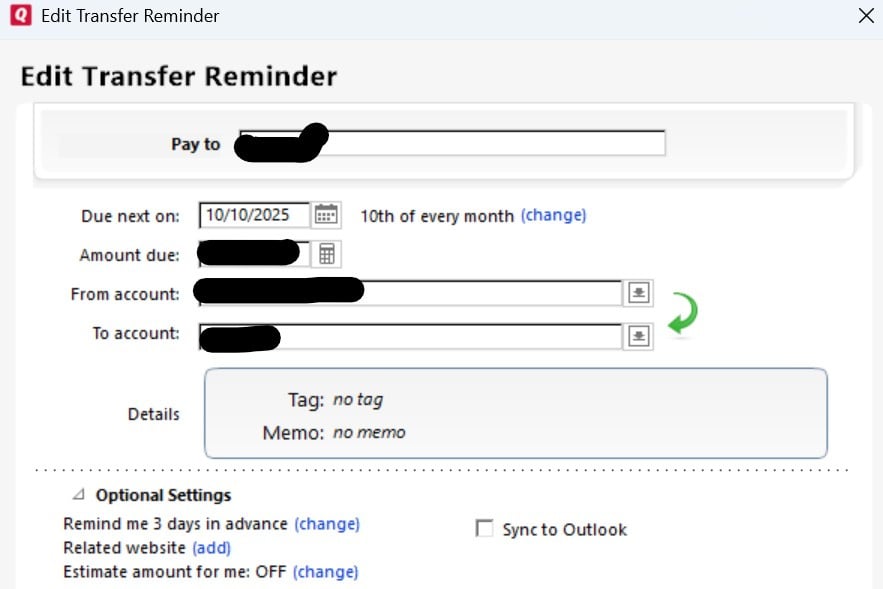
    Ah, fair enough. If you don't mind, one more question that is driving me nuts. I'm trying to update the split amounts for a transfer reminder and all the info I can find makes it sound like I should be seeing a Category dropdown with a grayed out split icon next to it, but this is what I see when I "Edit this and all future instances" of the reminder. Clicking on the Details section shows I have a split in the Tag section (even though it says "no tag" here) but no way to edit anything.

    Transfer Reminder.JPG
  • Chris_QPW
    Chris_QPW Quicken Windows Subscription Member ✭✭✭✭

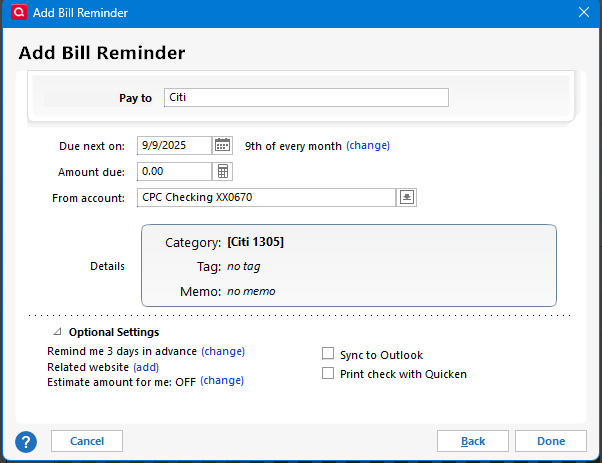
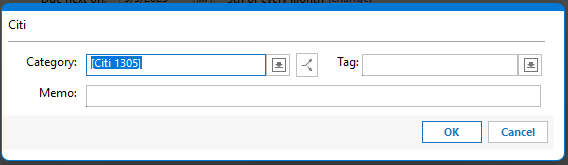
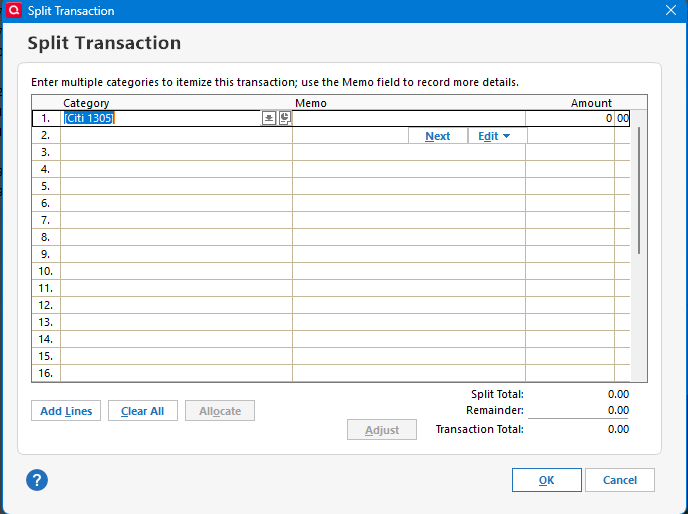
    Use a Bill Reminder, not a Transfer reminder. A Transfer reminder locks you into just putting into accounts, a bill reminder doesn't.

    I personally never use a Transfer reminder.

    It looks like this:

    image.png image.png image.png image.png

    Signature:
    This is my website (ImportQIF is free to use):

    http://www.quicknperlwiz.com/

  • Jim_Harman
    Jim_Harman Quicken Windows Subscription SuperUser ✭✭✭✭✭

    If the transfer is from an investing account to a spending account and you want to think of the transfer as income, you may want to use an Income reminder instead of a Bill. For example this will cause it to be highlighted in green on the Bills & Income page.

    QWin Premier subscription
  • jeesh999
    jeesh999 Quicken Windows 2017 Member ✭✭

    OK thank you! Really appreciate the help and expertise.

This discussion has been closed.