Paycheck Corruption - Easier way to Fix?

recursor1
recursor1 Quicken Windows Subscription Member ✭✭✭
Screenshot 2025-09-11 104447.png

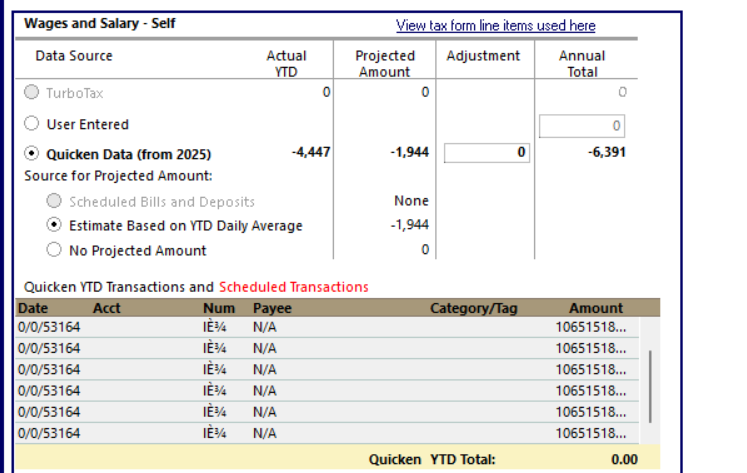
So, due to Quicken's recent Bill Sync crash issue, I once again have corrupted paychecks. It's really easy to figure out you have this corruption. Just delete all existing paychecks and then look at the tax planner for wages and salary self. This issue is the only reason I've ever had to recreate a new file in Quicken. I've never experienced any other form of corrupted data. And I'm sick of dealing with it. I've got so many accounts, and each time this happens I have to switch transfers to an expense category, export each account in a qif if, create new file, then slowly import everything in and then hook it up. Backups don't help in this situation and I'm sick of it. It takes hours.

Is there any easier way to resolve this then what I've been doing?

Comments

  • Quicken Anja
    Quicken Anja Moderator mod

    Hi @recursor1,

    Thanks for sharing the details about the Paycheck corruption issue. I understand how frustrating this can be.

    Since restoring a backup hasn’t helped in your case, another approach is advanced data file troubleshooting using Quicken’s Validate and Copy procedure. This can sometimes resolve lingering data issues.

    You can find the full instructions in this support article.

    Hope this helps!

    -Quicken Anja
    Make sure to sign up for the email digest to see a round up of your top posts.

  • recursor1
    recursor1 Quicken Windows Subscription Member ✭✭✭

    Hmm I think it might be an issue with the data in the cloud rather than the datafile itself. But the article gives me the idea of just deleting the account I throw my paychecks in and then recreating. Maybe that would resolve it.

This discussion has been closed.
