Due DATE disappeared from Bills & Income list in latest version (8.3.1) of Quicken Classic for Mac
After updating, the formatting of the Bills & Income tab changed. Previously, the "Due" column provided (1) the number of days in which the item is due (e.g., "Due in 14 days") and (2) the actual date on which the item is due (e.g., "August 31"). With the new update, however, the "Due" column now reflects the number of days in which the item is due (number 1, same as before) but replaces the actual due date (number 2 above) with the amount due (e.g., "$20.00").
This second piece of information is completely duplicative of whatever is already in the "Amount" column and adds nothing, whereas the actual date something is due is extremely helpful to see.
Is there a way to restore this to display the actual date something is due, as before?
Thanks.
Comments
-
Hello @NotTechnical,
Thank you for coming to the Community to provide your feedback. You are not the only person who is displeased with the change to showing the number of days until a bill is due instead of showing the actual date. Please add your vote and a comment to this Idea post:
Ideas that get enough votes may be implemented in the future!
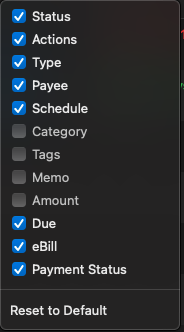
Unfortunately, I'm not aware of a setting to change the Due in "x" days back to a due date. You can right click on one of the column headers to select which columns you want to view.
You can unselect Amount so that you are not seeing duplicate information.
I hope this helps!
Quicken Kristina
Make sure to sign up for the email digest to see a round up of your top posts.
0
Categories
- All Categories
- 56 Product Ideas
- 36 Announcements
- 223 Alerts, Online Banking & Known Product Issues
- 22 Product Alerts
- 701 Welcome to the Community!
- 671 Before you Buy
- 1.2K Product Ideas
- 53.7K Quicken Classic for Windows
- 16.3K Quicken Classic for Mac
- 1K Quicken Mobile
- 813 Quicken on the Web
- 111 Quicken LifeHub