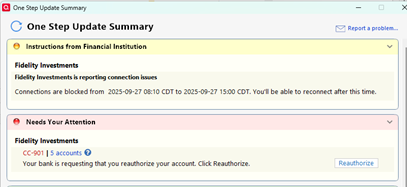
Quicken requests account re-authorization for Fidelity on every one step update
Starting a few days ago I did a one step update and Quicken informed me I needed to reauthorize access to my Fidelity account. I've had to do this before with other accounts and have never had any issues. The re-authorization worked fine, and transactions downloaded. Now on every one step update I have to reauthorize again.
I discovered that if I open my Fidelity account and select "Update Transactions" from the Actions drop-down, it will download all transactions WITHOUT requiring a redundant re-authorization. My workaround to the problem was to uncheck my Fidelity account from the one step account list and run a separate update just for the Fidelity account.
[Edited-Readability]
Comments
-
Hello @Alcors3,
Thank you for reaching out to let us know about the issue you're experiencing!
To help us better understand what's going on, could you please share a few more details?
- Where is your Quicken data file saved — is it stored locally on your computer (such as the C: Drive), or is it on a cloud service or external drive (like OneDrive, Dropbox, a USB drive, etc.)?
- Have you already tried any troubleshooting steps? If so, what have you done so far?
- Are you using a VPN when updating your accounts? If yes, does turning it off make any difference?
- Do you have any antivirus or malware protection software running that might be interfering with Quicken? If so, have you tried temporarily disabling it to see if that changes anything?
- Were there any major changes to your system or software around the time the issue started (like updates or new installations)?
The more details you can provide, the easier it will be for us to help identify what’s causing the problem.
Looking forward to hearing back from you!
Quicken Alyssa
Make sure to sign up for the email digest to see a round up of your top posts.
0 -
Exact same issue here. Updated Fidelity authorization successfully several days ago, which resulted in an initial transaction download and a message the credential update was successful. However… Quicken now continues to request a Fidelity credential update every single time I run a one-step-update. I do this every single time, receive a message the Quicken/Fidelity credential update was successful… however Quicken continues to prompt for a Fidelity credential update each and every time…
As an ADDED complication, Quicken is also demanding a Fidelity credential update for my wife's Fidelity IRA (which was moved to another brokerage several years ago). Despite the fact that I have disabled online updates for her account and also CLOSED this account in Quicken, Quicken continues to demand a Fidelity credential update for that closed account as well. Doing so is impossible since the actual account at Fidelity has been closed for years and no longer has a login.
Quicken file is stored locally.
No VPN is in use.
Occurs regardless if update is done with Virus Protection turned on or off.
No new updates to the system or software.
0 -
@Alcors3 @Tim_Hed The reauthorization box is certainly annoying. Many users say they feel they must go through that process each time they see the box.
When you get that box, is there a "Remind me later" or " Remind me next time" button at the bottom? If so, what happens when you click on that? Clicking on the button should make Quicken skip the reauthorization process.
All 4 sides of the box should be visible. Do you have to scroll down to see the whole box or something that would make you miss the button at the bottom?
QWin Premier subscription0 -
Now that I reauthorized the Fidelity accounts are full of "new" transactions I am supposed to accept. HOWEVER, the transactions are already in the account. How do we fix this?
This is the Second time I have had problems with Fidelity downloads Quicken what are you doing?
0 -
The recent fidelity update has truly disrupted by retirement account tracking. This is especially problematic since all of my older transactions were linked through transfer transactions from my checking account (through my paychecks). This is not the first time that this has happened with fidelity accounts and it's very frustrating.
0 -
Hello @justNana,
Thank you for adding to this discussion.
If you have "New" transactions to accept that are already existing in your register, you can Match them to the existing transactions by selecting Match instead of accept. match can be found under the Edit button. It will then give you choices of which transaction you would like to match it to. You would select the matching transaction and then do the same for the remaining transactions.
Here is a Help Article with specific steps and more information on this process.
I just want to acknowledge your concerns and apologize for the frustrations you are experiencing.
Thank you for sharing your experience — I’m sorry to hear how disruptive this Fidelity update has been for you. I completely understand how important accurate retirement account tracking is.
I want to assure you that our teams are aware and are actively working to investigate and resolve these things. While I know this isn’t the first time Fidelity connections have caused problems, your feedback helps reinforce the urgency of finding a more stable, long-term solution.
Thank you.
Quicken Alyssa
Make sure to sign up for the email digest to see a round up of your top posts.
0 -
Similar issues with the new reauthorization screen for Fidelity One Step Updates.
Some duplicate downloads and no memory of my having already reauthorized.
Why is Quicken relying on customers for troubleshooting their software updates when Quicken should be responsible, especially for large investment firms like Fidelity, TIAA etc.
Inexcusable to waste customers time like this and create anxiety for a product we pay a subscription for.
I won't bother wasting any more time, will wait for the next Quicken update which may or may not work.
0 -
Hello @Rob Garritt,
Thank you for adding to this discussion.
I completely understand your frustration — dealing with repeated reauthorization prompts and duplicate downloads is incredibly frustrating.
Your time is valuable, and I’m sorry this experience has caused such inconvenience and anxiety for you. Ideally, these transitions should be smoother, and we take your feedback seriously.
If you do decide to give it another shot, please know that we're here and ready to help troubleshoot — whether it's the reauthorization issues, duplicate transactions, or anything else you’re encountering. Your experience matters, and we want to do everything we can to make it better.
In the meantime, thank you for sharing your honest feedback.
Quicken Alyssa
Make sure to sign up for the email digest to see a round up of your top posts.
0 -
The worst part of the reauthorization is that the update downloads more than 100 days of data even though my last update was just a few days ago on September 18th (today is September 22nd). Instead of accepting all of those transactions (which weren't matching), I decided to start over, so I restored my backup from the 18th and updated again, this time skipping the reauthorization process. Hopefully, by the time I am forced to reauthorize, either Fidelity or Quicken will have fixed the problems.
[Edited-Readability]
1 -
I'm also having this problem. I'm running Quicken R63.21 and have not permitted automatic updates. I reauthorized my Fidelity accounts several weeks ago and the reauthorization message no longer appeared until last week. Should I update to R64.29 or wait until this problem is fixed with a new release?
For now I'm just choosing Remind Me Next Time to work around the problem.
0 -
Hello,
Thank you for chiming in and adding your thoughts to this discussion.
It sounds like you have automatic entry turned off. Instead of accepting duplicates you can delete them or match them to the existing transactions in your register. Some duplicates immediately after the switch are expected, but you should not continue having that issue going forward.
We are encouraging everyone to switch to the new connection method. You can track the progress of the migration here if that helps.
Thank you both.
Quicken Alyssa
Make sure to sign up for the email digest to see a round up of your top posts.
0 -
Thanks Quicken Alyssa,
I believe I'm running the new connection method after reauthorizing and the Fidelity problem started shortly after that. Is there a way to know if the new connection method is being used?
I have 18 years of Fidelity transactions and I'm very fearful of this buggy reauthorization process is going to mess this up.
[Edited-Readability]
0 -
Hi @DaveQN,
Thanks for reaching out — I completely understand your concern. It’s absolutely valid to feel uneasy with changes like this.
If you’ve gone through the reauthorization process for Fidelity, then you should be on the new connection method — assuming you haven’t restored a backup or made any changes that might revert things.
To confirm which connection method is being used:
- Go to Tools > Account List.
- Find the Fidelity account in question and click the Edit button next to it.
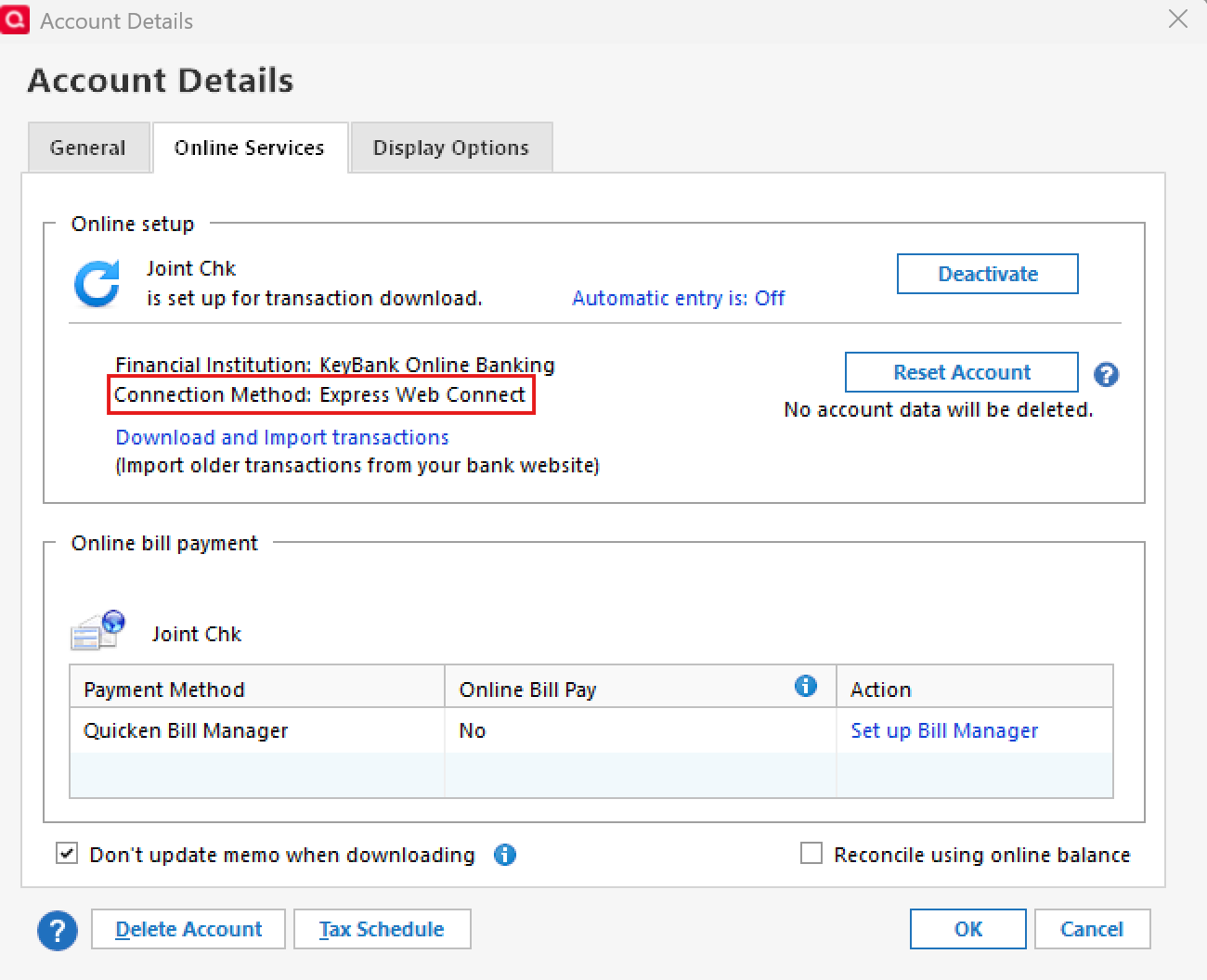
- In the Account Details window that appears, click on the Online Services tab.
- You’ll see the current connection method listed there (such as "Express Web Connect+" if you're on the new connection method).
If it says "Express Web Connect+" under the connection method, you’re on the new system. Let me know what you find, and I’ll be happy to help from there.
Thank you.
Quicken Alyssa
Make sure to sign up for the email digest to see a round up of your top posts.
0 -
The errors with one step update and Fidelity remain inconsistently persistent.
For example, a red circle with a line through it appear mysteriously - I follow the instructions and readd the account. The screen displays a message that the account has been added — then followed by a subsequent message that "account not found on Fidelity Investments — you should disable from one step update".
To make matters worse, the next time I perform one step update, 3 accounts that had been successfully updated with the authorization, now fail the one step update.
It goes round and round like this;
When will a solution be available?
[Edited-Readability]
0 -
Hello @Matthew Boone,
Thank you for adding to this discussion, though I am sorry for your frustrations.
Please try the following steps to resolve your issue:
1. Save a Backup. Steps can be found in this article if needed.2. Disconnect ALL Fidelity accounts in Quicken. Here are the steps on how to do that.
3. It's also a good idea to check for hidden accounts and make sure there are none that are still connected.
3. Revoke Quickens Third-Party Access from the Fidelity website.
4. Add accounts back into Quicken
Once back in Quicken, you will want to make sure you choose the "LINK to existing" option for any of the accounts that were already in Quicken.
I hope this resolves the issue! If not, we are here to help.
Quicken Alyssa
Make sure to sign up for the email digest to see a round up of your top posts.
0 -
Thanks again Quicken Alyssa,
I checked my Fidelity accounts connection method and they all still show the Direct Connect method. I'm not sure why the reauthorization process didn't work or complete. I'm hesitant to try again until Quicken releases an update to address the Fidelity reauthorization issues.
0 -
Hello @DaveQN,
Thank you for following up and sharing your concerns.
When you are ready please use the same steps I provided to Matthew to get your fidelity accounts connected via Express Web Connect +.
1. Save a Backup. Steps can be found in this article if needed.
2. Disconnect ALL Fidelity accounts in Quicken. Here are the steps on how to do that.
3. It's also a good idea to check for hidden accounts and make sure there are none that are still connected.
3. Revoke Quickens Third-Party Access from the Fidelity website.
4. Add accounts back into Quicken
Once back in Quicken, you will want to make sure you choose the "LINK to existing" option for any of the accounts that were already in Quicken.
I do hope it goes smoothly for you.
Quicken Alyssa
Make sure to sign up for the email digest to see a round up of your top posts.
0 -
Even with today's Quicken update download, and doing the things recommended in the above message, still receiving 'connectivity errors' in Quicken with Fidelity. What now is suggested??
[Edited-Readability]
0 -
Also, despite a successful update with one step, still receive error the account doesn't exist or nickname has been changed? Very unstable as it appears erratically. Now what?
[Edited-Readability]
0 -
I am having similar problems. Every time I start Quicken I am asked to reauthorize three account, all of which have been closed years ago. So I do the reauth process and get a message that says it was successful. BUT after the download and quote update is done and I look at my investments, none of the quotes have been updated and none of yesterdays transactions have been downloaded for any of my accounts. This all worked fine up until 5 or 6 days ago when it went sideways. I cannot get an accurate account value for my investments nor an accurate display of my holdings. I am not sure who is to blame here, Fidelity or Quicken and frankly don't care other than to figure out who to talk to to get this resolved.
0 -
I just started getting the error that I had to reauthorize my Fidelity accounts today, 9/27/2025. I tried and it seemed to work at Fidelity, i.e. it said it was successful, but Quicken said it failed. I currently can't download from Fidelity. Is there any new information on this issue?
0 -
Same for me. Told to reauthorize, go through the process, told everything is reauthorized and then discovered an error message that I need to reauthorize. It has been working ok for 10 days or so. What happened?
0 -
I got this a couple of hours ago when trying to update my accounts:
0 -
I just reauthorized successfully.
0 -
Also, getting repeatedly asked to reauthorize Fidelity accounts. I've tried disconnecting account and setting up again. No luck
0 -
Hello All,
Thank you for expressing your concerns and letting us know the steps you have tried, and the outcome of those.
For anyone who has not yet tried the steps provided above, please do so.
I am happy to hear your authorization went successfully!
From my end it shows your last connection with Fidelity was without errors. Are you still getting an error message?
For everyone else, who have tried the suggested steps, and are still stuck in a reauthorization loop or missing transactions, you should contact Quicken Support directly so we can get those reported.
Thank you!
Quicken Alyssa
Make sure to sign up for the email digest to see a round up of your top posts.
0 -
I am also having this issues with Version 8.3.2 (Build 803.58902.100) macOS 15.6.1
Please contact me when this is resolved so I can start using quicken again. Very disruptive issue.0 -
Hello @steves12345,
Thank you for adding to this discussion, though I am sorry for your frustrations.
If you need help with something specific, please share it, and we will do our best to help you get it sorted out.
Unfortunately, posting here will not get someone to reach out to you in the way I think you are hoping. But you can follow this Alert for updates and progress on this migration.
Hope this helps!
Quicken Alyssa
Make sure to sign up for the email digest to see a round up of your top posts.
0 -
Here is what is repeatedly occurring. After jumping through all of the hoops for dozens of times, I was finally over the weekend able to get the one step update working with Fidelity without errors.
Then the next day, when updating, all errors again returned: "Quicken is unable to update your account . This may be because the account was closed or its nickname has changed".
So whatever is the problem, it doesn't necessarily stay "fixed".
INTERESTINGLY, IF I DELETE THE RUNTIME.DAT FILE, one step update will subsequently work perfectly. But it doesn't stay that way, and ultimately the above errors and failures to download once again occur at subsequent one step updates.
I feel like the customers are having to become the programmers at Quicken, and try and debug the program themselves.
I have two very specific questions: 1) What is the problem 2) when will Quicken have a solution.
[Edited-Readability]
0 -
Hello @Matthew Boone,
Thank you for adding additional details regarding your experience with this issue.
I am sorry to hear that the issue has persisted for you. At this point, I think it is best if you contact Quicken Support so they can take a closer look at what might be happening. This way, you can also explain to them your additional findings.
I do hope they can help you find a resolution.
Thank you.
Quicken Alyssa
Make sure to sign up for the email digest to see a round up of your top posts.
0
Categories
- All Categories
- 56 Product Ideas
- 36 Announcements
- 223 Alerts, Online Banking & Known Product Issues
- 22 Product Alerts
- 701 Welcome to the Community!
- 671 Before you Buy
- 1.2K Product Ideas
- 53.7K Quicken Classic for Windows
- 16.3K Quicken Classic for Mac
- 1K Quicken Mobile
- 813 Quicken on the Web
- 111 Quicken LifeHub