Quicken Crashes Trying to enter Salary Payment/Split transaction.

jgharris7
jgharris7 Member ✭✭✭

I cannot update my financials because when I try to enter my Salary payment which is a recurring split transaction stored under the BIll and Income Reminders. Quicken also crashes when I copy and paste a previous salary payment into the check register, edit it, and hit enter.

The salary payment split includes a deposit to a checking account, tax and insurance deductions, and deposits into HSA and 401K accounts.

The crash occurs when the transaction is entered. Rebooting the machine and reinstalling Quicken did not fix the problem. I am running R64.25 build 27.1.64.25 on the PC running Windows 11 Enterprise.


Comments

  • Quicken Anja
    Quicken Anja Moderator mod

    Hello @jgharris7,

    Thanks for the detailed description of what’s happening—I know how disruptive crashes like this can be. To help narrow things down a bit more:

    • Is your Quicken data file stored on your local hard drive (C: drive), or is it on a cloud-based/external drive (such as OneDrive, Dropbox, or USB)?
    • When did you first notice this issue starting to occur?
    • Were there any significant changes to your system or software around that time (such as updates or new installations)?

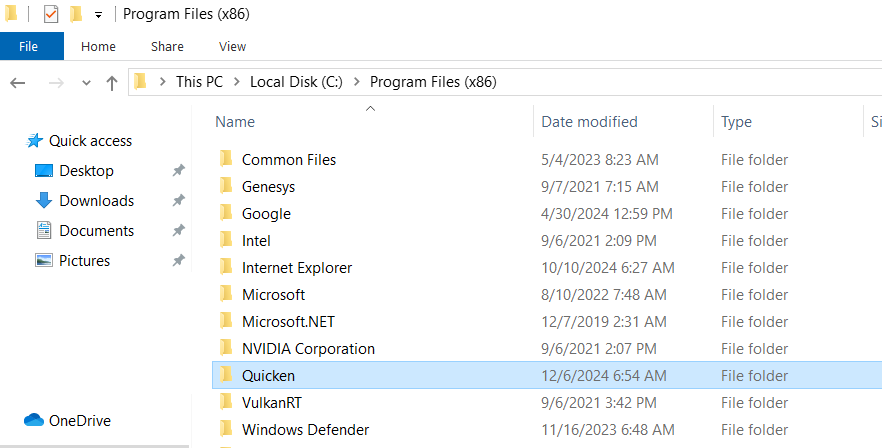
    Also, regarding the reinstall: when you reinstalled Quicken, did you first uninstall and then manually delete the Quicken folder from C:\Program Files (x86) before proceeding with the reinstall? (This step won’t affect your data files, but it helps ensure any corrupted program files are fully removed before reinstalling.)

    If you haven’t already, I’d recommend trying that clean reinstall process. Here’s a screenshot of where to find the folder:

    image.png

    Check back and let us know! Thank you.

    -Quicken Anja
    Make sure to sign up for the email digest to see a round up of your top posts.

This discussion has been closed.