can't fix (broken) online payee from Truist (caused during the Truist billpay upgrade 6/25)

John QW
John QW Quicken Windows Subscription Member ✭✭

I'm on windows R64.25 Windows 11, just to get that answered.

Bear with me here, I will show all combinations I've tried, but TLDR "that combination of payee name and account number already exists" (when I'm trying to refresh/readd that payee/accoutn number with a different mailing address.

Ok, so many of went through the Truist Bill Pay System 'upgrade' back in late June and we had a lot of threads on the issues (now all closed topics).

So one of the first online payees I tried to use failed right after the upgrade... Truist bill pay went into some kind of error state and converted that online payee (Citi Cards) from electronic payment to check.

And worse than that, unbeknownst to me at the time (since Ive been paying via electronic payment all this time), Citi Cards changed their billing address PO box since the last time I entered the info into the payee.

So the check was mailed to the older PO Box. I was waiting patiently for that check to arrive.. all the way up to day before due date, and figured it was lost. So I did an EFT transfer payment direct from my checking to Citi to make sure the payment got there on time.

I waited another week, still no check received and then figured out that the address changed, and assumed they had already stopped mail forwarding. So I called truist and issued a stop payment on the check... got them to waive the fee due to the billing system fiasco. And naturally arrived at Citi Cards the very next and they sent me a nastygram for the stop payment..(even though the account was already paid up...)

And now, back to the Citi Cards payee and the quicken issue. Truist still has it at manual check.. even though I have a second payee to same Citi cards thats still electronic. I called truist and they basically refused to change the payee to electronic ("the third party gets to decide if it electronic or check"). From that statement it may no longer be directly controlled by Truist.

So I tried to update the address of the payee on the truist site (my past experience with truist has been to update on the website, and pull the change into quicken as the most reliable for payees).. And... when I try to change the address, truist website errors out 'we're sorry, something went wrong'.

So then I figure OK, I'll delete the payee on truist site.. and pull that into quicken. they let me delete the payee on the site, but when I resynced it didnt remove from quicken (and I even did the ctrl-shift-contact info) and reset the online payee sync for truist.

So I try to delete the payee in quicken.. get the "you can't do that beecause you have scheduled or pending.." I didn't have scheduled or pending.. but I always forget that reminders count. So I delete the recurring reminders for the payee bill.. and then quicken lets me delete. (but not really).

So... the payee is gone on truist site. the payee is gone from my Quicken online payee lists for truist (or 'all online payees").

I got back to truist... and I add a 'new' payee for the deleted Citi Cards account. New Truist interface doesn't even ask me for an address (but also doesn't populate one (at all). they auto match the payee, and auto populate the 1-800 number (even though that phone number has changed on my most recent citi statement).

I try syncing to quicken...no new payee. And I see even in the OFX log, that truist just skipped the Citi cards payee in the payee sync (my other working citi cards account is there (with same outdated address etc..but again its electronic) as are all my other payees. I waited 24 hours... and still not address populating on truist site or via payee sync in OFX.

So last test, I again delete the payee on truist site. And I gt to quicken and try to add a new payee. And I forget this after any long stretch of no issues.. but Quicken really never (really) forgets any online payee.

So when I try to add the 'new' citi cards payee (with new address).. I can see the old one popping up as suggested (including the description field). I try entering the new info and even use a different description... but Quicken gives "that combination of payee name and account number is already in use. I even tried deleting that combination of payee (description) account number from the memorized payee list. But still no go. And while trying other combinations, I can see quicken still reminders old payee combinations from many years ago that are long dead).

So Whats left, any other options? I've looked in the one payments list (nothing there for this payee). Some other option secret key combo to re-enter/delete the old combo?

I can try to re-add the payee on truist and issue a payment direct from their website to see what happens.. (since they have no address shown, I assume it would automatically go electronic (?) ? but most likely if that works its only going to show up in quicken after said payment is made as a downloaded/cleared transaction, and not what I'd prefer, obviously.

If you made it through this post.. thanks! for your time.

Comments

  • John QW
    John QW Quicken Windows Subscription Member ✭✭

    So an update here. I re-add the payee via Truist website.. again it recognizes Citi Cards and automatically fills in the fields (but no billing address). I try an immediate electronic payment, issued from website. This correctly processes in 3 days, so thats good. But the 'new' payee (maybe because there is no address, or maybe because after their billing system upgrade, this no longer works) does not come down in the payee list in the ofx (all the other payees do).

    So for that part I guess the only option is to contact truist.. but my last few tech calls were abysmal with no working knowledge of quicken/billpay on their end. So I'm stuck paying this bill from the bank website for now/ever.

    But for the Quicken part.. this payee is deleted on quicken side, but i can't (ever) try to re-add from the quicken end (to see if the bank will update as a new payee).. Theres nothing pending, no reminders, no schedule transactions… but Quicken permanently remembers "this combination of payee and account number is already in use"… I have tried various ways to get it to add, but they all fail. Is there any way on Quicken side to get past the 'this combination of'.. or more directly delete that memorized combination?

  • John QW
    John QW Quicken Windows Subscription Member ✭✭

    Anybody from quicken to at least give a comment? Is there no way to unmemorize a combination of payee name and account number so that I can re-add it (the same combination).

  • Quicken Kristina
    Quicken Kristina Quicken Windows Subscription Moderator mod

    Hello @John QW,

    Thank you for reaching out! Sorry for the delayed response. If I'm understanding correctly, there are 2 issues.

    The first issue sounds like an issue on Truist's side, where the information for the payee isn't filling in correctly and isn't being sent to Quicken.

    To look into the second issue, where Quicken won't let you re-add the payee because it claims that combination of payee and account number already exists, sounds like that information is still being saved somewhere in your file. You mentioned that the payee is deleted on the Quicken side. Where did you delete it from? Does the payee show up when you navigate to Tools>Online Payee List?

    I look forward to your response!

    Quicken Kristina

    Make sure to sign up for the email digest to see a round up of your top posts.

  • John QW
    John QW Quicken Windows Subscription Member ✭✭

    Kristina,

    I mentioned that in my original post… but No, the online payee list does not show this payee anymore. no pending transactions, no scheduled payments, no reminders. Naturally, that 'combination of payee name and account number' is contained in many transactions (for when the payee worked back before the truist upgrade). Multiple years of payments are in the register. What used to work in cases like this in the past, was changing the option {description} for the payee/account number.. quicken would usually take that as a new payee. That no longer works.

    yes, the other issue appears to be truist side (for a payee entered on their website. So I want to try to 'push' the online payee from the quicken side (with name/address fields etc) and see if truist accepts and adds to the list.

    But I am stuck at the quicken end with "this combination of payee and account alreadyt exist

  • Quicken Kristina
    Quicken Kristina Quicken Windows Subscription Moderator mod

    Thank you for your reply,

    The issue may be file-specific, since you mentioned that even changing the description doesn't force Quicken to see it as a new payee. To troubleshoot for that, I suggest that you try validating your data file.  Please save a backup file prior to performing these steps. 

    Validate: 

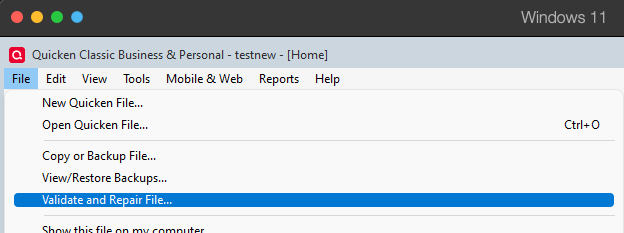
    1. File
    2. Validate and Repair File... Validate and repair.png
    3. Validate File
    4. Click OK
    5. Close the Data Log
    6. Close Quicken (leave it closed for at least 5 secs)
    7. Reopen Quicken and see if the issue persists.

    Please let me know how it goes!

    Quicken Kristina

    Make sure to sign up for the email digest to see a round up of your top posts.

  • John QW
    John QW Quicken Windows Subscription Member ✭✭

    yeah, I had tried validate already. but I tried it again. after validate, the same issue remains. 'this combination of payee name and account number already exists…'

  • Quicken Kristina
    Quicken Kristina Quicken Windows Subscription Moderator mod

    Thank you for your reply,

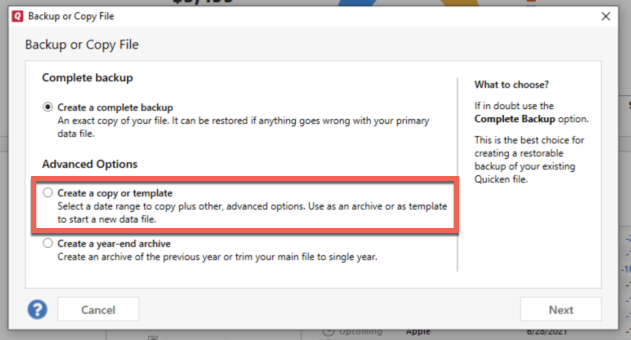
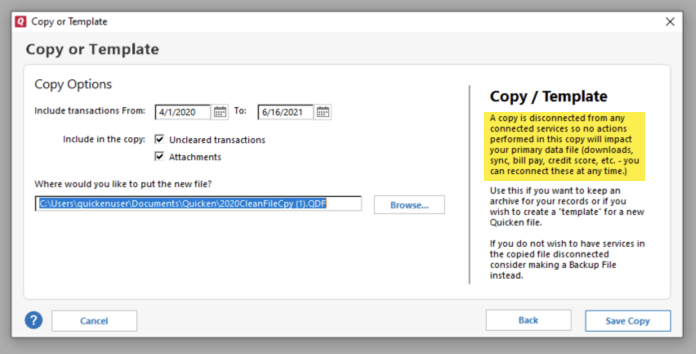
    Next, I suggest that you try creating a copy of your data file which will rebuild all of the internal lists and database tables. If successful, you would then move forward with the copied file. To create a copy, please navigate to File > Copy or Backup File... > Create a copy or template (see examples below) which will also allow you to select a date range to move forward with.

    If you wish to move forward with your entire data file, please check the full date range of your entire data file before copying so you can enter the correct date range if you do not wish to "shrink" your file by eliminating certain dates. Note - The only reason to "shrink" your file is if you believe older data may be causing the issue you're encountering.

    image.png image.png

    It's important to know that all online services will be disconnected in the copied file, and you will need to sign back in with your Quicken ID and reconnect all of your online accounts, online billers, Quicken Bill Manager services, etc if you plan to use that copied file going forward. The reason for this is that the new copy also creates a new and separate dataset ID.

    Please reconnect only what is necessary to test if the issue is resolved. If the issue is resolved in the copied file, then I recommend reconnecting everything and using the copy as your main file going forward.

    If the issue is not resolved in the copied file either, then feel free to switch back to your original file. For instructions on how to switch between data files, click here.

    I hope this helps!

    Quicken Kristina

    Make sure to sign up for the email digest to see a round up of your top posts.

  • John QW
    John QW Quicken Windows Subscription Member ✭✭

    Kristina,

    Well, the validate and 'try a file copy' are the last resort steps always suggested. Validate did not fix it.

    A Copy as you note will lose all the online payee information. I'd have to enter all existing payees and the reconnect to Truist. Thats not practical or doable without first wiping out all the payees from truist side (website) to begin with… which puts all the payees at risk of this issue, and/or my account to become messed up with duplicate payees.

    I'd like confirmation that the Quicken s/w logic here will actually allow a payee combination of account and payee to be re-entered (if description field is changed) and accepted. From what I have observed, its no longer possible.

    At very least, there should be some way to override the warning and allow it.

  • Quicken Kristina
    Quicken Kristina Quicken Windows Subscription Moderator mod

    Thank you for your reply,

    If the issue is file specific, setting it up in the copied file may correct the issue.

    Thank you!

    Quicken Kristina

    Make sure to sign up for the email digest to see a round up of your top posts.

  • John QW
    John QW Quicken Windows Subscription Member ✭✭

    the last resort copy would mean first deleting all the online payees out on the truist web side (from their web portal) otherwise risking duplicates as I'd have to recreate all the payees on the quicken side and try to sync them. Thats a big risk with a one way door on the bank side; especially since I don't even know if the payee push from the quicken side will work. That puts all working payees at risk.

    Still, looking for confirmation from quicken on the behavior of 'this combination of payee and account number' error even you change the description field for the 'new' payee. The behavior has either changed or is broken.

  • Quicken Kristina
    Quicken Kristina Quicken Windows Subscription Moderator mod

    Thank you for your reply,

    Since you're not comfortable making a copy of your file, I recommend that you contact Quicken Support directly for further assistance. The Quicken Support phone number can be found through this link here. Phone support is available from 5:00 am PT to 5:00 pm PT, Monday through Friday.

    I apologize that I could not be of more assistance! 

    Quicken Kristina

    Make sure to sign up for the email digest to see a round up of your top posts.

This discussion has been closed.