I've been with Quicken since Comdex 1988. I'm using Classic Deluxe on Windows. Believe it or not my first attempt to use Online Accounts was last week after getting a new Chase credit card. That is what brings me here today.
I was under the impression that ALL new transactions would auto sync from bank to Quicken whenever I clicked "Update Now". Sadly as I just experienced that is not the case. The only way transactions are downloaded is after they are out of the banks "pending" status. I confirmed pending transactions from yesterday and today do NOT show up on the Pending tab at bottom of register.
When I called support today in hopes they would have a way to download pending, I was told it that the bank decides when to send the transactions, which with many banks is only after they have cleared. This can take up to 72-hours, although I'm not sure if it's longer over a weekend. He suggested that what some people do is manually enter the transactions, and then when they get their statement they download transactions and manually compare/reconcile. It's bad enough to have to proof any downloaded transaction to be sure it was accurately assigned to the correct category, since the user is taking at least twice the amount of time needed with non-online accounts. Wow, so much for saving time, it's just the opposite.
I then decided to poke around in Quicken myself and found the Preferences->Pending Transactions! So I set it up again, only to discover Chase bank doesn't support downloading pending transactions. Why then was I given the option during the link process to choose between "show pending transactions in register" and/or "include in current ending balance" as shown in the screen shot below. Since one is grayed out it leads one to believe that that the other is in fact supported. Quicken needs to update their system to show valid information either before or during the link process to avoid the user from wasting their time, which I assume is why the setting is there in the first place.
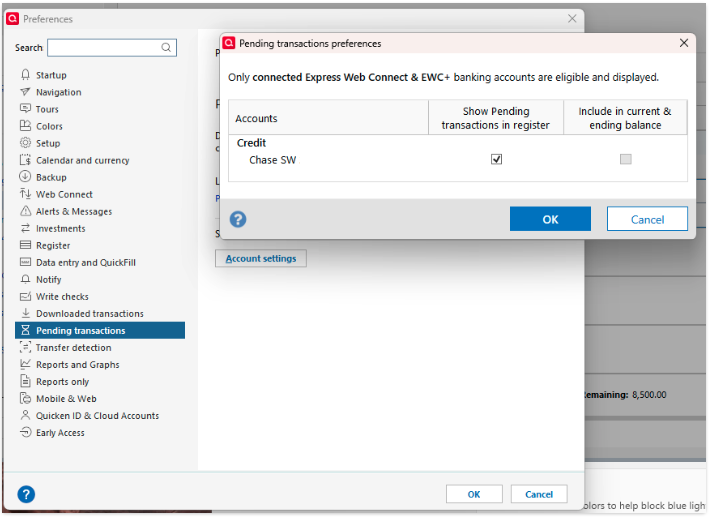
Considered that it's probably a uncommon situation for many (not all of course) to have multiple pending transactions for as little as maybe a few cents to thousands across multiple accounts. Therefore, the user will never see an accurate financial picture across their accounts. This also means they can't run accurate reports. In fact, no report for an Online Account will ever be up-to-date, therefore never accurate. One of the main reasons why people have Quicken is to always have a complete picture of your finances and for some investments as well. Also to save time by avoiding to manually enter transactions. Oh course there's reporting.
This led me to decided to get a better understanding of pending transactions using ChatGPT.
Here’s how it typically works in U.S. banks (and most others):
- Pending transactions are temporary holds placed on your account when you use your debit card or authorize a payment. They reduce your available balance but aren’t final yet.
- When the merchant sends the final request to actually withdraw the money, the bank tries to settle it.
	- If funds are available: it clears, becomes a posted transaction, and the hold is lifted.
	- If funds are not available: the bank may either
		- Decline/return the payment (the pending charge eventually disappears, often within a few business days), and the customer may be hit with an overdraft or NSF (non-sufficient funds) fee.
		- Cover it anyway (if you have overdraft protection or the bank allows it), in which case the transaction posts, your balance goes negative, and you’re fined.
- If the merchant never finalizes the charge (sometimes happens with gas stations, hotels, or car rentals), the pending transaction will drop off automatically, usually after 3–7 days, though some holds can last up to 30 depending on merchant type.

So yes: if the bank rejects the transaction for insufficient funds, the pending authorization will eventually disappear. But if the bank pays it and pushes your account negative, it will post instead of disappearing.

Do you want me to break down how this works differently for debit card holds (like at gas stations) vs. ACH transactions (like checks, PayPal, bill pay)?
So according to ChatGPT, it could take 3-7 days for a transaction to clear and finally appear in Quicken!
So, just as when cleared transactions appear, pending transactions would also be included. If a previously download pending transaction is deleted by the bank, then it would be auto deleted with next sync in Quicken. Given that Quicken has some kind of agreements with numerous banks, they should approach them with this idea of allowing pending transactions to be included.
I'm going to assume that most people have never experienced this. By manually entering transactions I've discovered multiple times during reconciling, that it's not uncommon for charges, that I have receipts in hand for with last 4-digits CC number, to never show up on the credit card bill. Across all accounts I have about $1,500 in old uncleared transactions. If I wouldn't have entered them manually, and discovered them during reconciling, I would have never discovered that. Without Quickens reporting ability, I also would not have known this total ongoing dollar amount. This is another reason why I going back to doing that exclusively.
Given all of the above, I can think of no reason to use Online Accounts feature.
[Edited - Removed partial account number]

