Error 324 connecting to Target Guest Card (aka Target RED Card)

For several weeks now, attempts to download from my Target RED Card (aka Target Guest Card) get error ACCOUNT_NOT_FOUND (324). I go through the Reconnect process, and it is completely successful except that it still gets the same error on the download.
I saw that there was an issue with Target National Bank, but a) that's not the store card, and b) the known issues topic says that issue is fixed. But I still get the same error.
Note: I can connect to the RED card using the web page, so I know my account does exist. And besides, if it didn't exist then they're be an error during the reconnection process.
Comments
-
Hello @Michael Schmitt,
Thanks for sharing the details. Before starting the reconnect process you mentioned, did you first fully disconnect the account in Quicken? That step can help avoid errors like the one you're seeing. Steps on how to do that can be found here in the Error 324 Article.
Also, as the article mentions, it's possible that a hidden account may still be connected and causing the issue. To check for this:
- Open Quicken and go to the Accounts menu at the very top of your screen.
- Select Hide and Show Accounts from the dropdown.
- Review the list to see if there are any hidden accounts associated with your Target RedCard.
- If you find any, please verify that they are fully disconnected from online services.
Let us know what you find!
Quicken Alyssa
Make sure to sign up for the email digest to see a round up of your top posts.
0 -
Nope. I followed the linked Error 324 Article instructions to fully disconnect, then reconnected it. There were no hidden accounts.
Same result: the connection process completes but then the download gets the same 324 error.
0 -
Hello again @Michael Schmitt,
Thank you for trying those steps and following up!
When reviewing your account internally, I am unable to see the 324 error that you are seeing from your end. Do you by chance have a VPN, Firewall or AntiVirus you are using? If so, would you be willing to disable it, try connecting again, and if you still get the 324, go to Help>report a Problem and send logs while that VPN is off?
Screenshots of what you are seeing from your end could also be helpful. If needed, please refer to this Community FAQ for instructions on how to attach a screenshot. Alternatively, you can also drag and drop screenshots to your response if you are not given the option to add attachments.
Thank you.
Quicken Alyssa
Make sure to sign up for the email digest to see a round up of your top posts.
0 -
I used Connection Status > Send Report to Quicken to send in logs a week ago. I'm not using a VPN. I do have firewalls(s) and anti-virus.
Current status of the account is "DISCONNECTED" for some reason. :-(. Reconnected it.
First, let's try rebooting the router to clear up any DNS issues. Nope, didn't help. It connects but then gets the 324 error.
I turned off Sophos Anti Virus, Little Snitch, and the macOS firewall. Same problem.
Screen shot of what? The Needs Attention pane in Connection Status? Is any of that info private?
0 -
Thank you for trying the extra steps and providing an update.
At this point, as stated in the Help Article, you will need to contact Quicken Support, as further investigation/escalation is needed.
I did see the log files you sent on the 13th. In preparation for your interaction with Quicken Support, you can go to Help>Report a problem from within your Quicken software to submit new logs.
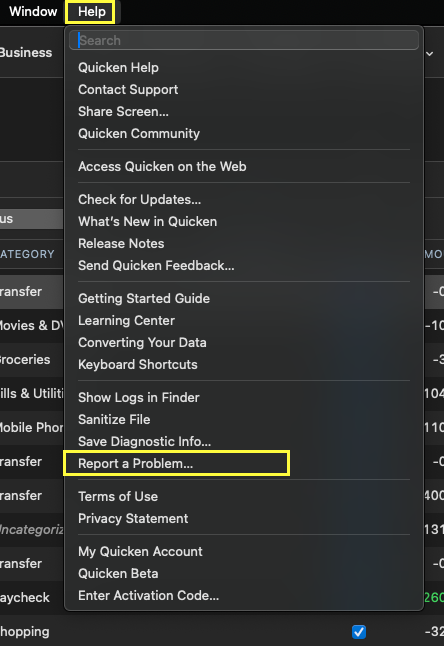
They will need log files that are less than a week old.
Thank you.
Quicken Alyssa
Make sure to sign up for the email digest to see a round up of your top posts.
0 -
I tried contacting Quicken Support today. "Gabriel" wouldn't help me because I'm a beta tester. Note that I'm not using a beta release here, it is Quicken Classic Premier 8.3.2. And my membership is valid until 12/31/2025.
Meanwhile: I tried connecting Target again today, and noticed something odd. When I got to the step where it asks me to select which Quicken account to match the downloads to, it said that account was already connected to a different account number — but the account number it says it is connected to has the same last 4 digits (the rest are masked) as a) the card, b) my online Target Circle account, and c) what it updated it to.
I'm wondering: Is Quicken getting the wrong account in the masked digits? Is it actually getting an account WITH masking characters in the digits?0 -
Hello @Michael Schmitt,
Thank you for following up, and I'm sorry to hear that you were unable to get support.
I have sent you a direct message. Please navigate to the inbox in the top right-hand corner of the Community page and check your inbox.

Thank you.
Quicken Alyssa
Make sure to sign up for the email digest to see a round up of your top posts.
0 -
Solution to this problem is to use Target National Bank for a Target RedCard (Credit), not Target Guest Card. Thanks @Quicken Alyssa !
0 -
Hi @Michael Schmitt,
Happy to hear that worked! Thank you for coming back to share that in the thread, as it may help others.
If you need more help, don't hesitate to reach back out!
Thank you!
Quicken Alyssa
Make sure to sign up for the email digest to see a round up of your top posts.
0
