Fidelity Transactions not downloading to Quicken Classic on Windows
Comments
-
Like many, unable to download Fidelity accounts. Mine has failed since October 27th.
I have tried the following multiple times:Create a backupof your Quicken file first.Deactivateall Fidelity accountsin Quicken.Revoke Quicken’s third-party accessfrom your Fidelity account on their website.Reactivatethe accountsin Quicken. When you’re redirected to the Fidelity site and then return to Quicken, make sure to select“LINK to existing”for any accounts that were already in your file.
The system recognizes the SPAXX and FDXX accounts during the reactivate session and asks if to set up as Cash account. I say yes and seems fine, but no transactions.
Sometimes it will recognize the account in Quicken and automatically link to existing and other times it asks to add a new account. This is also, random.
Then I tried:
1. Go to
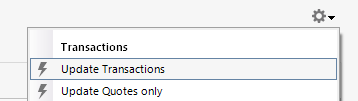
Edit > Preferences > Downloaded Transactions. The optionAutomatically add to investment transaction listsneeds to be unchecked.2. Refresh your online account information by clicking the Actions Gear Icon on the upper right of the register, and select
Update Transactions.Follow the on-screen instructions to complete the update.3. Confirm that the Sort Order in your account is by Date; just click the top of the Date column in your account register. It's possible the transactions are in your register, but not where you thought they'd be.
4.
Try refreshing your login session: To do this, go toHelp > Refresh Sign in. After completing the log-in process, trying running a One Step Update again.5. Go to
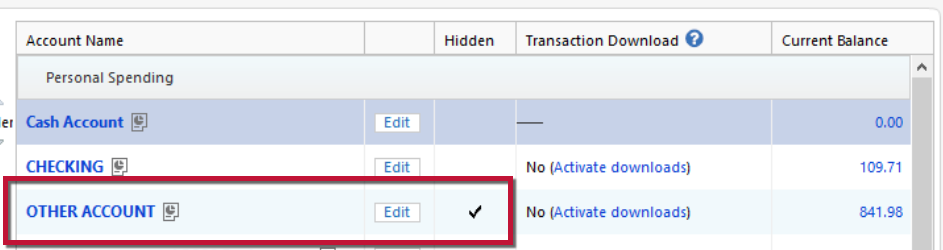
Tools > Account Listand checkShow Hidden Accountsat the bottom left. Confirm the missing transactions haven't been added to a hidden account by clicking on the name of any account that appears with a check mark in theHiddencolumn.Still no luck.
One error I get at random when clicking on one of my Fidelity accounts in quicken is "Invalid Date." Then the next time it disappears and won't see it again for days or weeks. - This could be red herring.
Version: Quicken Classic Deluxe, Windows, R64.35 build 27.1.64.35 on Windows 11
Quicken user since 1995.
0 -
Hello @DingoBaby & @Jeff Mich,
Thank you for letting us know you're also seeing this issue. If you followed the troubleshooting posted earlier in this discussion and the issue is persisting, then I recommend you contact Quicken Support directly for further assistance. They have access to tools we can't access on the Community and they're able to escalate the issue as needed. Quicken Support's contact information can be found through this link here. Phone support is available from 5:00 am PT to 5:00 pm PT, Monday through Friday. Chat support is available from 5:00 am PT to 5:00 pm PT, 7 days a week.
I apologize that I could not be of more assistance!
Quicken Kristina
Make sure to sign up for the email digest to see a round up of your top posts.
0 -
Have not had the chance to call support. I did do an experiment to see where the issue could be.
1. created a new Quicken file just for Fidelity. - Result: I was able to download transactions. But, alas not all of them came through as a couple were missing. Went back to my original file and still nothing, so could be something in the data file and an issue with the connection.
Progress, but not sustainable as I would lose out on years of investing data or have to manually input them. (sigh).Schwab, Etrade, banks, and credit works fine.
Will call support when time permits.0 -
Thank you for the follow-up @Jeff Mich,
Your test in the new file does indicate that file problems may be part of the problem. Doing a validate and repair on you main file may help. To do that, please save a backup file then follow these steps:
Validate:
- File
- Validate and Repair File...
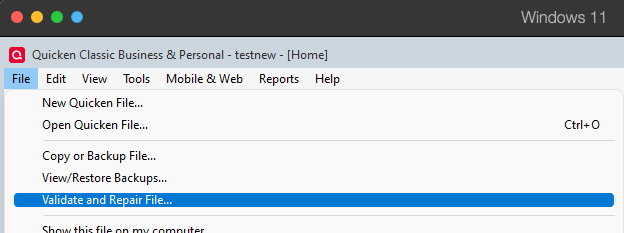
- Validate File
- Click OK
- Close the Data Log
- Close Quicken (leave it closed for at least 5 secs)
- Reopen Quicken and see if the issue persists.
Let me know how it goes!
Quicken Kristina
Make sure to sign up for the email digest to see a round up of your top posts.
0 -
@Quicken Kristina
No errors or issues found after doing the validation of the file. Tried setting up the download again for Fidelity and still didn't work. 🙄
What does work unfortunately is:
Deactivating the Fidelity accounts
Create a new account → don't setup the download yet and skip the cash and add stock to the account.
Move all the non-downloaded transactions from the old account to the new account to keep the history.
Do this by clicking on the gear icon in the old account- Move Transactions
- Select all the transactions
- Select the new account to move to (This is important to select the correct account)
- Click move
- Click done
- Now set up online downloads - Make sure to link to existing is to the new account.
***If you have multiple Fidelity accounts ensure you keep them checked for those that are done otherwise Fidelity will deauthorize them and you will get an error in Quicken that the account is no longer active and you have to reauthenticate them.
In the end I had 4 securities that didn't line up out of 25+ with the share amounts, but overall that worked a lot better than creating a new account, downloading transactions, and losing 10+ years of history.
Now to finish my other accounts. (Sigh)
0 -
Thank you for your reply,
I'm glad to hear you found a process to resolve the issue! Thank you for sharing the process you used.
Hopefully this will help others encountering this issue!
Quicken Kristina
Make sure to sign up for the email digest to see a round up of your top posts.
0 -
I've tried all the solutions even the plausible one from Jeff Mich and none of them work. Like others in this thread, I've been unable to receive transactions since 9/30. It seems simple from a software perspective that both go back through their changelogs to 9/30 and revert the errant code.
When is Fidelity and Quicken going to resolve this?
0 -
It's been so frustrating dealing with these missing transactions problem for Fidelity. What's the point of paying for annual subscription when I have to manually enter the transactions?
My BrokerageLink account (linked to my employer's 401k account) also isn't downloading transactions. Specifically, there was a reinvestment of dividend on Nov. 28. This was for a mutual fund (not money market).
That transaction isn't downloading, as of Nov. 30. But when I reconcile shares, it shows that the # of shares in my Quicken account doesn't match the holdings info downloaded from Fidelity. So apparently Quicken's last download of Holdings info from Fidelity did include the share balance that includes reinvestment. But it didn't download the actual transaction of reinvestment.
0 -
Hello @John@88,
Thank you for letting us know you're seeing this issue. To clarify, is it just that one transaction that isn't downloading? If not, are all transactions failing to download, or only some?
I look forward to your reply!
Quicken Kristina
Make sure to sign up for the email digest to see a round up of your top posts.
0 -
It's all transactions for dividend payments or reinvestment of dividends. For both mutual funds and money market funds. Fidelity mutual funds such as FNBGX and money market funds such as FSIXX distributed dividends on November 28. None of those downloaded by Quicken, even though the Holdings information updated to include the reinvested dividend shares.
0 -
Thank you for your reply,
To start troubleshooting, please follow these steps from our article on missing transactions/transactions not downloading:
Be sure to follow these steps in order:
1. Go to Edit > Preferences > Downloaded Transactions. The option Automatically add to investment transaction lists needs to be unchecked.

2. Refresh your online account information by clicking the Actions Gear Icon on the upper right of the register, and select Update Transactions. Follow the on-screen instructions to complete the update.
3. Confirm that the Sort Order in your account is by Date; just click the top of the Date column in your account register. It's possible the transactions are in your register, but not where you thought they'd be.

4. Try refreshing your login session: To do this, go to Help > Refresh Sign in. After completing the log-in process, trying running a One Step Update again.
5. Go to Tools > Account List and check Show Hidden Accounts at the bottom left. Confirm the missing transactions haven't been added to a hidden account by clicking on the name of any account that appears with a check mark in the Hidden column.
Please let me know how it goes!
Quicken Kristina
Make sure to sign up for the email digest to see a round up of your top posts.
0

