This discussion was created from comments split from:
Fidelity Investments no longer downloading transaction data
.
I'm very frustrated in that I can no longer download my Fidelity transactions. The Quicken support pointed at Fidelity and blamed them for the problem. I spoke with Fidelity and they made every effort to help me, however they pointed out that it is not their software. We did try opening a test company and I was able to download all of the information in the test company with no issue. This appears to be a customer by customer issue. My problems did not begin until September 25th. (I have been a Quicken user since the 1980s, and have downloaded my transactions since that feature became available.) I hope that this is resolved shortly as the downloading of transactions is what makes Quicken valuable and without this feature, it loses much of its value to me.
Hello @sm29,
Thank you for reaching out! I moved your post into it's own discussion because I can see you use Quicken for Windows and you posted on a Quicken for Mac discussion.
When you refer to a test company, do you mean Fidelity's support walked you through creating a new "test" Quicken file and connecting your accounts in that file? If that is the case, and your transactions downloaded in that test file, then that indicates there's a file-specific issue in your main file.
To troubleshoot this issue in your main file, I suggest that you start by validating your data file. Please save a backup file prior to performing these steps.
Validate:
Please let me know how it goes!
I have had the same problem since Quicken/Fidelity transitioned to the new system. My Fidelity accounts have not updated since the end of August. I have the latest Quicken updates, I have validated my Quicken files, I have tried with and without a VPN, and my Quicken files are local, not in the cloud. My other accounts update fine. These are all of the suggestions I have read on this discussion page.
Each Ttme I add or reset Fidelity accounts, the Fidelity site says it is approved, but either nothing updates, or Quicken says the account does not exist at Fidelity.com.
I created a new Quicken file and tried to sync several of my Fidelity accounts. Quicken asked me for the cash in each account, and when it was done, there was only cash, not any of the other assets. I synced again and nothing was added.
What can I do to use Quicken with Fidelity? When will this get resolved?
Hello @TQ,
Thank you for letting us know you're seeing a similar issue. To clarify, when you say that your Fidelity accounts have not updated, do you mean that no transactions have downloaded, or do you mean nothing is updating in the accounts? Is the behavior in the new file the same as the behavior you're seeing in your main file? Which holdings are not reflecting correctly? Are they core positions that should be tracked as cash?
I look forward to your reply!
Thank you for responding. Existing Fidelity accounts that have securities in them have not added new transactions since 8/29/25. I also created a new Quicken file with these Fidelity accounts and tried to set up Web Connect to download transactions. Only the cash balance I manually put in showed up, none of the securities in those accounts did after using one step update.
I have Quicken version Q64.30.
Yesterday, I talked with Quicken tech support, and they reset the accounts on their end and told me to try again in 24 hours. Now, when I try to update the accounts in the new Quicken file, it says "We are unable to update your account due to an unknown error. For more information, see this FAQ and quicken.com/support. Those links do not help.
I just tried to update the Quicken file I have been using, which has my assets and transactions up to the end of August. Each time I add or reset these Fidelity accounts in this Quicken file, the Fidelity site says it is approved, but either nothing updates (and the Quicken "Add account" screen says ", or Quicken says the account does not exist at Fidelity.com). This is the same error I reported in my first message.
What do I do to use Quicken with Fidelity?
Thank you for your help.
Thank you for your reply @TQ,
Which securities are not reflecting in the account? Is the value of those securities reflecting in the cash balance?
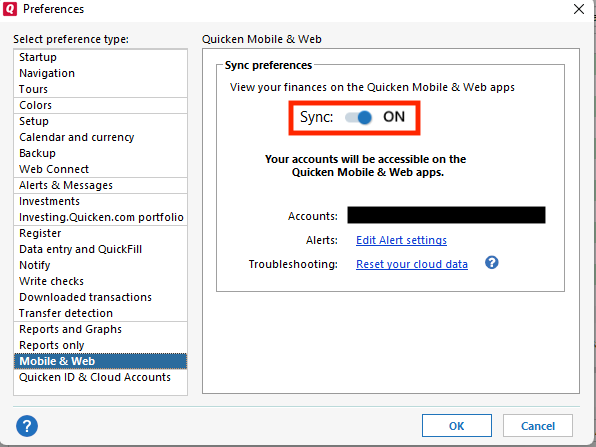
Do you have Cloud Sync turned on in your Quicken File? You can check this by navigating to Edit>Preferences>Mobile & Web.
If you do have Cloud Sync on, do you perform the sync as part of your One Step Update, or do you run the sync separately (from the Mobile & Web tab)?
Do you have multiple sets of login credentials with this financial institution and connected in your Quicken (for example, your accounts and a family member's accounts)?
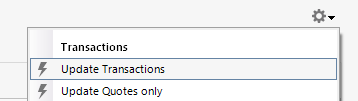
Do you update the accounts individually by clicking the gear icon near the upper right of the account register and selecting "Update Transactions"? If you do, are the accounts that you update individually the ones that are missing transactions?
I look forward to your response!
Thanks, Kristina, for your quick response.
I have two sets of Quicken files,
1. files I have been using all along and that synced perfectly until the change in syncing Fidelity accounts.
2. A new file I created (as suggested in this forum)
The Quicken files I have been using all along (#1) have all the securities I had on 8/29/25, but they do not add any new transactions, and securities are not being updated. Therefore, Quicken has the same amount of each security as I had on 8/29. The value goes up and down because the stock prices change. But, I do not have any new transactions since 8/29
I don't use cloud sync.
I use the same login for all the Fidelity accounts.
I try to update accounts altogether using One Step Update, and I have tried to update individual accounts individually. Neither work, and the results are as described in my previous emails (either I have to refresh each Fidelity account without success, or Quicken says those accounts do not exist at Fidelity, even though they do).
The new file I created a few days ago (#2) has no securities except the cash I manually added, as requested by Quicken, when I set up the account. Quicken does not add my securities when I try to sync, and none of my securities (except the cash I manually added) are in my Quicken file. Therefore, they are not being reflected in my net worth in this Quicken file.
Thank you again for your quick response and clear directions!
Here's a scenario with teh EWC+ connection that took me by surprise but seems related.
I created a new datafile from a Quicken datafile template that was for data 2 weeks old. So there should have been downloaded transactions for the new datafile after connecting with Fidelity again. Quicken reestablished the connections for the Fidelity accounts seemingly successfully. However, there were no downloads at all. It appeared that once the EWC+ downloads transactions, they couldn't be redownloaded. I checked all the accounts' Online tab for connection and the one that had missing transaction downloads also showed it was not connected. So, I retried connecting Fidelity accounts. Quicken displayed a successful connection for all the accounts. Once again, the same account showed it wasn't connected. So make sure your accounts that are missing transactions are really connected. Quicken makes it look like they are connected during the authorization and link process but they may not actually be connected. Check the Online tab for an actual connection. Very buggy software for EWC+ with Fidelity. This might be a cause of missing transactions. Quicken incorrectly reports an account is connected during setup but it is not really connected.
I have the same issue. I'm a longtime user and had no problems with Fidelity downloads until the past month. My accounts are linked to Fidelity using EWC+. We have 9 Fidelity accounts under two user names, and no transactions have downloaded for since 09/30 for some accounts or 10/06 for other accounts. I deactivated all of the accounts and then successfully reactivated them through the Add Account flow. When I update transactions through One Step Update, Quicken says 9 Fidelity accounts were updated, 0 transactions. When I try to update a single Fidelity account, I still get 0 transactions even though Fidelity reports transactions in all accounts since 09.30. I have validated the file and super validated the file. No errors. I am using Quicken Classic R64.30, build 27.1.64.30. I opted NOT to include MMFs in cash. I tried it and spent a weekend cleaning up the resulting mess of placeholders and duplicated transactions. The MMFs are still treated as securities as they have been for years. Quicken may be connected to the account,s but it is not downloading recent transactions.
This issue has not be resolved for weeks. What the [Removed - Language] is going on? I have authorized my accounts multiple times and it never works. Is there a fix in development? I have used this product for over 30 years and have never experienced an issue like this with no resolution.
Since you're not using cloud sync and the behavior is functionally the same in the new file you created, I recommend following this troubleshooting step from our article on missing transactions/transactions not downloading:
Try refreshing your login session: To do this, go to Help > Refresh Sign in. After completing the log-in process, trying running a One Step Update again.
If the issue persists, please let me know.
Hello @Killer Bee & @Gary,
Thank you for reaching out! To start troubleshooting this issue with transactions not downloading, please follow these troubleshooting steps from our article on missing transactions/transactions not downloading:
Be sure to follow these steps in order:
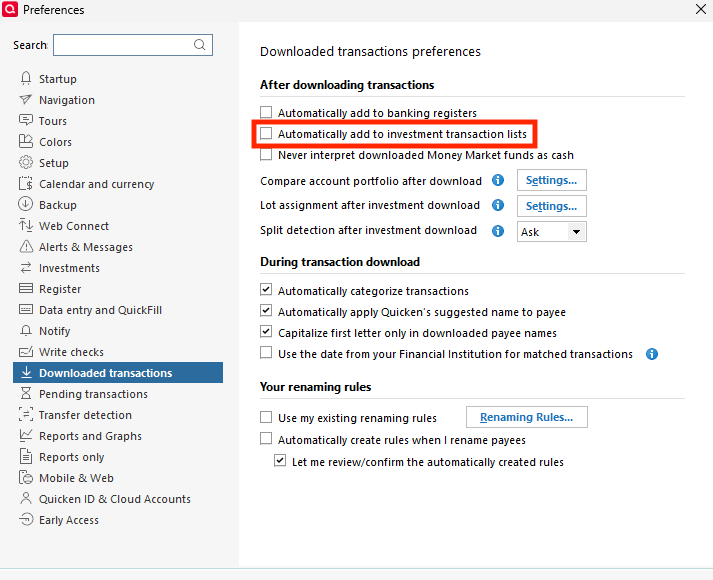
1. Go to Edit > Preferences > Downloaded Transactions. The option Automatically add to investment transaction lists needs to be unchecked.
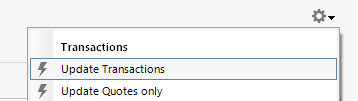
2. Refresh your online account information by clicking the Actions Gear Icon on the upper right of the register, and select Update Transactions. Follow the on-screen instructions to complete the update.
3. Confirm that the Sort Order in your account is by Date; just click the top of the Date column in your account register. It's possible the transactions are in your register, but not where you thought they'd be.
4. Try refreshing your login session: To do this, go to Help > Refresh Sign in. After completing the log-in process, trying running a One Step Update again.
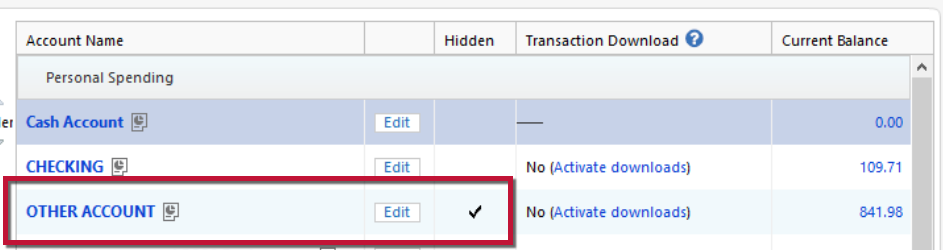
5. Go to Tools > Account List and check Show Hidden Accounts at the bottom left. Confirm the missing transactions haven't been added to a hidden account by clicking on the name of any account that appears with a check mark in the Hidden column.
Thank you, Quicken Kristina, for the clear instructions. Unfortunately, they didn't work, and I'm guessing it is a problem between Fidelity and Quicken that they need to work it out, since you had me do pretty much everything I could on my end. I will talk with Fidelity web support and Quicken support. if I learn anything helpful to this chat, I will let you know.
Again, thanks so much!
Thank you for the follow-up @TQ,
Please let me know how things go with Fidelity and Quicken Support!
UPDATE ABOUT FIDELITY ACCOUNTS NOT UPDATING. Thanks, Quicken Kristina, for all your help. I'm writing to update the community about what I learned.
My Fidelity accounts have not been reliably updated since Quicken/Fidelity transitioned to the new express update system in late August. I have all the latest Quicken updates, a reliable Ethernet connection, and local Quicken files (not in the cloud). I have tried with and without a VPN, and my Quicken files are local, not in the cloud. My other accounts update fine.
I received valuable help from Quicken Kristina and three Quicken customer support people; however, I have still not been able to update Fidelity accounts in Quicken reliably.
I tried the following.
I have done the above probably 100 times since the problem started. Each time I add or reset Fidelity accounts, the Fidelity site says the connection is approved, but either I cannot update the accounts, or Quicken says the account does not exist at Fidelity.com.
[Edited - Readability]
Thank you for the update,
I sent you a DM. To view it, please click the envelope icon near the upper right.
Thank you!