Fidelity credit card account - keeps requiring reset

AZ66
AZ66 Quicken Windows Subscription Member ✭✭

Using Quicken Classic Deluxe R64.30 on a Windows 11 machine. I have multiple Quicken data files to keep things separate. Across those multiple files I keep getting requested to reset or verify my Fidelity (Elan) credit cards. I've done this almost daily now for a few weeks. This seems to be related to the Fidelity cash balance issue which many others have reported. There are cumbersome work arounds for the cash balance issue. I haven't found one yet for this card account issue. It won't sync unless I reset the account and link it again to Fidelity's systems. Then the next time I try and sync it says that the account cannot be found. It's clearly not a connectivity problem since immediately after the reset it works for at least a single sync. Please provide a bug fix for this.


Comments

  • Quicken Kristina
    Quicken Kristina Quicken Windows Subscription Moderator mod
    edited October 6

    Hello @AZ66,

    Thank you for sharing your experience. You mentioned that you have your Fidelity (Elan) cards connected in multiple Quicken data files. Are you getting these prompts to reset after switching between files? Your description of the issue makes it sound like the files may be fighting over the authentication token that allows them to connect/update. To test if being connected in multiple files is the root cause of the issue, please try deactivating the problem account in all but one file, then test to see if the issue persists.

    I look forward to your response!

    Quicken Kristina

    Make sure to sign up for the email digest to see a round up of your top posts.

  • mginsb8724
    mginsb8724 Quicken Windows Subscription Member ✭✭

    Having the exact same issue

  • Quicken Kristina
    Quicken Kristina Quicken Windows Subscription Moderator mod
    edited October 25

    Hello @mginsb8724,

    Thank you for reaching out! To clarify, is your Fidelity credit card connected using the Elan Financial Services connection? Are you seeing any error messages/codes? When did you first notice this issue?

    When I check our internal tools, I can see you've been getting a CC-503 (invalid credentials) error with Elan Financial Services. If that is the issue you're encountering, then to troubleshoot, please backup your Quicken file, then follow these instructions from our article on CC-503 errors:

    Step One: Verify your bank login information

    1. Type your password/PIN into a text application, such as Notepad, WordPad, or other text/word application. 
      • Note: This is a way of confirming you don't have typographical errors in this field.  
    2. Highlight the "confirmed" password and then copy it (Ctrl + C) and paste it (Ctrl + V) into the appropriate fields in Quicken.

    Step Two: Verify your bank login at the bank's website

    1. Go to your bank's website and confirm that you're able to log in with the expected username and password.
    2. Once you are logged in, review your account at the website for notifications (such as pending messages in a mailbox or message center) to confirm if further action is required to grant Quicken access. 
      • Some banks will require a separate login, password, or both to access accounts on third-party software. Also note, you may need to go to your settings at the website to access these prompts for new credentials. 

    New passwords: If you are required to make a new password, be aware that some special characters may cause errors in Quicken. These special characters are the ampersand (&), left carat (<), right carat (>), backslash (\), and forward slash (/). Additionally, while Quicken does not have a character limit, your bank may have one. 

    Step Three: Update your password(s) in Quicken

    1. Choose Tools > Account List.
    2. Click the Edit button next to the account you want to change the login ID for.
    3. In the Account Details window, click the Online Services tab.
    4. Click Reset Account.
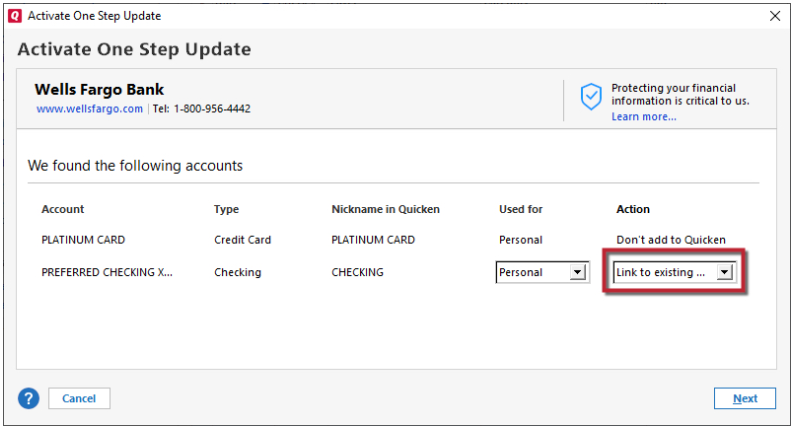
    5. Enter the correct login ID and follow the on-screen prompts to complete the reset. 
    6. If prompted, carefully LINK the accounts found to the existing accounts in Quicken.  Link to Existing.png

    After the reset process is complete, attempt your online session again. 

    I hope this helps!

    Quicken Kristina

    Make sure to sign up for the email digest to see a round up of your top posts.

This discussion has been closed.