I see from recent posts why I can no longer import web express downloads. But when I try to add web connect express+, Quicken tells me Bank of America isn't one of their banks??!!! I really do not want to manually add every bank transaction.
Hello @rclaire,
Thanks for sharing these details. Just to clarify—Bank of America is not leaving Quicken; they’re migrating to Express Web Connect+ (EWC+). Web Connect (QFX downloads) and Direct Connect are being discontinued, but Express Web Connect+ is still supported.
To help narrow this down, could you let us know:
This will help us determine the next steps! Thank you.
Yesterday, there was just a window in which to type a name and Quicken tried to tell me Bank of America was not one of its banks. Yesterday, on the third or fourth try, I got a message saying Quicken was currently unavailable online and telling me to try again "in 10 minutes."
Today Quicken showed me a menu, which had BoA - all states and when I typed in Bank of America, Bank of America Quicken did come up. So today I was able to link accounts - problem has been solved. thanks!
Thanks for the update! I’m glad to hear the issue is now resolved and you were able to link your accounts successfully.
For future reference, if you ever see the message “Quicken online service is unavailable” again, you can follow the troubleshooting steps outlined in this Community FAQ, which can help resolve the issue.
Thank you!
If Bank of America is no longer using Web Express but is now using Express Web Connect, why can't Quicken add Express Web Connect to its online options? Sorry but I'm not tech savvy enough to deal with all the file options listed on one of the other chats, just want to be able to get my BOA downloads back again.
Hello @Hank Prussing,
Thanks for chiming in!
Just to clarify — Express Web Connect+ (EWC+) is available for Bank of America accounts. It’s only the Web Connect (QFX file downloads) and Direct Connect methods that have been discontinued.
Check back and let us know! Thank you.
I have uploaded my account and the express web connect seems to sync with Bank of America but it is not downloading into my quicken register. I can't see the updates….nothing updated since Sept 23 2025. Even though Quicken and Bank of America are showing successful updates. What step am I missing?
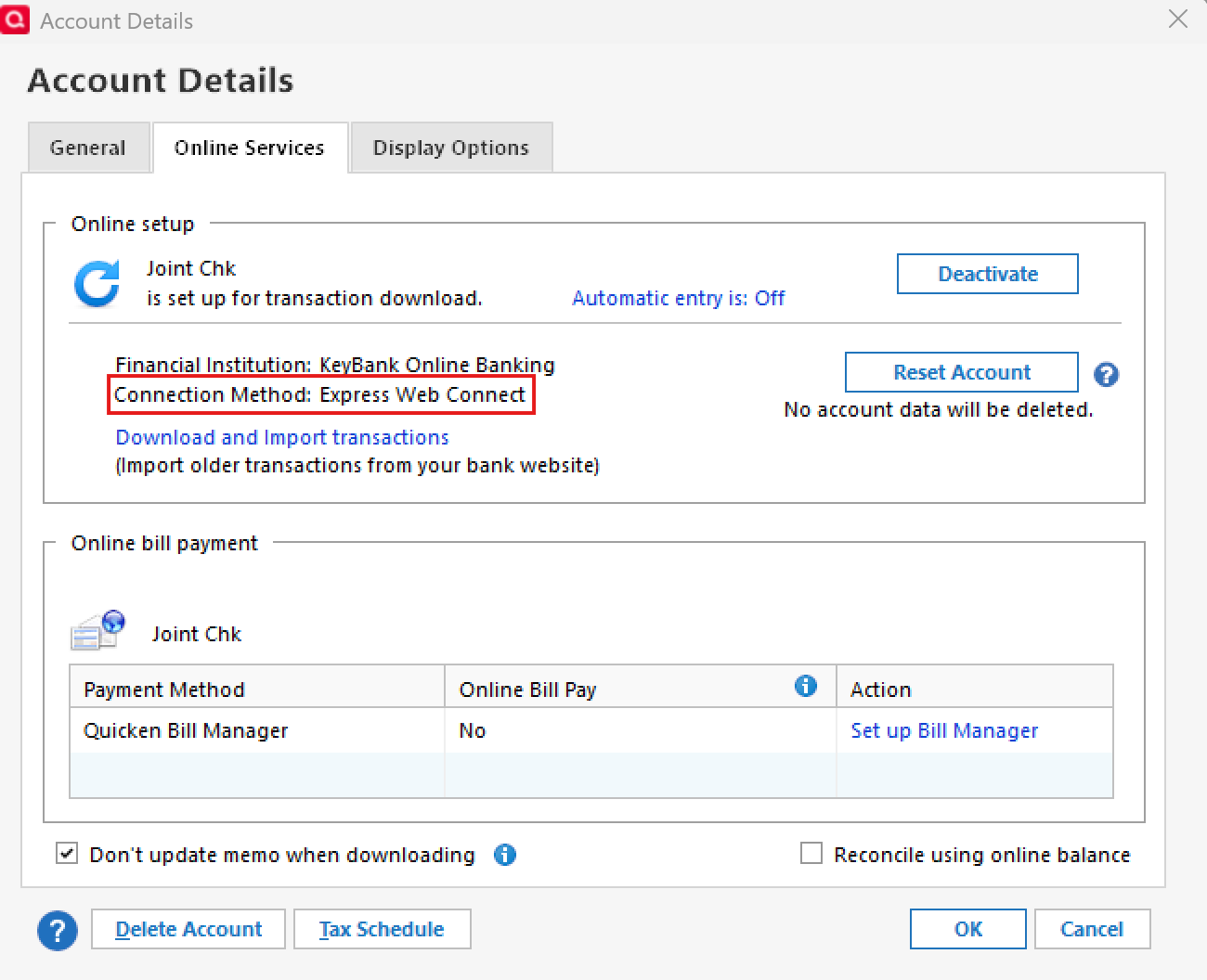
Is your account set up for downloading via Express Web Connect (as you stated) or via Express Web Connect+? This can be seen in the Online Services tab of Account Details.
If it shows "Express Web Connect" then it appears your account has not yet been migrated to and reauthorized for "Express Web Connect+". In this case, you might want to click on "Deactivate" and then click on "Set Up Now". This should then take you through the reauthorization process that will set the account up with EWC+.