Memorized payees & auto categorizing by accounts
I have been trying to utilize the update to Quicken (earlier this year I believe) to have memorized payees that are applied based on which account the transations post to. In this case I have a payee named "Wawa" that has transations that are either convenience store purchased (I use restaurants category for these) or gasoline purchases. I always use different cards for these purchases. However, the process has never worked to automatically assign the correct category.
Here is how I have the memorized payee setup.
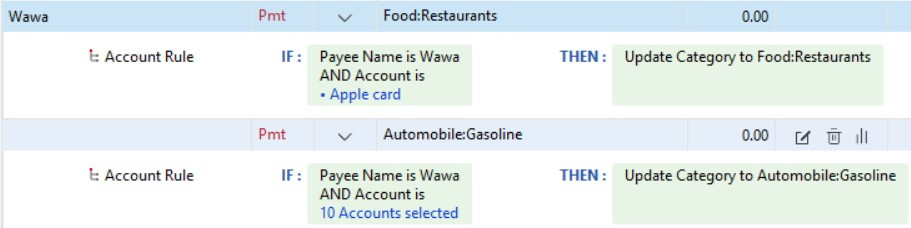
Why is this not working?
Comments
-
Hello @John Rocke,
Thanks for reaching out to tell us about this issue!
To better assist you, could you please provide the following details?
- Where is your Quicken data file stored?
- Is your file being synced/backed up by any third-party cloud services> (e.g.: OneDrive, Dropbox, iCloud, etc.)?
- Have you attempted any troubleshooting steps so far? If so, what were they?
- Were there any significant changes to your system or software before the issue began (updates, new installations, etc.)?
Your answers will help us diagnose the issue more effectively.
Looking forward to your response!
Quicken Alyssa
Make sure to sign up for the email digest to see a round up of your top posts.
0 -
Sorry - just saw this. For some reason I was not automatically subscribed to this topic that I created.
My data file is stored on my laptop. I do not sync to cloud services. I have tried multiple times to remove and re-add the memorized payees and configured them the same way as I posted above but it has never worked. I have no history of changes to my system but I haven't done anything other that normal Windows updates.
0 -
What happens when this doesn't work? Does it use the Payee Wawa and assign one of those Categories but not the right one, or something else?
Things to check: Do you have a Renaming Rule that assigns Wawa to variations on that which might be downloaded?
Please post screen shots of the settings at Edit > Preferences > Data entry and QuickFill and Edit > Preferences > Downloaded Transactions.
QWin Premier subscription0
Categories
- All Categories
- 56 Product Ideas
- 36 Announcements
- 223 Alerts, Online Banking & Known Product Issues
- 22 Product Alerts
- 701 Welcome to the Community!
- 671 Before you Buy
- 1.2K Product Ideas
- 53.7K Quicken Classic for Windows
- 16.3K Quicken Classic for Mac
- 1K Quicken Mobile
- 813 Quicken on the Web
- 111 Quicken LifeHub


